Server error. Can't access 3CX Dashboard

Status
Not open for further replies.

Frank86

Bronze Partner
Joined
Jan 18, 2018
Messages
300
Reaction score
26
First I noticed our phone 3CX app shows a grey icon for availability status.
Then, when I try to open the dashboard on the 3CX server itself through Chrome, it shows a "server error' message.
Rebooting the server does not fix the issue.
Running the latest 3CX 18 on a Windows 10 VM.
System worked fine until yesterday.
 
You need to check if all the 3cx services are running within the windows vm.

Run services.msc - check any non running 3cx services - start them.

You could also change the service startup to automatic delay
 
  • Like
Reactions: VasilisV_3CX
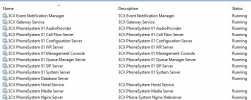
Checking the services as @Saqqara mentioned is the first thing to do. Make sure that you can see all 14 services and that they are all running:
1636618482459.png

Note: The 3CX Hotel Service might not be but that's okay if you are not using that module.

Services are set to "Automatic" startup by default meaning they should start up upon a system reboot. Do however try to start them manually anyway as Saqqara mentioned just in case. If they fail, first thing I'd recommend is making absolutely sure that the there is no issues in regards to resource usage (HDD,RAM, etc) and that the 3CX Host is generally compliant with our hardware specs. You might even want to take a look at the windows Event Viewer right after attempting to start the services to see if any errors pop up with hopefully more information on what is might be causing the issue.
 
Status
Not open for further replies.

Forum statistics

Threads
111,975
Messages
590,084
Members
164,902
Latest member
OnionITServices