Server Error when trying to login

Status
Not open for further replies.

g.fiszt

Premier Customer
Joined
Mar 17, 2021
Messages
43
Reaction score
14
Hello!

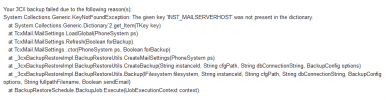
I'm having problems to login at the web management page. Reading other threads throughout the forum, I've discovered the commands to stop and start the server again.
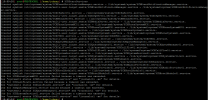
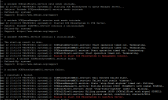
I've executed the 3CXStopServices after that 3CXStartServices and then I got the following errors. Have someone faced this problem yet? On the second image is the output of "journalctl -xe".
1616439324651.png

1616439570041.png
 
Sorry for that
It's a version 16, I don't remember the exact release, but I do remember that it was updated to the latest release aproximatelly a week ago;
It's self-hosted in a Debian 9 server that was also updated a week ago;
It was working just fine until last Friday. Today morning when I tryed to access it, it was already stopped.
 
Some more info...
We have a daily backup routine at 10PM and yesterday it didn't work.
1616441066393.png
 
So when you say updated, you mean you updated it manually? 3CX only supports installs from the ISO, and letting 3CX handle the OS updates. The logs just show that 3CX is timing out, but not why. I'd take your latest backup, do a fresh install from the ISO and restore.
 
The system was updated manually and 3CX was updated after that.
It was working after that, but I'll try to restore a backup. Thanks
 
Guys,
I was mistaken when I said that the system was updated manually. It was my teammate who updated and he's made it right, updating the 3cx and let it handle the SO packages. It's interesting because it stopped working during the weekend, it was ok before that and the update was made more than a week ago.
Before I restore the backup, I want to take a look at the logs. I wanna know why the services are timing out.
Where can I find these logs? Thanks!
 
For issues such as services stopping I would recommend investigating on the OS level first. The logs for a Debian 9 machine can be found in /var/log. I'd recommend having a look at syslog first. If you have an idea of about what time the services went down it will make going through the log much easier.

Depending on the cause, you might even be able to get additional information via the 3CX logs. Verbose Logging would need to be enabled at the time the issue occurred:

Any logs related to 3CX you can find in
"/var/lib/3cxpbx/Data/Logs"
and
"/var/lib/3cxpbx/Instance1/Data/Logs"
 
Thanks Chris.
I'll take a look at the logs
 
  • Like
Reactions: ChrisC_3CX
Status
Not open for further replies.