Server Side Integration - Freshsales

Status
Not open for further replies.

kevin_sc

Forum User
Joined
Jun 26, 2020
Messages
4
Reaction score
1
We are using the server side integration with freshsales. According to our 3CX account the connection is working fine. But automated detection of incoming/outgoing calls is not working since weeks. The same goes for the automated call logging in Freshsales. Any help, ideas?
 
In order to troubleshoot this, you should enable verbose logs as explained here, then reproduce the issue with a test call, and check the 3cxSystemService.log file. In that file you will see all the interactions between 3CX and Freshsales, so any error will be visible there.
 
I couldn't see any error in the logs. just that there was "no match found". But this is strange since we checked the connection between FS and 3CX with the exact same number in the mangagement console and everthing works fine. shale I share the log file here?
 
If there is no contact matched, the call journaling is skipped. So you need to fix the contact lookup issue, and that will probably also fix the call journaling issue.

When you test the contact lookup from the 3CX Console > Settings > CRM Integration > Test button, you need to ensure that a contact is returned when you test with a number you know is in Freshsales. If no contact is returned, even if there is no error, the integration is not properly configured, or you are storing contacts in Freshsales with a wrong format and that causes that there is no match...
 
Thx for the idea with the formats. If the number in the CRM is with international code like +41.... and if I copy it to the 3CX webclient it shows me the number without the +41 and obviously sends it to the CRM lookup also without +41 with the result of "no matchings found". That's a bit a bad "manner" of the 3cx webclient from my point of view. Or is it something we can adjust from our end in the management console???
 
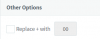
Check the Web Client > Settings > General > Other Options. There is a setting to replace the + with 00:
1593453404475.png

Then, in the 3CX Console > Settings > E164 Processing, you can configure 3CX to remove the prefix if it's in the same country. You can disable that.
 
Thanks so much. It all works fine now.:cool:
 
  • Like
Reactions: edossantos
Status
Not open for further replies.

Latest Posts

Forum statistics

Threads
112,325
Messages
591,898
Members
165,478
Latest member
postmaster@studiolegaleda