Setting Outbound Caller ID to Users DID

bnorman

Titanium Partner
Joined
Mar 18, 2025
Messages
2
Reaction score
0
For normal calls we want to send a building wide DID (each users Caller ID in that building is the same). For E911 purposes we want to our Emergency rules to send the users DID. I looked at all of the variables listed here and couldn't find one that would send the DID instead of the Caller ID. Using a custom Provider template is fine. I also started looking at CFD, but do not have experience with it. Will CFD do this for me? Looking for ideas.

My only workaround I've come up with is creating outbound rules for each building, then set the users Caller ID the individual ID.

Thanks,
 
You can set up emergency rules under System --> Emergency and add the Outbound caller ID you want there. You need to create 1 for each user.
 
You can set up emergency rules under System --> Emergency and add the Outbound caller ID you want there. You need to create 1 for each user.
Did I mention they have 1200 users? Individual emergency rules would be the very last option.
 
I would recommend using emergency rules for emergency calls as that's what they are there for. Also calls to emergency numbers gain priority and you can also set notifications when a emergency number is called.
And you can still do the same thing as outbound rules. Set the caller ID on the extension level and create 1 emergency rule without setting a caller ID there.
 
I would recommend using emergency rules for emergency calls as that's what they are there for. Also calls to emergency numbers gain priority and you can also set notifications when a emergency number is called.
And you can still do the same thing as outbound rules. Set the caller ID on the extension level and create 1 emergency rule without setting a caller ID there.
Using the 3CX Cloud Hosted instance, is it possible to create all of these emergency numbers through the API or do you have to create them one by one?
 
API usage would be the same for 3CX Hosted as for other installs. Just make sure any IPs accessing the API are whitelisted since by definition they will not be on a local network.
 
API usage would be the same for 3CX Hosted as for other installs. Just make sure any IPs accessing the API are whitelisted since by definition they will not be on a local network.
Maybe I did not phrase the question correctly. I can POST and PATCH from Postman without any issues, but what I am looking for is the path and JSON I can use to create all of the emergency numbers.

For example, I have a request I use to create departments:

POST {{base_url}}/xapi/v1/Groups

JSON:
{
  "AllowCallService": true,
  "Language": "EN",
  "Name": "Sales and Marketing",
  "PromptSet": "",
  "TimeZoneId": "51",
  "ClickToCallId": "",
  "TranscriptionMode": "Voicemail"
}

What I am trying to figure out is whether there is a similar path to create emergency numbers in bulk, instead of having to create them one by one in the portal. If so, I am looking for what that path and JSON body format would look like.
 
Ok, I was able to figure this out (at least in my environment). You can POST to the OutboundRules endpoint and include "EmergencyRule": true in the JSON body. When you do this, 3CX creates the rule as an Emergency Number and places it under System → Emergency, rather than under the normal Outbound Rules section.


POST {{base_url}}/xapi/v1/OutboundRules

Code:
{
  "Name": "TEST Emergency Rule",
  "Prefix": "933",
  "Priority": 1,
  "NumberLengthRanges": "3",
  "EmergencyRule": true,
  "Routes": [
    {
      "TrunkId": 137,
      "StripDigits": 0,
      "Prepend": "",
      "Append": "",
      "CallerID": ""
    }
  ],
  "DNRanges": []
}

Afterward, I was able to validate with GET {{base_url}}/xapi/v1/OutboundRules/Pbx.GetEmergencyOutboundRules()
 
I figured I would drop this here in case anyone else runs into the same situation.

If you need to create multiple Emergency Number rules via the 3CX XAPI, you can do it in bulk using Postman and a CSV file.

Create a CSV with the following headers: ext, did, priority, trunk_id, prepend
- ext is the extension the rule applies to
- did should be in E.164 format

- priority must be unique across emergency rules
- trunk_id can be found in the trunk URI under 'Voice & Chat' (mypbx.3cx.us/#/office/voice-and-chat/trunk/edit/137)
- prepend you may not need, but I needed to add the SIP information for my provider
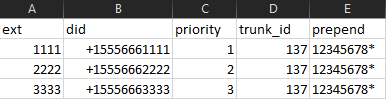

1768578067848.png

Create a new collection and configure:
- Authorization (OAuth2 / client credentials)
- Required headers (at least Content-Type: application/json) as this avoids Runner getting stuck parsing unrelated requests.

Create a request:
- POST {{base_url}}/xapi/v1/OutboundRules
- You can set the body from raw to JSON, and leave it as {} (it will be overwritten by the script).

Add this Pre-request Script and it reads values from the CSV, builds the JSON payload, and posts it as an emergency rule:

JavaScript:
console.log("CSV row:", pm.iterationData.toObject());

const ext = pm.iterationData.get("ext");
const did = pm.iterationData.get("did");
const priorityRaw = pm.iterationData.get("priority");
const trunkRaw = pm.iterationData.get("trunk_id");
const prepend = pm.iterationData.get("prepend");

const priority = Number(priorityRaw);
const trunk_id = Number(trunkRaw);

if (!ext || !did || !prepend || !Number.isFinite(priority) || !Number.isFinite(trunk_id)) {
  throw new Error(
    `Missing/invalid CSV value(s): ext=${ext}, did=${did}, priority=${priorityRaw}, trunk_id=${trunkRaw}, prepend=${prepend}`
  );
}

const payload = {
  Name: `911 for extension ${ext}`,
  Prefix: "911",
  Priority: priority,
  NumberLengthRanges: "3",
  EmergencyRule: true,
  Routes: [
    {
      TrunkId: trunk_id,
      StripDigits: 0,
      Prepend: prepend,
      Append: "",
      CallerID: did
    }
  ],
  DNRanges: [{ From: String(ext), To: String(ext) }]
};

pm.request.headers.upsert({ key: "Content-Type", value: "application/json" });
pm.request.body.update(JSON.stringify(payload));
console.log("Payload:", payload);

Run the collection:
- Open Runner
- Select only this collection
- Attach the CSV file
- In Preview, make sure the CSV columns are split correctly. You may have to change did and prepend to string instead of auto-detect so you can see the e.194 format.
- Run the collection


Key gotchas to be aware of:
- Priorities must be unique or the API will return HTTP 400
- DN ranges must not overlap existing emergency rules
- Using a new collection avoids Runner getting stuck at “Preparing…”
- Test with one or two DIDs first before adding ALL of them

Hopefully this saves someone else a few hours of trial and error.
 
  • Like
Reactions: accentlogic

Latest Posts

Forum statistics

Threads
111,990
Messages
590,161
Members
164,926
Latest member
tohoken1