- Joined
- May 1, 2018
- Messages
- 55
- Reaction score
- 9
We were thrilled a few years ago when 3CX added the ability to set a paging zone / multicast / ring group - sorry I don't remember the name any more - per IP phone via the old management interface. This allowed us to consolidate multiple Yealink templates into one as they only differed by one multicast paging zone. We were surprised to find that this interface option appears to have been removed in V20. I thought I had read up on features that had been (temporarily) removed, and I don't remember seeing this mentioned. We do, of course, have a workaround in that we can go back to using separate templates again.
First, if someone would let me know the correct name of that option, I'd appreciate it so that I can use it going forward. Second, does anyone know whether that option is expected to return, if so when, or whether it has been removed indefinitely?
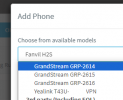
If the option is not expected to return, I have a related follow-up question. Our five custom templates were created years ago, all with distinct names. With a recent 3CX update, prior to V20 I think, those custom templates now appear in the template list as multiple instances of just the phone's model name. For example, we have five entries in the list all called "Yealink T42S", making it tricky to know which is the correct template for a given phone. Is there a way to differentiate the names in the template list so that it's clear which entry corresponds to which custom template? Thank you.
First, if someone would let me know the correct name of that option, I'd appreciate it so that I can use it going forward. Second, does anyone know whether that option is expected to return, if so when, or whether it has been removed indefinitely?
If the option is not expected to return, I have a related follow-up question. Our five custom templates were created years ago, all with distinct names. With a recent 3CX update, prior to V20 I think, those custom templates now appear in the template list as multiple instances of just the phone's model name. For example, we have five entries in the list all called "Yealink T42S", making it tricky to know which is the correct template for a given phone. Is there a way to differentiate the names in the template list so that it's clear which entry corresponds to which custom template? Thank you.