Setting redirection from the keyboard

Status
Not open for further replies.

turbo21

Customer
Joined
Apr 9, 2020
Messages
9
Reaction score
0
The user for example to perform a *31#ext# where "ext" would be there the 3CX would forward their calls to when the away status was enabled

I must have this setting for the office.


The application may not be such requirements by the contracting authority
 
More info please?

Are users using the web client only?

Do they have desk phones?

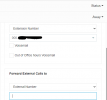
*3x is for changing the status of your extension. So, you would need to set up forwarding rules of the extension based on status if you want to forward calls to another number/extension. This can be done from the management console under extension settings or via the web client > settings > status

1640255330175.png

1640255368656.png
 
  • Like
Reactions: Evolute IT
Hi @turbo21,

The user for example to perform a *31#ext# where "ext" would be there the 3CX would forward their calls to when the away status was enabled
I'm afraid that this isn't possible via the dial codes, and can only be done via the 3CX Apps.

This is just to confirm what @kieferschild mentioned.
 
  • Like
Reactions: Evolute IT
Redirection is available on low-cost telephone exchange
from the keypad and not as much advanced 3CX Enterprise Annual :mad: I must have this feature on Yealink and Grandstream. They cannot be web applications
 
Redirection is available on low-cost telephone exchange
from the keypad and not as much advanced 3CX Enterprise Annual :mad: I must have this feature on Yealink and Grandstream. They cannot be web applications
Then change phone system. 3CX doesn't work this way. They can change statuses from BLF keys but not set the forward number.
 
Status
Not open for further replies.

Members Online Now

Forum statistics

Threads
111,831
Messages
589,277
Members
164,660
Latest member
RJenkinsROCK