Setting up Live Chat on Wordpress (grey icon)

Status
Not open for further replies.

Semji - IT

Customer
Joined
Apr 15, 2020
Messages
5
Reaction score
0
Hello guys, I'm having troubles setting up the plugin 3cx live Chat on my wordpress. I did everything asked but the icon stays grey, and its not opening up.
I added my domain with no slash, I have been looking for usual troubles on forums but it is still not working.
I put the livechat like to a personal extension for test purposes, put the link on the wordpress plugin.
I followed to 3cx manual to setup everything, so I'm looking for some help ir ?
Thanks !
Best regards.
 
Hi Semji,

If you're using the 3CX version:
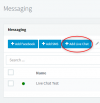
  • Log in to the Web Client as the Admin, Click 'Messaging' and 'Add Live Chat'
    1611561104490.png

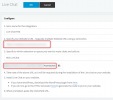
  • Make sure that you've entered the correct URL in the configuration step 2, and copied the correct URL to copy into Wordpress Live Chat.
    1611561638929.png

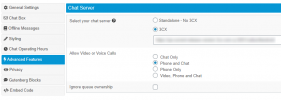
  • Select 'Advanced Features' in Wordpress Live Chat settings, click 3CX and enter your Live Chat link.
    1611561305250.png
  • Save the settings and refresh the Wordpress page.
 
Other common mistakes, are:
  • The WP website does not have a valid SSL certificate
  • You are using a Self-signed certificate on 3CX that again may cause problems
  • The HTTPS port of your 3CX is cannot be contacted from your WP site.
 
Hey thanks for the feedback, I am indeed testing it on a internal website to make shur it does not break everything to our production wordpress. Is there anything to do to make it work without https ?
Thanks again, regards.
 
Unfortunately no, you would have to replicate a valid HTTPS connection on your internal website in order to fully test this.
 
Status
Not open for further replies.

Forum statistics

Threads
112,149
Messages
590,965
Members
165,170
Latest member
SupportRock