Setting up SIP trunk provider not on the supported list

Status
Not open for further replies.

desev

Customer
Joined
Aug 5, 2022
Messages
5
Reaction score
1
Trying to set up a SIP trunk provider that is not on the preapproved list in the US. Instructions received from the SIP trunk provider is telling us to select Generic out of the Select Country drop down. I do not see Generic as an option in the Country Drop down or the Provider drop down after selecting US.

Where do I find instructions for connecting a SIP trunk provider that is not on the list?
 
Regarding your question, the generic sip trunk option is not under a specific country and is under the main list. Still, we can suggest using a tested and supported provider verified by 3cx to avoid any issues with receiving support when required.
 
Last edited:
We are not seeing the Generic option being offered. The company has an instruction guide showing that we should be selecting the Generic option from the Select Country drop down. 3CX SIP Trunk.JPG
 
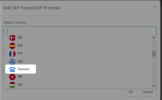
This is correct. The generic option is under the Select country dropdown menu.
1659725613469.png
 
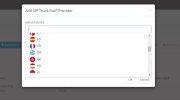
That is not showing up in our instance. Any direction on how to get it included?
3CX SIP Trunk 2.JPG
 
That is it. Thank you for the help.
 
  • Like
Reactions: Charles_3CX
You are welcome.
 
Status
Not open for further replies.

Latest Posts

Members Online Now

Forum statistics

Threads
111,831
Messages
589,276
Members
164,660
Latest member
RJenkinsROCK