Solved Setting up SIP Trunk to service 2 phones

Status
Not open for further replies.

texmansru47

SOHO User
Joined
Jan 9, 2021
Messages
122
Reaction score
20
All. I have an SMB Free edition as well as the one I am paying for (Pro). On the free one, what is the designation for the SIP trunk to be set for if I have one SIP trunk for multiple phones? There is no information about that anywhere... and no offense but this is not a formal support issues... This is just a question since there is NO INFORMATION about this anywhere I can find. The default looks to be END CALL but I don't think that is correct. A blurb on that page as to the meaning of the options would be helpful... just a bit of feedback.

Cheers,
Texmansru47
 
Hi, maybe there is something not clear in what you want and how you are wording the question ?
I think ? what you are asking is

how to bind SIP trunk for a 3cx instance
and then
how to configure call flow / from extensions-users in 3cx system for inbound and outbound call flow?

broadly speaking if you are starting from ground zero, a clean 3cx instance,
you have SIP trunk from external SIP_TRUNK_Carrier, basically that means you have a SIP server name, user-pass info for the service.
Once the trunk is linked to your 3cx then calls to the DID at your SIP carrier will route to 3cx.
After that you must ensure you have EXT exist in your 3cx - ie - create an extension or two or three; for your different users/ handsets
then you will need to configure inbound call flow (trivial use case -> Inbound call comes in > hits a ring group > all handsets/EXT will ring, anyone can answer). and then outbound calling - you need to setup basic dial plan rules for how to deal with users punching buttons on their handset/phone-device. Such as "10 digit dial > send out via SIP TRUNK" or suitable rules for Long Distance, etc. dial rule set. This is all covered in the setup documentation I believe. Not 'hard' per se but you do need to read the documents, especially if you haven't set things up successfully yet on 3cx ever.

if I'm missing the point please ping back on the thread?

Tim
 
I will try to clear it up. I have two FANVIL IP Phones X3G model... first you cannot find a X3G firmware upgrade on the Fanvil page... which is genius... NOT. Here is what I am trying to do:

1) I have a 3CX SMB FREE setup
2) My SIP is via Voxtelesys and it is working since my softphones work brilliantly.
3) the two IP Phones I cannot get to register and SIP Trunk... AT ALL.
4) I have a SMB Local server (Raspberry Pi) and it is working and recognized.
5) I have tried multiple times to register the SIP... I get one following errors
A) Failed with 403
B) Straight back to INACTIVE
6) I have downloaded the last 3 firmware packages from the X3S Lite and Pro, the same from the X3SG (lite and Pro)
A) ALL FAIL
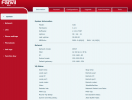
7) I have included both screenshot of the Firmware that is currently on both phones
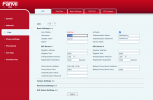
8) I have included a screenshot of the FAILED SIP Activation that I got instructions from a FANVIL video (horrible BTW - no details as to WHY anything is being done,,, just watching a hand type in data. BTW the screen on the two videos I have watched to not even look like the one I have.
9) My activation is using the LOCAL SMB since I have the Server Name, the SERVER IP, the Auth ID and Auth password.
A) Now I am assuming that the Auth ID and Passwords are the ones presented to me from my 3CX Configuration which would make sense. YET it fails every time!

I am frustrated since both these phones worked on my 3CX hosted (paid) site for 2 years.... I had to downgrade and now they refuse to work. Honestly I paid for these phones and they must work and it is frustrating since Fanvil support blows and their firmware packages are not even documented.. just listed.

Sorry my frustration is showing. But this does not have to be this stupidly blind to follow.
 

Attachments

  • fanvilinfo.png
    fanvilinfo.png
    84.1 KB · Views: 6
  • fanvilNOTRegistering.png
    fanvilNOTRegistering.png
    85.3 KB · Views: 6
I will try to clear it up. I have two FANVIL IP Phones X3G model... first you cannot find a X3G firmware upgrade on the Fanvil page... which is genius... NOT. Here is what I am trying to do:

1) I have a 3CX SMB FREE setup
2) My SIP is via Voxtelesys and it is working since my softphones work brilliantly.
3) the two IP Phones I cannot get to register and SIP Trunk... AT ALL.
4) I have a SMB Local server (Raspberry Pi) and it is working and recognized.
5) I have tried multiple times to register the SIP... I get one following errors
A) Failed with 403
B) Straight back to INACTIVE
6) I have downloaded the last 3 firmware packages from the X3S Lite and Pro, the same from the X3SG (lite and Pro)
A) ALL FAIL
7) I have included both screenshot of the Firmware that is currently on both phones
8) I have included a screenshot of the FAILED SIP Activation that I got instructions from a FANVIL video (horrible BTW - no details as to WHY anything is being done,,, just watching a hand type in data. BTW the screen on the two videos I have watched to not even look like the one I have.
9) My activation is using the LOCAL SMB since I have the Server Name, the SERVER IP, the Auth ID and Auth password.
A) Now I am assuming that the Auth ID and Passwords are the ones presented to me from my 3CX Configuration which would make sense. YET it fails every time!

I am frustrated since both these phones worked on my 3CX hosted (paid) site for 2 years.... I had to downgrade and now they refuse to work. Honestly I paid for these phones and they must work and it is frustrating since Fanvil support blows and their firmware packages are not even documented.. just listed.

Sorry my frustration is showing. But this does not have to be this stupidly blind to follow.
 
I will try to clear it up. I have two FANVIL IP Phones X3G model... first you cannot find a X3G firmware upgrade on the Fanvil page... which is genius... NOT. Here is what I am trying to do:

1) I have a 3CX SMB FREE setup
2) My SIP is via Voxtelesys and it is working since my softphones work brilliantly.
3) the two IP Phones I cannot get to register and SIP Trunk... AT ALL.
4) I have a SMB Local server (Raspberry Pi) and it is working and recognized.
5) I have tried multiple times to register the SIP... I get one following errors
A) Failed with 403
B) Straight back to INACTIVE
6) I have downloaded the last 3 firmware packages from the X3S Lite and Pro, the same from the X3SG (lite and Pro)
A) ALL FAIL
7) I have included both screenshot of the Firmware that is currently on both phones
8) I have included a screenshot of the FAILED SIP Activation that I got instructions from a FANVIL video (horrible BTW - no details as to WHY anything is being done,,, just watching a hand type in data. BTW the screen on the two videos I have watched to not even look like the one I have.
9) My activation is using the LOCAL SMB since I have the Server Name, the SERVER IP, the Auth ID and Auth password.
A) Now I am assuming that the Auth ID and Passwords are the ones presented to me from my 3CX Configuration which would make sense. YET it fails every time!

I am frustrated since both these phones worked on my 3CX hosted (paid) site for 2 years.... I had to downgrade and now they refuse to work. Honestly I paid for these phones and they must work and it is frustrating since Fanvil support blows and their firmware packages are not even documented.. just listed.

Sorry my frustration is showing. But this does not have to be this stupidly blind to follow.
 
Also here are the screenshots from my phones setup in 3CX... Again the Softphones are WORKING... The handset keep stating NOW we have SIP configured... YET LINE one (SIP Trunk is blinking red and I get a dial tone but cannot execute an outbound call.
 

Attachments

  • 3cxphones.png
    3cxphones.png
    53.1 KB · Views: 10
The reason why you cant connect your physical IP Phones is that you have them defined as normal phones. You will require a 3CX SBC to connect physical phones to the PBX.

The Apps have the tunnel built in to them, thats why they work.
 
  • Like
Reactions: GregG_3CX
Hi,

I have checked our Fanvil model support, and the X3G in particular was never a supported model so no idea if it will work correctly.

PS: You've missed the registrar host name here
1739535575814.png
 
  • Like
Reactions: GregG_3CX
I have an SBC and it is what I using... Not sure I understand "I have the phones setup as normal phones"
 
I got the phones working. Thanks!
 
Status
Not open for further replies.

Members Online Now

No members online now.

Forum statistics

Threads
111,831
Messages
589,277
Members
164,660
Latest member
RJenkinsROCK