"Shared" Meeting Rooms

Status
Not open for further replies.

LEAD

Customer
Joined
Jan 5, 2021
Messages
52
Reaction score
10
I am looking at the following documentation Under "Meeting Rooms" (https://www.3cx.com/user-manual/video-conferencing/)

For the life of me there is no documentation on Shared meeting rooms. Where do I find this information? I am specifically looking for the Approve Participants feature in a shared meeting room or if possible in a scheduled meeting (not possible currently from my testing)

Thanks a million
 
Under the extension in the management console. Click2Talk/Click2Meet tab.
 
I get that for individual users that is where you can enable that feature. But I am looking for what 3CX calls "Shared" meeting rooms per the mentioned links in my initial post. Thanks!
 
That's the same tab but under the call queues.
 
I get that for individual users that is where you can enable that feature. But I am looking for what 3CX calls "Shared" meeting rooms per the mentioned links in my initial post. Thanks!

1610629687089.png

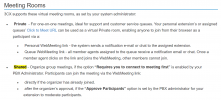
If you are referring to this specifically then think of it as such:

Private = Click2Meet

Shared = When using the "Schedule Conference" tab in your webclient

So in answer to your original question, you cannot approve people coming into a shared meeting since you already invited them in the first place and are not considered anonymous guests to require approval
 
View attachment 20098

If you are referring to this specifically then think of it as such:

Private = Click2Meet

Shared = When using the "Schedule Conference" tab in your webclient

So in answer to your original question, you cannot approve people coming into a shared meeting since you already invited them in the first place and are not considered anonymous guests to require approval
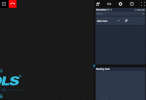
I agree that that is how it is supposed to work in theory, but it doesn't in practice. Apart from the direct invites sent to invitees, there is also the general meeting link that is provided to the organizer send to anyone.

Users do get prompted to type in their name, but there is no participant approval even though the option is enabled.

3cxmeeting.gif

Though this might be a separate issue, we would prefer to just have a single link for all invites (no unique links), and require everyone to type in their name and email address when joining. What will happen is that Karen from sales will get the invite and send it out to anyone she thinks should be in that meeting. Then when it comes time for the meeting (with 3cx not allowing multiple sessions per link) you end up bumbling about and sending out links to everyone needed, wasting time.
 
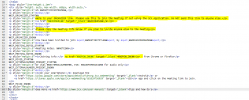
Just looked through the email templates, maybe this is how I get that last part accomplished?

1. Replace %%JOINURL%% with %%OPENLINK%% for the general body of the message
2. Replace %%OPENLINK%% with %%JOINURL%% for the meeting organizer saying "Hey, this is your link to login and organize the meeting"

I also moved the Organizer_Start section to the top of the email chain so it would not be confusing.

3cx.PNG
 
Last edited:
Hi @LEAD

The easiest way is to get a single link is to pick the iCal option. That only includes the shareable link and it should achieve what you wanted (one link, and participants need to enter their name).

You can always access the Organizer link from your webclient if needed.
 
Last edited:
Status
Not open for further replies.

Forum statistics

Threads
111,973
Messages
590,078
Members
164,896
Latest member
sameage