Show DID called instead of caller ID

Status
Not open for further replies.

Ben C

Joined
Oct 14, 2014
Messages
71
Reaction score
0
Hi. We have several DIDs. When a call comes to a specific DID, we need to acknowledge which DID was called, instead of who called. That's because we have to answer based on the DID the call came for. How can I do that for a few DIDs?
I have been playing with 'VOIP Provider' > 'name' > 'Source ID' > 'Source identification by DID' > 'Add DID' > chose 'SIP Field containing DID numbers', but no luck so far. Is this the right place?
How can I do this?

Thank you
Ben
 
I think that a lot of users pass the calls through a ring group (or queue), and pick up an identifying name there. The name should be kept short ,as some devices do not have the ability to show all information (CID number/name and RG name) resulting in truncation.
 
Just put the DID into the DID rules and setup according to the provider (Source ID, etc). The DID name will show up.
Ensure the Prepend option is on as well.
 
Hi craig
Thanks for the reply.
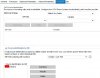
I can't find the "Prepend" option.
The manual says:
"The DID name can be pre-pended or appended to the Caller ID so as to identify on which
number a caller has called. You can enable this from the Settings > General > Global options page
under ‘Append/Prepend name to caller ID’." but it's not there...
I have V12, SP6, 37098.738

Thank you
Ben
 

Attachments

  • DID.jpg
    DID.jpg
    40.5 KB · Views: 969
Hi
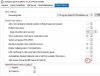
I got it.
...Settings > General > Global options.
First tick the "Add Queue, Group and DID names to Caller ID" to have "Append/Prepand name to Caller ID" shown
 

Attachments

  • DID.jpg
    DID.jpg
    33.5 KB · Views: 973
Status
Not open for further replies.

Members Online Now

Forum statistics

Threads
111,835
Messages
589,288
Members
164,665
Latest member
dominik.pepel