


- Joined
- Jun 13, 2017
- Messages
- 424
- Reaction score
- 256
Purpose: Allow authorized (those who poses a PIN) users to call in to record and activate a temporary greeting to be played prior to standard call routing.
NOTE: After uploading the CFDs, call into CFD1 and press option 1 to deactivate the temporary greeting. This will set the condition to Inactive and create the global property.
Summary: There are 2 CFDs. CFD1 (Record and Activate/Deactivate) and CFD2 (Play Temp Greeting). The user calls into CFD1. If there is a temporary greeting active, the user is presented with the option to deactivate it or record an updated temporary greeting. If there is no temporary greeting active, the user is prompted to record a temporary greeting and upon their acceptance of the temporary greeting, it is activated. CFD2 is where your incoming call rule points to. When a call comes in, it evaluates if a temporary greeting is active. If it is active, it is played and then the call is passed to normal call routing. If there is no temporary greeting active, the call is passed directly to normal call routing.
Screenshots and Notes are provided, please use at your own risk. If you have questions, improvements, or recommendations, please feel free to share.
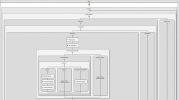
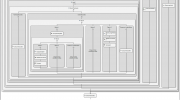
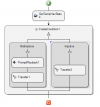
Notes:
CFD 1 – Record and Activate/Deactivate
Main.flow Variables
• Name: PIN | Initial Value: “1234”
• Name: PinAttempts | Initial Value: 0
• Name: TryPINagain | Initial Value: true
• Name: RecNeeded | Initial Value: true
• Name: path | Initial Value: "/var/lib/3cxpbx/Instance1/Data/Ivr/Prompts/Callflows/rec_temp_greeting/"
Here are the layers of the app
• Loop1
condition: AND(callflow$.TryPINagain,LESS_THAN(callflow$.PinAttempts,3))
<!--This condition checks to ensure variable TryPINagain is still true and the PinAttempts variable is less than 3-->
• RequestPIN (User Input)
Initial Prompt: "Please enter your PIN"
Subsequent/Timeout/Invalid Prompts: "Please try again"
Min Digits: 4
Max Digits: 4
• RequestPIN - Invalid Input
Disconnect
• RequestPIN - Valid Input - (create a condition) CheckPIN
PINnoMatch
IncrementVariable1 | Variable Name: callflow$.PinAttempts
PINmatch
Assign a Variable (PINmatched) | Variable Name: callflow$.TryPINagain | Expression: false
Get Global Property (tempwavStatus) | Property Name: "TEMPWAVSTATUS"
(create a condition) tempwavStatusCheck
tempwavInactive (empty)
tempwavActive - Menu1
Initial Prompts: "A temporary greeting is currently active. Press 1 to remove the temporary greeting. Press 2 to update the temporary greeting."
Subsequent/Timeout/Invalid Prompts: "Please try again"
Option 1
Set Global Property (SetToInactive) | Property Name: "TEMPWAVSTATUS" | Property Value: "inactive"
Prompt Playback (tempwavDisabled) | "Your temporary greeting has been disabled"
Disconnect
Option 2 (empty)
Timeout/Invalid: Disconnect
• Loop2
condition: callflow$.RecNeeded
<!--This conditionc checks to ensure the variable RecNeeded is still true-->
• RecordTempWav
Prompt: "Please record your temporary greeting after the tone. When done, press any key."
Save to file = true
File name: CONCATENATE(callflow$.path,"temp.wav")
Nothing Recorded > Disconnect
Audio Recorded
Menu2
Prompt: "To listen to your recorded greeting, press 1. To re-record the temporary greeting, press 2. To save the recorded greeting, press 3."
Option 1:
Prompt Playback: Recorded Audio Prompt | RecordTempwav.AudioId
Menu3
Prompt: "To save the temporary greeting, press 1. To rerecord, press 2."
Option 1:
Assign Variable
Variable Name: callflow$.RecNeeded
Expression: false
Set Global Property - SetStatusToActive
Property Name: "TEMPWAVSTATUS"
Property Value: RecordTempwav.AudioId
Prompt Playback : "Your temporary greeting has been saved and is now active."
Option 2: (empty)
Timeout/Invalid: (empty)
Option 2: (empty)
Option 3:
Set Variable - RecNoLongerNeeded
Variable Name: callflow$.RecNeeded
Expression: false
Set Global Property - SetStatusToActive
Property Name: "TEMPWAVSTATUS"
Property Value: RecordTempwav.AudioId
Prompt Playback: "Your temporary greeting has been saved and is now active. Goodbye"
Timeout/Invalid: Disconnect
CFD 1 – Play Temp Greeting
• Get Global Property (GetTempWavStatus)
Property Name: "TEMPWAVSTATUS"
• CreateCondition1
NotInactive | Condition: NOT_EQUAL(GetTempWavStatus.PropertyValue,"inactive")
Prompt Playback
Recorded Audio Prompt: GetTempWavStatus.PropertyValue
Transfer (to standard routing destination/extension)
Inactive | Condition: (blank)
Transfer2 (to standard routing destination/extension)
NOTE: After uploading the CFDs, call into CFD1 and press option 1 to deactivate the temporary greeting. This will set the condition to Inactive and create the global property.
Summary: There are 2 CFDs. CFD1 (Record and Activate/Deactivate) and CFD2 (Play Temp Greeting). The user calls into CFD1. If there is a temporary greeting active, the user is presented with the option to deactivate it or record an updated temporary greeting. If there is no temporary greeting active, the user is prompted to record a temporary greeting and upon their acceptance of the temporary greeting, it is activated. CFD2 is where your incoming call rule points to. When a call comes in, it evaluates if a temporary greeting is active. If it is active, it is played and then the call is passed to normal call routing. If there is no temporary greeting active, the call is passed directly to normal call routing.
Screenshots and Notes are provided, please use at your own risk. If you have questions, improvements, or recommendations, please feel free to share.
Notes:
CFD 1 – Record and Activate/Deactivate
Main.flow Variables
• Name: PIN | Initial Value: “1234”
• Name: PinAttempts | Initial Value: 0
• Name: TryPINagain | Initial Value: true
• Name: RecNeeded | Initial Value: true
• Name: path | Initial Value: "/var/lib/3cxpbx/Instance1/Data/Ivr/Prompts/Callflows/rec_temp_greeting/"
Here are the layers of the app
• Loop1
condition: AND(callflow$.TryPINagain,LESS_THAN(callflow$.PinAttempts,3))
<!--This condition checks to ensure variable TryPINagain is still true and the PinAttempts variable is less than 3-->
• RequestPIN (User Input)
Initial Prompt: "Please enter your PIN"
Subsequent/Timeout/Invalid Prompts: "Please try again"
Min Digits: 4
Max Digits: 4
• RequestPIN - Invalid Input
Disconnect
• RequestPIN - Valid Input - (create a condition) CheckPIN
PINnoMatch
IncrementVariable1 | Variable Name: callflow$.PinAttempts
PINmatch
Assign a Variable (PINmatched) | Variable Name: callflow$.TryPINagain | Expression: false
Get Global Property (tempwavStatus) | Property Name: "TEMPWAVSTATUS"
(create a condition) tempwavStatusCheck
tempwavInactive (empty)
tempwavActive - Menu1
Initial Prompts: "A temporary greeting is currently active. Press 1 to remove the temporary greeting. Press 2 to update the temporary greeting."
Subsequent/Timeout/Invalid Prompts: "Please try again"
Option 1
Set Global Property (SetToInactive) | Property Name: "TEMPWAVSTATUS" | Property Value: "inactive"
Prompt Playback (tempwavDisabled) | "Your temporary greeting has been disabled"
Disconnect
Option 2 (empty)
Timeout/Invalid: Disconnect
• Loop2
condition: callflow$.RecNeeded
<!--This conditionc checks to ensure the variable RecNeeded is still true-->
• RecordTempWav
Prompt: "Please record your temporary greeting after the tone. When done, press any key."
Save to file = true
File name: CONCATENATE(callflow$.path,"temp.wav")
Nothing Recorded > Disconnect
Audio Recorded
Menu2
Prompt: "To listen to your recorded greeting, press 1. To re-record the temporary greeting, press 2. To save the recorded greeting, press 3."
Option 1:
Prompt Playback: Recorded Audio Prompt | RecordTempwav.AudioId
Menu3
Prompt: "To save the temporary greeting, press 1. To rerecord, press 2."
Option 1:
Assign Variable
Variable Name: callflow$.RecNeeded
Expression: false
Set Global Property - SetStatusToActive
Property Name: "TEMPWAVSTATUS"
Property Value: RecordTempwav.AudioId
Prompt Playback : "Your temporary greeting has been saved and is now active."
Option 2: (empty)
Timeout/Invalid: (empty)
Option 2: (empty)
Option 3:
Set Variable - RecNoLongerNeeded
Variable Name: callflow$.RecNeeded
Expression: false
Set Global Property - SetStatusToActive
Property Name: "TEMPWAVSTATUS"
Property Value: RecordTempwav.AudioId
Prompt Playback: "Your temporary greeting has been saved and is now active. Goodbye"
Timeout/Invalid: Disconnect
CFD 1 – Play Temp Greeting
• Get Global Property (GetTempWavStatus)
Property Name: "TEMPWAVSTATUS"
• CreateCondition1
NotInactive | Condition: NOT_EQUAL(GetTempWavStatus.PropertyValue,"inactive")
Prompt Playback
Recorded Audio Prompt: GetTempWavStatus.PropertyValue
Transfer (to standard routing destination/extension)
Inactive | Condition: (blank)
Transfer2 (to standard routing destination/extension)


