Solved Siganling Group Name not showing up

Status
Not open for further replies.

UKortkamp

Customer
Joined
Apr 11, 2020
Messages
11
Reaction score
5
Hello all,
unfortunately nobody in the German-speaking forum has an idea anymore - so I'll try it here.

Problem:
We have a signaling group [GlobalCall] in which ALL extensions are registered (checking if someone is still in the office before the alarm system is activated).

If the number of the group (-599) is called from a specific extension (-184), the receiver correctly displays "[Global Call] - Extension Name".
If called from all other extensions, only "Extension Name" will be signaled (although definitely all extensions will ring) - so if "A" is directly calling "B".

This is problematic in times of (Corona-) HomeOffice as well as mobile Apps:
If "[Global Call] - Extension Name" is signaled, no one who is not in the office answers, because everyone knows why this call is coming.
With only signaled "extension name" it often happens that even employees in the home office or via mobile app still pick up - they do not know at that moment "is this now a GlobalCall or does the caller really want to reach me".


Environment:
3CX V18U2 on an on premise Windows Server 2019.
All extensions from which the [GlobalCall] is called are on the same local lan as the 3CX.

Already figured out or tested:
  • with every newly created extension it works - no matter how many or which end devices are provisioned
  • another device provisioned to -184 works as well
  • all extensions, including -184, were created with 3CX V16
  • the call list in the management console shows each call correctly as "RG [Global Call] (599)", regardless of the source extension.
  • its not a problem with the signaling group - a newly created with only 1 extension behaves identical


We have about 8 extensions that could trigger the globalcall. Many have (incl. Windows, Mobile-APP, DECT) several terminals.
Of course I would like to avoid deleting all extensions, creating new ones and having to re-provision all end devices.

I will gladly accept any tips.

Thanks in advance

Uwe
 
If you create a new extension and call the RG does it display?

If you create a new RG and call it, does it display?
 
Already figured out or tested:
  • with every newly created extension it works - no matter how many or which end devices are provisioned
  • its not a problem with the signaling group - a newly created with only 1 extension behaves identical
 
I can confirm I have the same behaviour..

i'll come back to you after i've done some testing.
 
Are the receiving extensions that are having the issue all IP Phones? If yes, the problem is most probably due to the fact that IP Phones are fed with a contact list containing all extensions and their names. What's most probably happening is that, the IP Phone receives the call, and if the extension number exists within it's contact list (which it will), it will display the name saved in that local contact list on the screen and ignore what name the PBX sent(containing the RG name).

The reason why it briefly works as you expect for new extensions is because the new extensions do not exist in the IP Phones contact list until they reprovision or request the new contact list file.

You can test if this is the case by logging into the webclient of an extension that has this problem, does the webclient show the correct RG name for these calls?

Note: Extension 184 probably works because you are hiding it from the contact list with the following setting:
"Extensions/Users >> Edit >> Options >> Hide this extension from 3CX company phonebook and 3CX Apps"
 
Are the receiving extensions that are having the issue all IP Phones? If yes, the problem is most probably due to the fact that IP Phones are fed with a contact list containing all extensions and their names. What's most probably happening is that, the IP Phone receives the call, and if the extension number exists within it's contact list (which it will), it will display the name saved in that local contact list on the screen and ignore what name the PBX sent(containing the RG name).

The reason why it briefly works as you expect for new extension is because the new extensions do not exist in the IP Phones contact list until they reprovision or request the new contact list file.

You can test if this is the case by logging into the webclient of an extension that has this problem, does the webclient show the correct RG name for these calls?

Note: Extension 184 probably works because you are hiding it from the contact list with the following setting:
This is exactly whats happening.

After checking this option and reprovisioning my phone, the RG is prepended.
 
WOW - I didn't expect an overly convincing explanation so quickly.
Unfortunately, I won't be back in the office to test it until Monday.

Thank you very much in any case.
 
I'll leave the thread open just in case so let us know what you find and if this is indeed the case.
 
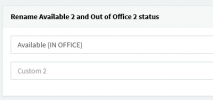
You could always utilise your custom statuses and set it to something like Available (IN OFFICE) and ask them to change their status based on if they're in or out.

1645196498600.png

1645196540579.png

Obviously this depends on users actually changing this.

you could go one further and create a CFD so when you dial it, it pages all extensions with a prerecorded message to say the alarm will be activated in x minutes. This would give whoever enough time to let you know they're there.

or... you call in anonymously and dial the RG ext from an IVR.
 
  • Like
Reactions: Evolute IT
@ ChrisC_3CX

100% correct answer
  • Source extension 'hidden from 3CX company phonebook and 3CX Apps'
  • Destination extensions newly provisioned
  • Call from source extension to (test-) signaling group
-> Correct display of "[RG name] - extension name".

Thanks again for the super fast help.
 
  • Like
Reactions: ChrisC_3CX
Now the next problem... how to solve it (otherwise)?

Removing from 3CX phonebook works - but has a big disadvantage:
the person who calls me sees in his own display only the extension number but not the corresponding name.

I have found in YEALINK itself the possibility (apparently) to search differently for incoming and outgoing calls (Directory->Settings) - but for this I would have to adapt the template in the 3CX (which would again show me all phones as "red").

Using a call queue would work better as far as the display is concerned - but it is a matter of time before many extensions intentionally or accidentally log out of the queue.

I would be very happy about further ideas or suggestions.
Many thanks and greetings

Uwe
 
Now the next problem... how to solve it (otherwise)?

Removing from 3CX phonebook works - but has a big disadvantage:
the person who calls me sees in his own display only the extension number but not the corresponding name.

I have found in YEALINK itself the possibility (apparently) to search differently for incoming and outgoing calls (Directory->Settings) - but for this I would have to adapt the template in the 3CX (which would again show me all phones as "red").

Using a call queue would work better as far as the display is concerned - but it is a matter of time before many extensions intentionally or accidentally log out of the queue.

I would be very happy about further ideas or suggestions.
Many thanks and greetings

Uwe
Did you choose not to read what I wrote?
 
Did you choose not to read what I wrote?
Already read...

A user-defined status that generally signals an availability would also ring with the GlobalCall.

A CFD for this I find a little exaggerated and not really useful for us.

Anonymously calling would be a great idea but I can call anonymously only via external line - or is that also possible "internally"? (would not be known to me)

The GlobalCall number is deliberately not accessible from outside - otherwise people would make a joke out of it at some point :)
 
You could set up a DTMF input IVR and set up a PIN to stop anyone from being able to dial in.

Otherwise, you could specify a number under the emergency numbers and have it ping all extensions via chat/email.
 
  • Like
Reactions: Evolute IT
1st Test looks good:
  • New RingGroup "[GC Test via IVR]" (with 1 extension) und Ring All Strategy
  • New IVR with Prompt "Global Call will be started.."
    • after 1 second "no input" connect to RingGroup "[GC Test via IVR]"
    • I hope that even after reprovisioning the RingGroupName is still displayed.
  • No DID assigning / no Keypress necessary (we also have users who are as technically proficient as my dog) :-)
Will test tomorrow with some more extension
 
  • Like
Reactions: ChrisC_3CX
Hello all,
unfortunately we could not solve the problem until now. No matter which way we choose - latest after the next reprovisioning only the name is displayed again.

Nevertheless, we now know at least what the problem is and have decided to install a simple door intercom module at the exit, which exclusively calls the GlobalCall.

With the requirement to start the GC only from this module and the assigned name "Global Call" our problem should be solved.

Many thanks again to all who have contributed here and helped so constructively.

Kind regards
Uwe
 
  • Like
Reactions: ChrisC_3CX
Glad to see you found a workaround!

Do let us know if you need additional information or assistance!
 
Status
Not open for further replies.

Forum statistics

Threads
111,974
Messages
590,081
Members
164,899
Latest member
mazet