Simply trying to configure SIP Trunk and I get an error clicking on voice and chat

MR R

Trial User
Joined
Oct 14, 2018
Messages
3
Reaction score
1
when I click on voice and chat to add SIP Trunk I get the following error:
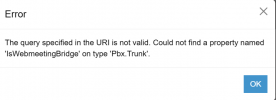
Error​

The query specified in the URI is not valid. Could not find a property named 'IsWebmeetingBridge' on type 'Pbx.Trunk'. FQDN resolves correctly. The only thing I did prior was upgrade to latest release, which is I beleive a beta release, but I would think a bug adding SIP trunks would have been evident and fix prior to even a beta release. Any ideas on where to look next?


1744049980269.png
 
I see you have a support ticket open with us and we will check this with you there.
 
I have exactly the same problem on a new installation of Version 20.0 Update 6, can you help me with the solution?
 
@AzulInteligente The license key of this installation where you have the issue has a valid license key ( not expired ) and an FQDN?
Do you see the FQDN of this key in your Partner Portal?
Please check and let us know.
 
The license is a valid Trial license, and the FQDN in both the PBX and the Partner Portal are visible and functional. I even accessed this area as soon as the PBX was provisioned and created a trunk. I believe that after applying the update from version 20.0.551 to the latest version, the problem started to happen, but I'm not sure and what I remember was different.

I made a backup before updating and restored it, but the problem persists.
 
Can yo
The license is a valid Trial license, and the FQDN in both the PBX and the Partner Portal are visible and functional. I even accessed this area as soon as the PBX was provisioned and created a trunk. I believe that after applying the update from version 20.0.551 to the latest version, the problem started to happen, but I'm not sure and what I remember was different.

I made a backup before updating and restored it, but the problem persists.
Please open a support ticket to ensure that the system is configured correctly and that the FQDN and subscription exist and are live.
 
I don't have an option to open a support ticket at the moment, and I'm uploading a validation environment that I need to test on the client. Is there an alternative to a ticket?

As I said, the FQDN and license are active. I could post the printouts here, but that would make the environment visible.
 
Hi AzulInteligente, can you maybe give a bit more detail, just to clarify a bit more, for example

-this is hosted where? (client site behind a NAT firewall, 'public cloud somewhere', other?')
-was it working smoothly at some prior point recently in past, and then stopped working recently/ after update?
confirm status on 'dashboard' page - you can visit the dashboard page fine via "MADEUPNAME.3cx.com or similar FQDN?
dashboard page has - lots of things in 'green checkbox' status such as (auto update, you are up to date) // trunks / phones / system extensions // troubleshooting area has service and firewall green tick boxes etc.

Maybe you can do a screen grab of the dashboard - status page - and just blot out for 'privacy concerns' the bits where it shows Partner / part of the FQDN / LicenseOwner Email address -- for reference to better show what you see?

-is the rest of the web admin interface working ok for you / other than trying to drill into the 'voice and chat' area ?
- do you know what prior-exist sip-trunk config you had in service, if it was for example a single sip trunk from a normal-supported provider? a custom template sip-trunk 'not official supported 3cx' that you added in manually? a bit of a mix? etc ?

possibly with a bit more detail, it will be apparent what it is that is special here / and the source of problem(s) ?


Tim
 
having same issue but can't open a support ticket
 

Latest Posts

Forum statistics

Threads
111,963
Messages
589,998
Members
164,868
Latest member
swegner