Simultaneous Ring from VOIP to Cell - caller ID

Status
Not open for further replies.

Kyle Kohuth

Joined
Jun 29, 2018
Messages
9
Reaction score
0
Hello 3cx members,

I am trying to have all calls from my VOIP phone simultaneously ring my cell phone, and have my cell phone accurately reflect the caller ID data. The way it is currently set up for me is, I have the 3cx app, and my VOIP calls ring both my VOIP and cell phone, but the cell phone doesnt list any caller ID outside of our companies General number. It does not list the extension if it is an internal call, or the client number if it is an external call, instead it just always lists our general number. When I receive a call, the 3cx app does not open, or do anything. Instead, the call it routed to my cell like any other call I receive on my Iphone.

Is there any way I can have this set up so the VOIP calls also ring my cell phone while accurately reflecting the Caller ID information?

Thanks!
 
Assuming your VoIP provider supports it (some prevent you sending caller ID other than your own), you need to modify the outbound parameters on your SIP trunk. You need (I think from memory) to set "From: User Part" to "OriginatorCallerID".

Again, I must stress, most providers will either ignore this and present your normal CLI or will block your call.

A better solution might be to install the 3cx softphone client Android/iPhone onto your mobile device and have it logon with the same extension number.
 
Assuming your VoIP provider supports it (some prevent you sending caller ID other than your own), you need to modify the outbound parameters on your SIP trunk. You need (I think from memory) to set "From: User Part" to "OriginatorCallerID".

Again, I must stress, most providers will either ignore this and present your normal CLI or will block your call.

A better solution might be to install the 3cx softphone client Android/iPhone onto your mobile device and have it logon with the same extension number.
Thank you for the reply. One of my co workers supposedly has it set up so that whenever he receives a call on VOIP that is forwarded to cell, the 3cx app automatically opens up, which then provides the caller ID. Do you know if this is possible?
 
Maybe you are confused?

If you install the 3cx mobile client on your phone and use the QR code to provision it (or the welcome email) to the same extension as your desk phone, whenever a call comes through to your extension the cell will ring and you can take the call.

The option "simultaneously ring my mobile" makes an OUTGOING call to your cell number when your extension is called. For this reason, you rely on the voice provider to forward caller ID which isn't your own.

Really, if you have a smartphone either Android or iPhone, install the 3cx mobile client and provision it with your extension number. I'm sure this will provide the functionality you require.
 
Maybe you are confused?

If you install the 3cx mobile client on your phone and use the QR code to provision it (or the welcome email) to the same extension as your desk phone, whenever a call comes through to your extension the cell will ring and you can take the call.

The option "simultaneously ring my mobile" makes an OUTGOING call to your cell number when your extension is called. For this reason, you rely on the voice provider to forward caller ID which isn't your own.

Really, if you have a smartphone either Android or iPhone, install the 3cx mobile client and provision it with your extension number. I'm sure this will provide the functionality you require.

Yes I think I am confused, I appreciate your help. I have the app and used the welcome email to provision it. But when I receive a call on my VOIP phone, my cell also rings, but my cell just lists our office generic number regardless of who calls me, internal co worker or external cclient. There is no caller ID. The 3cx app doesnt open. It basically just looks like anyone else calling my Iphone.
 
Have you set the option "simultaneously ring my mobile" on the forwarding rules for the extension? If so, this is the problem. This causes an outbound call to be made to your cell number. You don't need this option switched on to receive 3cx calls to the mobile client.

Oh, and make sure the "Enable PUSH for smartphones" option is selected for your extension on the provisioning page too... :)
 
Have you set the option "simultaneously ring my mobile" on the forwarding rules for the extension? If so, this is the problem. This causes an outbound call to be made to your cell number. You don't need this option switched on to receive 3cx calls to the mobile client.

Oh, and make sure the "Enable PUSH for smartphones" option is selected for your extension on the provisioning page too... :)
Gotcha, thanks! So I need to uncheck the "simul ring my mobile" button on the call forwarding rules?

if I dont have this clicked, will I still receive the VOIP calls on my mobile somehow? Will this be through the app? I will have to forward this to our IT consultant, so I just want to make sure how to have this set up.

Again, appreciate your quick responses!
 
Yes. If the 3cx mobile app is installed on your iPhone and provisioned correctly (with push enabled and the correct extension number) then the iPhone will ring when your extension is called (externally or internally). For this, you DON'T want the "simultaneously ring my mobile" option selected.

The "simultaneously ring my mobile" option doesn't require the app to be installed and just dials out to whatever number is in the mobile field on your extension. If you didn't have an iPhone but had a really old non-smartphone you could use this to make the mobile ring. But the mobile app is better ;)
 
Yes. If the 3cx mobile app is installed on your iPhone and provisioned correctly (with push enabled and the correct extension number) then the iPhone will ring when your extension is called (externally or internally). For this, you DON'T want the "simultaneously ring my mobile" option selected.

The "simultaneously ring my mobile" option doesn't require the app to be installed and just dials out to whatever number is in the mobile field on your extension. If you didn't have an iPhone but had a really old non-smartphone you could use this to make the mobile ring. But the mobile app is better ;)
Thanks so much! I will forward to our IT consultant and hopefully he can take care of this. Thanks again!
 
On the extension, select the "phone provisioning" tab, if you have multiple devices provisioned for that extension, select the "3CX Client" in the "Your phones" list. The "Enable PUSH for smartphones" is the first check-box just under the network settings
 
On the extension, select the "phone provisioning" tab, if you have multiple devices provisioned for that extension, select the "3CX Client" in the "Your phones" list. The "Enable PUSH for smartphones" is the first check-box just under the network settings
Thanks Jon, when you say "on the extension", is this something my IT admin has to do? Or can I do this through the 3cx Web client, desktop app, or mobile app?
 
I don't have access to my 3cx system from here.... I *think* this has to be done from the 3cx management server. I don't believe I've seen an option to disable/enable push that's accessible to the end-user.

You can check if its already enabled... open the 3cx mobile client on your iPhone and leave it open and in the foreground. Get someone to call your extension - the 3cx app should ring. Now tap the iPhone power button to send the iPhone to sleep and try again. If this iPhone "wakes up" starts ringing then push is already enabled for your extension. If it only works when the iPhone is unlocked and the 3cx app is on-screen, then push isn't enabled.

Hope this helps
 
I don't have access to my 3cx system from here.... I *think* this has to be done from the 3cx management server. I don't believe I've seen an option to disable/enable push that's accessible to the end-user.

You can check if its already enabled... open the 3cx mobile client on your iPhone and leave it open and in the foreground. Get someone to call your extension - the 3cx app should ring. Now tap the iPhone power button to send the iPhone to sleep and try again. If this iPhone "wakes up" starts ringing then push is already enabled for your extension. If it only works when the iPhone is unlocked and the 3cx app is on-screen, then push isn't enabled.

Hope this helps
Thank you again sir. Hope you have a great day
 
You too my friend
 
You too my friend
Jon, is there a 3cx customer support line that is callable? I cant seem to find a number anywhere on this site to call for support. Thanks again
 
I'm sorry - I'm not aware of one - maybe someone from 3cx would care to answer this question?
 
Jon, is there a 3cx customer support line that is callable? I cant seem to find a number anywhere on this site to call for support. Thanks again
Please note that you can use our contact form to locate a partner in your area that can help with any questions or inquiries you might have.
Alternatively you could purchase a ticket that will allow you to get in touch with our support department through the ticket.
In your case however i believe that the phone administrator should be able to easily set up the requested functionality for you.
 
  • Like
Reactions: jonpennell
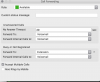
This can be setup by the end user... In the Desktop Softphone, goto the Forwarding Rules and Disable "Also Ring my Mobile"

Mac:
Screen Shot 2018-07-06 at 3.59.01 PM.png

Windows:
Screen Shot 2018-07-06 at 4.00.12 PM.png
 
Status
Not open for further replies.

Members Online Now

No members online now.

Forum statistics

Threads
111,832
Messages
589,286
Members
164,662
Latest member
DejanMDS