SIP > Outbound Calling > Configuration

Status
Not open for further replies.

soniskincareclinic

Free User
Joined
Dec 2, 2022
Messages
4
Reaction score
0
Dear All

I hope you can assist here, let me provide you with details on what I am using and then the problem

AWS LightSail
Self Host > Free Version
Twilio

In the 3CX Management console, I have set up the configuration, which I believe is correct. I can receive inbound calls, but I am unable to make outbound calls, this is to a landline and mobile, and both numbers are coming up as a busy tone.

SIP Trunks > General > I have set the Outbound Proxy to what Twilio has recommended.
SIP Trunks > DIDs> The number has been added +44*******
Outbound Rules - I have setup up by following a tutorial on YouTube US - which I have modified for the UK

Is there anything that I could have missed?
Thank You
 
Dear All

I hope you can assist here, let me provide you with details on what I am using and then the problem

AWS LightSail
Self Host > Free Version
Twilio

In the 3CX Management console, I have set up the configuration, which I believe is correct. I can receive inbound calls, but I am unable to make outbound calls, this is to a landline and mobile, and both numbers are coming up as a busy tone.

SIP Trunks > General > I have set the Outbound Proxy to what Twilio has recommended.
SIP Trunks > DIDs> The number has been added +44*******
Outbound Rules - I have setup up by following a tutorial on YouTube US - which I have modified for the UK

Is there anything that I could have missed?
Thank You
Is your Twilio SIP trunk showing as connected, i.e. Trunk Up on the dashboard?

If yes, then it may be an issue with your Outbound rules.

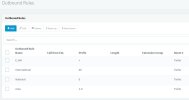
For example, in my setup, I have the Outbound rules shown in the attachment. Do your rules look similar?
 

Attachments

  • Screenshot 2022-12-02 143558.png
    Screenshot 2022-12-02 143558.png
    50.7 KB · Views: 68
Hi

So under SIP Trunks > Twilio is showing up as connected (green radio button)

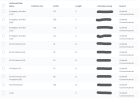
My Outbound rules are not the same as yours, maybe that is the issue. I have sent two attatchments, one is the overview and one in when clicking on Area what I have configured.

Would you be able to confirm if that is correct?
 

Attachments

  • Outbound Overview.jpg
    Outbound Overview.jpg
    42.4 KB · Views: 47
  • Area Number.jpg
    Area Number.jpg
    84.7 KB · Views: 41
Your rules don't look very specific.

I would check the 3CX Activity Log (Verbose) to see what number(s) are actually being sent to your provider, if the calls are even getting that far. That will indicate if the number format is correct, and if it is your provider that is actually rejecting them, and they are not simply being blocked within 3CX.
 
Thanks for the config guide, I just updated a few things

1. under SIP Trunk > Caller ID I added my outbound number
2. Under Outbound Rules, I made a few changes, following the guide. However, under Area,> prepend do I under +44 and then my area code?

I still can't make any outbound calls, having checked the activity log it shows an error, which is below. Having checked google it shws the problem as being under Security > Allowed Country Codes, I see Europe and UK being checked.

02/12/2022 21:33:25 - Dialed number (078865****) belongs to forbidden country (blocked country code = +49)
 
How are you actually dialing the number on the set, what digits? (why would it think you are dialing +49 ?) Have you set up the E164 settings?
 
So I am just dialing my mobile as 07886****

Do you have to turn of E164 under advance settings?
Thanks
 
02/12/2022 21:33:25 - Dialed number (078865****) belongs to forbidden country (blocked country code = +49)
You seem to have a mistake in your outbound rules with strip / prepend. Somehow it seems you are dialing a number starting with +49 which is Germany so the call is not allowed.
Check your outbound rules carefully and try again.

Or as a test make a very basic outbound rule with the only restriction being your extension number and place it on the very top of the list. Then dial the number with the + (+44XXXXXXXXX) and see if that works. Use a 3CX app for this where you can dial with a +. See if that works and go from there.
 
Status
Not open for further replies.

Members Online Now

Forum statistics

Threads
111,831
Messages
589,277
Members
164,660
Latest member
RJenkinsROCK