- Joined
- Oct 11, 2016
- Messages
- 18
- Reaction score
- 0
Hello,
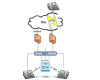
I am now facing a problem is that we have a line specific for sip through vpn to our sip provider which is not connected to internet.
I use two network ports and set the default gateway to the internet one. Remain blank of the sip vpn one. I install 3cx on windows 10 so I use route table to force the sip provider ip go through vpn network. But when I use wiredshark to testify. Only the verify secession will go through vpn network. After 183 secession start RTP will all go through internet network. Should there has other setting I missed? Or I should change the parameters?
Thanks for your help/
I am now facing a problem is that we have a line specific for sip through vpn to our sip provider which is not connected to internet.
I use two network ports and set the default gateway to the internet one. Remain blank of the sip vpn one. I install 3cx on windows 10 so I use route table to force the sip provider ip go through vpn network. But when I use wiredshark to testify. Only the verify secession will go through vpn network. After 183 secession start RTP will all go through internet network. Should there has other setting I missed? Or I should change the parameters?
Thanks for your help/