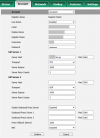
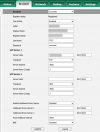
SIP request (REGISTER) from xx.xx.xx.xx was rejected. Reason: Block WAN requests is ON

DSima

Silver Partner
Basic Certified
Joined
Feb 22, 2019
Messages
10
Reaction score
1
Hello,

We're using Version 20.0 Update 5 (Build 551 Release) — Type: Professional Annual, 16 Simultaneous Calls.

We're trying to set up a new phone and we're getting an error about "Block WAN request is ON." I understand this used to be the "Block use outside LAN" setting, but it's no longer available in the user's options.

I can't find this setting anywhere—could you please help?
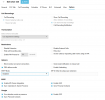
 

Attachments

  • Screenshot 2025-05-12 110507.png
    Screenshot 2025-05-12 110507.png
    52.8 KB · Views: 18
How do you provision the phone? Is the pbx external to the phones?
 
Hello,


Yes, 3CX is hosted on a VPS outside the company.


All phones are configured as external, and we set them up manually because auto-provisioning causes the phone's web interface to become inaccessible—and we need to retain access to it.
 
Your phones need to provisioned over an sbc or as an router phone. The webinterface is always accessable, your password you will find on your pbx.
 
Is there a way to make Block WAN requests OFF?
 
Is there a way to make Block WAN requests OFF?
That wouldnt help you and isnt supported anymore as you should know.
 
I understand this used to be the "Block use outside LAN" setting, but it's no longer available in the user's options.
It was renamed to "Block remote non-tunnel connections" and you already have it disabled.

All phones are configured as external, and we set them up manually because auto-provisioning causes the phone's web interface to become inaccessible—and we need to retain access to it.
That makes no sense at all, even if you manually configure them they should still be over SBC and they should not be connecting over WAN directly as this is no longer supported or recommended if the goal is to have reliable telephony.

The interfaces are accessible for supported phones, if you provisioned them properly as you should you would notice that the login URL now becomes HTTPS for most phones these days after provisioning (for increased security and browser compatibility).

It may have been better to make a post telling us what issue you had, the model and firmware version of the phones, and we could advise for that one instead of going down an unnecessary rabbit hole. We still don't know any of the above.
 
  • Like
Reactions: bitn2 and GregG_3CX
Thank you for your answer. The issue I'm seeing is the error I posted.
This phone was set up with another user who left the company and we want to set it up with a new user.
I'm using the same procedure I've set up the rest of the phones, about 30.
Phone model: Yealink T31G
Firmware Version 124.86.0.40
Hardware Version 123.1.0.32.2.0.0
3CX console error:
1747044386800.png
Account setup which doesn't work:
1747044482587.png

Account setup that works:
1747044601744.png
They're actually the same, except I've used the correct register name and password provided by 3CX.
As server host we use the hostname of the server.
I see that the new version maybe doesn't allow new connections outside of the LAN despite I have it disabled as you said?
 
Why haven't you installed an SBC yet though?
 
  • Like
Reactions: bitn2

Latest Posts

Forum statistics

Threads
111,962
Messages
589,996
Members
164,867
Latest member
swegner