Dear team,
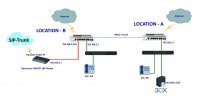
Please refer attached design -- i have two locations both are connected over IPSEC VPN.
Local A is having 3CX On-Premise, and Location2 i have SIP Trunk Connected (to the LAN2 port of Fortigate Firewall).
im unable to register the SIP Trunk (Etisalat UAE) to the 3CX Server. im able to ping 192.168.3.1 from 3CX Server on location A (which is the SIP Gateway local address )
all subnets are pinging back and forth. but unable to get the SIP Trunk registered.
any help in this matter will be highly appreciated
Regards,
Ameer Ali
Thanks for responding olegR,
Please find below the capture results.
No. Time Source Destination Protocol Length Info
1164 18.041976 192.168.1.254 192.168.3.1 SIP/SDP 949 Request: INVITE sip:
[email protected]:5060 |
Frame 1164: 949 bytes on wire (7592 bits), 949 bytes captured (7592 bits) on interface \Device\NPF_{7BE988B9-C76D-4EA4-B02D-662B3276BE12}, id 0
Ethernet II, Src: Dell_98:9b:58 (00:be:43:98:9b:58), Dst: Fortinet_62:c8:bf (80:80:2c:62:c8:bf)
Internet Protocol Version 4, Src: 192.168.1.254, Dst: 192.168.3.1
User Datagram Protocol, Src Port: 5060, Dst Port: 5060
Session Initiation Protocol (INVITE)
No. Time Source Destination Protocol Length Info
1226 18.134520 192.168.1.254 192.168.3.1 SIP 360 Request: ACK sip:
[email protected]:5060 |
Frame 1226: 360 bytes on wire (2880 bits), 360 bytes captured (2880 bits) on interface \Device\NPF_{7BE988B9-C76D-4EA4-B02D-662B3276BE12}, id 0
Ethernet II, Src: Dell_98:9b:58 (00:be:43:98:9b:58), Dst: Fortinet_62:c8:bf (80:80:2c:62:c8:bf)
Internet Protocol Version 4, Src: 192.168.1.254, Dst: 192.168.3.1
User Datagram Protocol, Src Port: 5060, Dst Port: 5060
Session Initiation Protocol (ACK)
No. Time Source Destination Protocol Length Info
1572 23.106789 192.168.1.254 192.168.3.1 SIP/SDP 952 Request: INVITE sip:
[email protected]:5060 |
Frame 1572: 952 bytes on wire (7616 bits), 952 bytes captured (7616 bits) on interface \Device\NPF_{7BE988B9-C76D-4EA4-B02D-662B3276BE12}, id 0
Ethernet II, Src: Dell_98:9b:58 (00:be:43:98:9b:58), Dst: Fortinet_62:c8:bf (80:80:2c:62:c8:bf)
Internet Protocol Version 4, Src: 192.168.1.254, Dst: 192.168.3.1
User Datagram Protocol, Src Port: 5060, Dst Port: 5060
Session Initiation Protocol (INVITE)
No. Time Source Destination Protocol Length Info
1588 23.224009 192.168.1.254 192.168.3.1 SIP 362 Request: ACK sip:
[email protected]:5060 |
Frame 1588: 362 bytes on wire (2896 bits), 362 bytes captured (2896 bits) on interface \Device\NPF_{7BE988B9-C76D-4EA4-B02D-662B3276BE12}, id 0
Ethernet II, Src: Dell_98:9b:58 (00:be:43:98:9b:58), Dst: Fortinet_62:c8:bf (80:80:2c:62:c8:bf)
Internet Protocol Version 4, Src: 192.168.1.254, Dst: 192.168.3.1
User Datagram Protocol, Src Port: 5060, Dst Port: 5060
Session Initiation Protocol (ACK)