SIp trunk provider not listed . How to define it manually or convert from FreePBX ?

Status
Not open for further replies.

dandumit

Forum User
Joined
Mar 16, 2022
Messages
36
Reaction score
2
HEllo,
I am from Romania and SIP trunk provider it's not listed.
I have tried to put some values there but not completely working.
How could I define manually SIP Trunk ?
I have tried to make backup and tried to convert config but convertor does not work

What could I try ?
Thank you,
DAniel
 
Hello @dandumit

The first recommendation would be to use a 3CX support provider from the list. If that is not possible then just look at the settings of your SIP trunk and make the necessary changes manually using a generic template.
 
Hello @YiannisH_3CX - if I open a support ticket would be possible to configure it for me ? I have got examples from their support how a session should be , in freepbx its working. however I did not manage to convert configuration from freepbx. automatic convert fails and I don't know what to do
 
Our support will not assist with an unsupported provider so a ticket will not help in this instance, What version of FreePBX are you using and what version 3CX? I want to see if the converter supports your scenario.
 
I am using last version on 3CX and for FreePBX 15.0.23. I need at least trunk information to be migrated.
is there any tutorial / explanation to define a new sip trunk ?
 
As you can see from our guide that the conversion tool support FreePBX versions 12/13/14 so that is why the conversion is not supported.
If you know the settings of your provider then you can add them here and we may be able to assist you convert them to the 3CX equivalent settings.
 
  • Like
Reactions: dandumit
Thank you .
I have following setup from Operator :

Internet Public STAtic IP Addess -> pfsense ->192.168.1.A ETH0 ->3CX
SIpTrunkPRovider-> ONT box -> 192.168.32._ ETH1->3CX

I have declared 2 static routes toward my SIP trunk provider.

Those are settings that I have received from telecommunication company

Settings on local (ETH1) :
ip:192.168.32.110
nm:255.255.255.252
gw:192.168.32.109
5 channels

numbers =31433538= principal number ;
username=31433538
password =XXXXX
domain = sip.rcs-rds.ro
proxy - sip.rcs-rds.ro
DNS-eses - 82.76.7.30, 82.76.7.26
Acces toward 82.76.7.30 si 82.76.7.26 can be done only through gw:192.168.32.109.

Method REGISTER is not mandatory, only for each INVITE it’s needed Proxy Authentication with username and password.
The identity is transmitted through the 'From' header. If something other than the main number appears in the 'From' header, then the caller ID will be automatically set to the main number.
of call 31433538.


Setup that it's working now on freepbx is :
username=31433538
type=peer
secret=XXXXXXX
nat=no
insecure=invite
host=82.76.7.26
fromuser=31433538
fromdomain=sip.rcs-rds.ro
dtmfmode=inband
disallow=all
defaultuser=31433538
context=from-trunk
canreinvite=no
allow=alaw

My 3CX now it's on a RPI 4 Board.
I have put settings that I knew over another provider and it's ringing on incoming but not connecting voice and outbound does not work at all.

Thank you,
Daniel
 
My 3CX now it's on a RPI 4 Board.
I have put settings that I knew over another provider and it's ringing on incoming but not connecting voice and outbound does not work at all.
First off, I have to mention two things, first, the Pi is no longer supported to host a PBX on and, even if you do, how would you have two NICs?

In any case, try creating a Generic SIP Trunk and then try these settings:
1647957125932.png


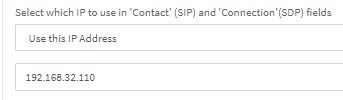
In the options tab set the contact ip as follows:
1647957156478.png


Regarding the network setup and additional settings I recommend taking a look at a guide we have for a Provider with a similar config:
https://www.3cx.com/docs/cypriot-sip-trunk-cyta/#h.felrzf762ecc

Specifically check the section that reads "Over the Cyta Network" and make sure you go over the adding static routes section carefully.

You would have to add static routes for the DNS servers too (82.76.7.30, 82.76.7.26) as it sounds like the domain can only be resolved via those DNS servers.

Also, since the host is a domain, you would have to probably find out what ip it resolves to so that you can add a static route for that address too.
 
PBX on and, even if you do, how would you have two NICs?
Thank you Chris ! - I have 2 NIC's because that's the SIP proider decided that way, I guess that's he want to offer SIP trunk inside of LAN to avoid connecting over internet and thus way to improve security. (here where known a lot of cases of "stealing" using other trunks for making illegal traffic)

Anyway until now outstanding support on chat. FAR FAR better than others !

I will check right away and i will come back immediately with result.
Thank you,
Daniel
 
Thank you @ChrisC_3CX !
Based on your info I have been able to configure (more or less correct the) trunk and now I am able to receive calls from outside.
I have defined and outbound rule and now I have moved to next step outbound calls are failing (I will open a new thread for that).
Please tell me one more thing : second ethernet board it's USB adaptor. May this affect in any way functionality ?
Thank you,
Daniel
 
HEllo @ChrisC_3CX Hello @YiannisH_3CX ! thank you for your support ! I have been able to register correctly trunk from RCS-RDS .
I have added that 2 static routes and because I was not able to make system to resolve name of sip.rcs-rds.ro I have added it like a "red neck" in /etc/hosts
Please save those configurations as a reference for other possible customers because RCS-RDS it's a big operator here in Romania and most likely many of customers have faced this issue and are struggling with other solutions not so polished.

One more question then please put case solved : I didn't manage in such a short notice to find a new computer with 2 ethernet boards si second interface board it's usb- usbhub- Eth Adapter. on this interface it's connected the sip trunk . May I run for a period in production like this ?

Once again thank you and congratulations for support !
Daniel
 
One more question then please put case solved : I didn't manage in such a short notice to find a new computer with 2 ethernet boards si second interface board it's usb- usbhub- Eth Adapter. on this interface it's connected the sip trunk . May I run for a period in production like this ?
Although an Ethernet adapter via USB is not the most reliable method and I would not recommend it you could potentially run it for a bit like that if the system is low traffic and if you are not facing any issues at the moment. But I would recommend finding a PC with 2 adapters the earliest.

Glad to see you were able to resolve your issue
 
  • Like
Reactions: dandumit
Status
Not open for further replies.

Forum statistics

Threads
111,993
Messages
590,175
Members
164,931
Latest member
admintest