- Joined
- Jul 20, 2020
- Messages
- 77
- Reaction score
- 7
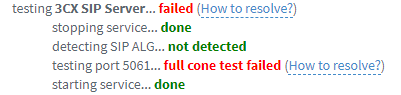
I'm struggling receiving calls on 3CX with a trunk I assigned on the system.
This particular trunk is what is provided by a career with the information of an IP,a CID, and UDP port 5060(which is issued to the IP of the System and the port I told them).
The signal of the trunk is green on the "SIP Trunks" list, and outbound call was successful, however incoming calls do not reach the System.
The provider checked the log on their side and they said that the 3CX server did not answer to calls(but ping was OK).
The settings I made on the system are;
▼Trunk Details
・Registrar/Server/Gateway Hostname or IP
IP aaa.bbb.cc.ddd port 5060
・Outbound Proxy
IP aaa.bbb.cc.ddd port 5060
▼Authentication
・Type of Authentication
IP Based
・Authentication ID (aka SIP User ID)
03XXXXXXX
▼Route calls to
・Main Trunk No
03XXXXXXX
・Destination for calls during office hours
Extension
(*aaa.bbb.cc.ddd - IP of the provider, 03XXXXXXX - CID)
Please kindly advice me what else I should do for settings, or anything wrong with the settings above?
This particular trunk is what is provided by a career with the information of an IP,a CID, and UDP port 5060(which is issued to the IP of the System and the port I told them).
The signal of the trunk is green on the "SIP Trunks" list, and outbound call was successful, however incoming calls do not reach the System.
The provider checked the log on their side and they said that the 3CX server did not answer to calls(but ping was OK).
The settings I made on the system are;
▼Trunk Details
・Registrar/Server/Gateway Hostname or IP
IP aaa.bbb.cc.ddd port 5060
・Outbound Proxy
IP aaa.bbb.cc.ddd port 5060
▼Authentication
・Type of Authentication
IP Based
・Authentication ID (aka SIP User ID)
03XXXXXXX
▼Route calls to
・Main Trunk No
03XXXXXXX
・Destination for calls during office hours
Extension
(*aaa.bbb.cc.ddd - IP of the provider, 03XXXXXXX - CID)
Please kindly advice me what else I should do for settings, or anything wrong with the settings above?