


- Joined
- Jul 31, 2023
- Messages
- 4
- Reaction score
- 0
I buy the 3cx SMB because you told me that can i have more than 1 SIP Trunk this is misinformation and you change it at feature list.
I ask you to tell me what to do and you told me to by 2nd DID i buy 2nd DID but i cant set routing for this DID!!!! and you instructions is not telling anything about how to configure! only in first number has call routing not in second DID and in your manual you said:
https://www.3cx.com/docs/manual/sip...t&utm_medium=referral&utm_campaign=admin_help
5. You can route a DID number to a Ring Group, Queue or Digital Receptionist by going to “Call handling”, clicking on the destination and selecting the DID from the “DID Numbers” drop-down box. To route a DID to an extension, navigate to “Users”, select the desired user and use the “DID Numbers” drop-down under the “General” tab.
as you see this is not possible and i think that this misinformation is for make me pay support hours!!!
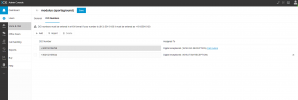
I ask you to tell me what to do and you told me to by 2nd DID i buy 2nd DID but i cant set routing for this DID!!!! and you instructions is not telling anything about how to configure! only in first number has call routing not in second DID and in your manual you said:
https://www.3cx.com/docs/manual/sip...t&utm_medium=referral&utm_campaign=admin_help
5. You can route a DID number to a Ring Group, Queue or Digital Receptionist by going to “Call handling”, clicking on the destination and selecting the DID from the “DID Numbers” drop-down box. To route a DID to an extension, navigate to “Users”, select the desired user and use the “DID Numbers” drop-down under the “General” tab.
as you see this is not possible and i think that this misinformation is for make me pay support hours!!!


