Site refused to connect

Status
Not open for further replies.

noreply@gammapowersports.

New User
Joined
Jun 5, 2023
Messages
1
Reaction score
0
Hi, I have a question.

Is there anything that prevents my connection to the website?

I was trying to access the management console and the web client. I can access these from other systems or even from my phone. I am not sure why I am not able to access it from my system, and it says connection refused.

I checked the proxy settings and firewall settings as well. There is no difference when compared with other systems.
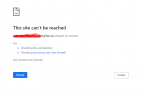
1685990833899.png

I got this 'The remote device or resource won't accept the connection' when I ran the troubleshooter. Any help will be appreciated.
Thanks.
 
Likely your IP was blacklisted. If you were setting up a new phone, ensure it has the most recent firmware before starting. Specifically setting up a router phone on old firmware can trigger a block, per other posts here. On 3CX hosting I believe the block will expire in 24h. Note you may need to unplug said phone so it doesn't keep blocking your IP.
 
If it was a blacklist issue the management console would load but logging in would not work. It looks like a DNS or network issue to me.
 
Ah yes you’re correct of course. I must have been thinking of fail2ban which blocks access via firewall, since I just helped a couple clients with that on non-3CX web servers.

Rereading the OP, @noreply@gammapowersports. wrote “other systems” which I read as “other IPs/locations”…other PCs on the same network are fine? Then something on or affecting just that PC…hosts file?
 
  • Like
Reactions: YiannisH_3CX
Hi, I have a question.

Is there anything that prevents my connection to the website?

I was trying to access the management console and the web client. I can access these from other systems or even from my phone. I am not sure why I am not able to access it from my system, and it says connection refused.

I checked the proxy settings and firewall settings as well. There is no difference when compared with other systems.
View attachment 35793

I got this 'The remote device or resource won't accept the connection' when I ran the troubleshooter. Any help will be appreciated.
Thanks.
Try to access it using the direct IP instead of the FQDN (bypassing DNS). You will get a TLS warning but it should be accessible.
If this works, then as my colleague mentioned you probably have a DNS resolution issue.

Either way, you need to troubleshoot this as a network issue since it works fine for everyone else.
 
Status
Not open for further replies.

Forum statistics

Threads
111,974
Messages
590,081
Members
164,899
Latest member
mazet