SMB Free Twilio Auto-Setup Not Working (Exception has been thrown by the target of an invocation)

DavidQuinnContrac

SMB User
Joined
Oct 20, 2025
Messages
8
Reaction score
2
We recently set up the free SMB license to trial 3CX for our Australian users after purchasing numbers and a call package from Twilio through our supplier, Gradwell Communications (UK).


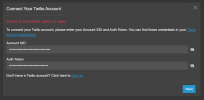
Gradwell (via Twilio) provided us with the Account SID and Auth Token for use with the Twilio auto-setup when adding the trunk. However, when we enter these details and click Next, 3CX throws the error:


“Exception has been thrown by the target of an invocation.”

Twilio support advised that they’re unable to assist, as the issue appears to be on the 3CX side — specifically related to the auto-setup integration. That said, I’m not entirely convinced this is solely a 3CX issue.


We’ve tried both configuration paths, but neither works:


  • Admin > Voice & Chat > Add Trunk > Country: AU > Provider: Twilio (Auto-setup) → fails
  • Admin > Voice & Chat > Add Trunk > Worldwide > Provider: Twilio (Auto-setup) → fails

Since we’re only trialing the platform, we don’t currently have any open support tickets with 3CX.


Has anyone else encountered this issue? I couldn’t find any relevant discussions on the forums.


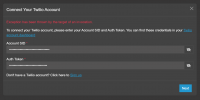
For reference, I attempted to add the trunk again this morning (20/10/2025) using the same SID and token, and this time received a new error message:


“Service is unavailable, please try again.”
 

Attachments

  • 1.png
    1.png
    37.4 KB · Views: 6
  • Screenshot 2025-10-20 091559.png
    Screenshot 2025-10-20 091559.png
    54.6 KB · Views: 6
  • Like
Reactions: N_G
Hello,

Twillio is reporting an incident (https://status.twilio.com/) due to a fault with some AWS systems (https://health.aws.amazon.com/health/status).

Once those are back to full operation, please try again.

Best,
KS
This issue has been ongoing since 03/10/2025. The current error, “Service is unavailable, please try again,” is most likely related to today’s AWS outage. However, once AWS is fully restored, the original error — “Exception has been thrown by the target of an invocation” — will likely reappear.
 
Hi,

Once it is back, we will be checking too.
 
I asked our supplier to remove 99 numbers from the 100-number block on Twilio’s side.


After that change, the single remaining number was adopted immediately using the Twilio auto-setup.


It’s clear there’s an issue between 3CX and Twilio when using the auto-setup feature with a large number of numbers. I’m not sure what the limit is, but it’s evident that 100 numbers do not work.
 
Hi,

I would suggest you get a proper Trial account (https://www.3cx.com/signup/) and not an SMB Free account, as that is limited in its abilities to a large degree.

Can you confirm that the Twillio product been connected was "Elastic SIP Trunking" and the numbers were no already part of an existing Trunk? Wish to have as many of the parameters known before investigating.

Best,
KS
 
I asked our supplier your question, and they responded with the following:


“These numbers were not associated with any existing trunk, as per 3CX’s instructions. You add an address on the account, purchase your numbers, and then let the auto-setup tool handle the rest.”
 
Thank you for confirming that. Again let me urge you more generally to reach out to a 3CX partner or to get a trial licence yourself if you want to do a proper evaluation, SMB is very much geared for small scale use.
 
We plan to upgrade to an Enterprise license after this trial — we just needed to confirm that these numbers would work properly before making the commitment.


Thanks for your help. I do hope 3CX’s partners make customers aware that adding too many numbers to a free SMB license can trigger confusing errors like this one.
 
  • Like
Reactions: KyriacosS_3CX
In which state of the process were you getting the error? Where you getting it after you added the credentials or after you selected the numbers from the next menu?
 
Hi YiannisH_3CX,


I’m encountering the error message “Exception has been thrown by the target of an invocation” right after clicking the Next button, following the step where I paste my account SID and token. Because of this, I’m unable to proceed further or view the numbers from Twilio.
 
Ok so even before selecting any numbers. We will look into it. Thank you for confirming.
 
  • Like
Reactions: Evolute IT
Hi YiannisH_3CX,

Have you had a chance to look into this issue any further?

I’m happy to run some additional testing using our free SMB account with the 100 numbers if that would help.
 
Hi chaps,

I thought I would add my input on to this, as I was the engineer that assisted David with this issue. We trialled the trunk setup internally on our own dedicated instance, including on a server that had higher resources than what was recommended. We even tried with another customer's trunks that had a significant amount of DDIs (approx. 60 numbers), which also failed with the same error.

It seems the error appears when there is a large quantity of numbers.

It could possibly be a Twilio fault, but unfortunately their support wasn't too helpful. Whenever I query their API with my scripts I am able to retrieve all numbers from a subaccount within seconds, without any errors.

Hope this input is somewhat helpful!
 
  • Like
Reactions: N_G
Hi David,

We believe we have identified the issue. We will add the fix in update 8 which should resolve your issue. The set up wizard could not display all 100 numbers so it threw an error (I think max is 50 for now). It should be ok in the next release.
 
  • Like
Reactions: KyriacosS_3CX
Hi Yiannis,


We have now identified a clear and reproducible cause for the Twilio auto-setup failure on 3CX SMB Free, and I wanted to share the findings for visibility.


This issue is volume-related, not credential or API availability related.


In our case, the Twilio account contained a large block of DIDs (100 Australian numbers). When using the SMB Free Twilio auto-setup, the process consistently failed with either:


  • “Service is unavailable, please try again”
  • “Exception has been thrown by the target of an invocation”

Using the same Account SID and Auth Token:


  • Twilio API calls work correctly outside of 3CX (confirmed via CLI and direct API queries).
  • Elastic SIP Trunking is fully enabled and operational.
  • The failure only occurs once the number of DIDs exceeds a threshold. The lowest reproducible failure point we observed was around 63 numbers.

Our carrier (Gradwell) and Twilio both confirmed:


  • The Twilio API returns all numbers successfully, even with 100+ DIDs.
  • No errors are raised on the Twilio side.
  • The same credentials work immediately once the DID count is reduced.

As a test, excess numbers were moved to a separate Twilio subaccount, leaving a single DID on the original account. With no other changes, the 3CX SMB auto-setup worked immediately.


This strongly suggests the SMB auto-setup process fails during automatic enumeration or processing of large DID lists, resulting in an unhandled exception that surfaces as the generic errors above.


This also explains why the issue appears account-specific and why it is difficult to reproduce internally, as most SMB deployments have only a small number of DIDs.


Workarounds that are confirmed to work:


  • Reduce the number of DIDs visible to the auto-setup (for example by splitting across subaccounts).
  • Use manual Elastic SIP Trunk configuration on non-SMB or dedicated instances.

Hopefully this helps narrow down the root cause and explains the inconsistent behaviour reported by different users.


Happy to provide more detail if required.


Kind regards,
David Quinn
 
  • Like
Reactions: YiannisH_3CX
Hello David,

Thank you for the information. As I mentioned above this should be fixed once you update to Update 8. We have added pagination in the wizard which should handle large amounts of DIDs.
Please try again once you update to Update 8 of Version 20 and let us know if everything is OK.
 
  • Like
Reactions: Evolute IT

Members Online Now

Forum statistics

Threads
111,831
Messages
589,277
Members
164,660
Latest member
RJenkinsROCK