- Joined
- Oct 20, 2025
- Messages
- 8
- Reaction score
- 2
We recently set up the free SMB license to trial 3CX for our Australian users after purchasing numbers and a call package from Twilio through our supplier, Gradwell Communications (UK).
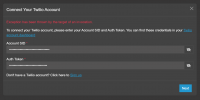
Gradwell (via Twilio) provided us with the Account SID and Auth Token for use with the Twilio auto-setup when adding the trunk. However, when we enter these details and click Next, 3CX throws the error:
Twilio support advised that they’re unable to assist, as the issue appears to be on the 3CX side — specifically related to the auto-setup integration. That said, I’m not entirely convinced this is solely a 3CX issue.
We’ve tried both configuration paths, but neither works:
Since we’re only trialing the platform, we don’t currently have any open support tickets with 3CX.
Has anyone else encountered this issue? I couldn’t find any relevant discussions on the forums.
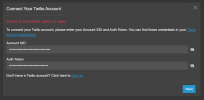
For reference, I attempted to add the trunk again this morning (20/10/2025) using the same SID and token, and this time received a new error message:
Gradwell (via Twilio) provided us with the Account SID and Auth Token for use with the Twilio auto-setup when adding the trunk. However, when we enter these details and click Next, 3CX throws the error:
“Exception has been thrown by the target of an invocation.”
Twilio support advised that they’re unable to assist, as the issue appears to be on the 3CX side — specifically related to the auto-setup integration. That said, I’m not entirely convinced this is solely a 3CX issue.
We’ve tried both configuration paths, but neither works:
- Admin > Voice & Chat > Add Trunk > Country: AU > Provider: Twilio (Auto-setup) → fails
- Admin > Voice & Chat > Add Trunk > Worldwide > Provider: Twilio (Auto-setup) → fails
Since we’re only trialing the platform, we don’t currently have any open support tickets with 3CX.
Has anyone else encountered this issue? I couldn’t find any relevant discussions on the forums.
For reference, I attempted to add the trunk again this morning (20/10/2025) using the same SID and token, and this time received a new error message:
“Service is unavailable, please try again.”