SMS Configuration is Disabled in 3CX

Status
Not open for further replies.

bhibbard89

Customer
Joined
Sep 7, 2021
Messages
3
Reaction score
0
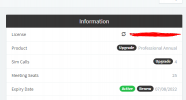
When I attempt to press "OK" when configuring SMS I get a message, "Feature available in 3CX Professional and Enterprise Editions" and it does not allow me to save the settings. I have the Professional edition with 4 sim calls.
 
Refresh your license key , under setting - license
 
Thanks for the reply, I did, and that's why I posted here, because it is not allowing me to save the settings even though 3cx is showing I have a professional key.
1631040750793.png

Tried it again and it still is not working.
 
Thanks for the reply, I did, and that's why I posted here, because it is not allowing me to save the settings even though 3cx is showing I have a professional key.
View attachment 24272

Tried it again and it still is not working.
Clear your cache and retry.
 
I have, tried across 3 different browsers, incognito mode, clearing cache and another device.

Only error I'm seeing in my dev console is

Failed to load resource: the server responded with a status of 403 ()
/api/License/license
 
To get a bit more information on this:

• Where is this instance hosted(Hosting Provider, 3CX, on-premise)?
• If no Hosted with 3CX, what OS is 3CX running on?
• Have you tried restarting the machine or all 3CX services at all? (you can try restarting services from "Dashboard >> Services")
• When you clicked on "Refresh License Key information", did you get an error at all?
• What happens when you try to use other features that require a professional license such as Call Queues, Recordings, etc.
 
I am also seeing this issue. My info:

* Hosted by 3CX
* Restarted machine and services
* No errors when refreshing license key. Client shows no error messages and support info logs seem clean
* Can create new call queues just fine. SMS configuration is the only thing I have run into that is disallowed
 
@bhibbard89

@wes_h

What browser have you tried it with?
Can you confirm you've tested with the latest version of Google Chrome?
 
Yes. Tested with

* Chrome: 93.0.4577.63
* Firefox: 91.0.2
 
@wes_h

I'll PM you for more information regarding this.
 
@ChrisC_3CX

Thanks for reaching out. Per your instructions, I added a new user that had full system rights to the management console.

I tested the same workflow with that user and I was able to successfully create a SMS configuration.

Then I went back and tested the workflow again using the super admin account and I was able to successfully create a SMS configuration with that as well.

I don't know if something changed overnight. I didn't retry before creating the new user. Maybe the automated license check finally applied correctly.

Regardless, a solution for when this happens seems to be to create a new user with full system rights.
 
  • Like
Reactions: ChrisC_3CX
@wes_h
I don't know if something changed overnight. I didn't retry before creating the new user. Maybe the automated license check finally applied correctly.

Regardless, a solution for when this happens seems to be to create a new user with full system rights.
I have to say, I doubt that creating the user had anything to do with it but nevertheless, I'm glad to hear you managed to resolve the issue.

@bhibbard89

Could you confirm if the issue persists and if you tested with the latest version of Google Chrome? If it does, please give what @wes_h mentioned a shot and let me know if anything changes when you do that.
 
I am also having this issue. I have tried Safari, Firefox and Chrome and am unable to resolve. This is on a 3CX hosted system
 
I am having this same exact issue. How did you create a new superuser?
 
Refreshing my license key did not work for me.
 
Can you please let me know what solution ended up working? Refreshing the license did not work for me. I attempted trying this on the latest version of Chrome, Firefox and Safari and was unsuccessful. I also created a new admin user for the console which also did not help.
 
I was finally able to create a message template with Flowroute after a restore of my system. However, when I go to a user and click ENABLE SMS, the user pull down menu is blank
 
@wes_h

I have to say, I doubt that creating the user had anything to do with it but nevertheless, I'm glad to hear you managed to resolve the issue.

@bhibbard89

Could you confirm if the issue persists and if you tested with the latest version of Google Chrome? If it does, please give what @wes_h mentioned a shot and let me know if anything changes when you do that.
I am also currently having this exact issue. Any ideas why?
 
Status
Not open for further replies.

Forum statistics

Threads
111,976
Messages
590,089
Members
164,904
Latest member
gdstratton