
- Joined
- Sep 7, 2021
- Messages
- 3
- Reaction score
- 0


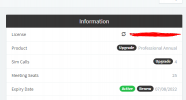

Clear your cache and retry.Thanks for the reply, I did, and that's why I posted here, because it is not allowing me to save the settings even though 3cx is showing I have a professional key.
View attachment 24272
Tried it again and it still is not working.

I have to say, I doubt that creating the user had anything to do with it but nevertheless, I'm glad to hear you managed to resolve the issue.I don't know if something changed overnight. I didn't retry before creating the new user. Maybe the automated license check finally applied correctly.
Regardless, a solution for when this happens seems to be to create a new user with full system rights.
I am also currently having this exact issue. Any ideas why?@wes_h
I have to say, I doubt that creating the user had anything to do with it but nevertheless, I'm glad to hear you managed to resolve the issue.
@bhibbard89
Could you confirm if the issue persists and if you tested with the latest version of Google Chrome? If it does, please give what @wes_h mentioned a shot and let me know if anything changes when you do that.
Founded in 2005, when VoIP was an emerging technology, 3CX has gone on to establish itself as a global leader in business communications.


