SMS is completely missing after Update 6

Status
Not open for further replies.

Noel Evolution

Silver Partner
Basic Certified
Joined
Apr 10, 2020
Messages
99
Reaction score
12
I have one install that is not like any of the others. Our SIP trunk simply has no SMS tab. The same goes for the webclient. It just is not there. I don't want to delete the Trunk because reentering the DID info would be unreasonable.
 
Even if we blow away the Trunk and then attempt to recreate, In the Web Client, the "Country" Worldwide is not an option in adding a Trunk - thus no Twilio. We are DEAD IN THE WATER for SMS after the Upgrade... How to add?
 
Even if we blow away the Trunk and then attempt to recreate, In the Web Client, the "Country" Worldwide is not an option in adding a Trunk - thus no Twilio. We are DEAD IN THE WATER for SMS after the Upgrade... How to add?
Well, we re-added the Twilio Trunk in the Management Console, got the SMS setup page... BUT Enable SMS is gone from the User General Tab and cannot find any SMS enabling per-User in the Web Client, nor can we find any SMS routing setup in either console. Please HELP!
 
How would you fix that in this scenario:

- MAIN Flowroute number send to
-> In hours -> Digital receptionist
-> After hours -> Another digital receptionist

In hours receptionist offers choices, two of them transfer to queues

Before this cluster disaster, incoming SMS would go to support queue
Now what?
 
Thanks KonnectCraft... Sort of have it working with Inbound and Outbound Rules... BUT (and I believe what saint_ is asking) - inbound voice needs to go to IVR, while inbound SMS needs to go to certain extensions. Everything I look at says that's unified, i.e., cannot send SMS to one and voice to another, and of course (and logically) IVRs cannot receive SMS so?!?!
 
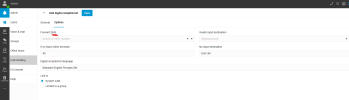
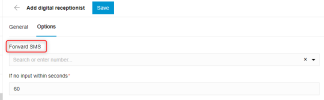
Digital Receptionist can handle SMS. Its in the Options Tab on the webclient version. Not management console.

1675735897625.png
 
THANK YOU AGAIN KONNECTCRAFT! But not through IVR to new User Group(s) or multiple Users/Extensions - maybe through Call Queues or Ring Groups? Meh, enough for tonight!
 
any rebuttal @YiannisH_3CX ? Do I really have to hack the files to get this done?
Exporting and importing Inbound rules is not hacking. Its a convenient and fast way to help you export the trunk and re-add it.

The user must be bound to a DID and SMS enables by default.
The option to enable SMS per user is gone. Now users that can receive SMS can also send SMS. That means that if you point a DID at a user then that user can also send SMS with that DID.
That also means that if you point a DID at a queue or a Ring group then all members of that Ring Group or queue can send SMS via that DID. So multiple users can use the same numbers to send SMS.
 
To seperate
How would you fix that in this scenario:

- MAIN Flowroute number send to
-> In hours -> Digital receptionist
-> After hours -> Another digital receptionist

In hours receptionist offers choices, two of them transfer to queues

Before this cluster disaster, incoming SMS would go to support queue
Now what?
Your scenario is fine. Your routing of voice will remain the same and unaffected. Just access you Digital receptionists through a Webclient with the appropriate rights and forward your SMS messages where ever you like
1675755458118.png
 
  • Like
Reactions: Evolute IT
Just to expand on that, each digital receptionist can have its own setting for SMS. So your during business hours IVR can go to Queue A and your after hours IVR can go to Ring Group B
 
Exporting and importing Inbound rules is not hacking. Its a convenient and fast way to help you export the trunk and re-add it.


The option to enable SMS per user is gone. Now users that can receive SMS can also send SMS. That means that if you point a DID at a user then that user can also send SMS with that DID.
That also means that if you point a DID at a queue or a Ring group then all members of that Ring Group or queue can send SMS via that DID. So multiple users can use the same numbers to send SMS.
It IS hacking because the import fails unless you modify the CODE (it is code albeit in CSV format) and you know what you are looking at. For us the import failed every time. Turned out it did not like the extension 888 being in there. So yes, a hack job.
 
@YiannisH_3CX

Will this transition be improved in future versions?
-if so I would rather turn off automatic updates, revert back to previous version prior to "Update 6 (Build 908)". Everything was working fine beforehand.

I'm sure it is obvious at this point that the product team should take notice that these breaking changes have created a burden that is annoying...
 
Last edited:
I was able to use "smillstid" steps above for FlowRoute, THANKS!

Still dead in the water on Twilio... I was just using twilio for messaging and forwarding the voice to a different DID. Now I need to setup an elastic trunk (I think). As far as I can tell, the only notification that this update had a breaking change for twilio was a 3cx blog entry. Not cool 3cx, not cool at all...

Note - One of the problems with the above steps for FlowRoute is there doesn't appear to be a way to view the config after it is created. Can't see it in the console or admin web client.
 
@YiannisH_3CX

Will this transition be improved in future versions?
-if so I would rather turn off automatic updates, revert back to previous version prior to "Update 6 (Build 908)". Everything was working fine beforehand.

I'm sure it is obvious at this point that the product team should take notice that these breaking changes have created a burden that is annoying...

UPDATE:

I decided to play with it instead of fearing the unknown... I was able to get it to work without tearing down existing SIP Trunk nor having to mess with the DIDs.

SIP Carrier: Telnyx

I first tested (before deleting trunk) by adding new trunk of same provider (renamed old one and its "Main Trunk No"). I was able to get it to work. I did that by creating a new “messaging” profile and API Key on SIP provider and updating a single number to test out. Then modified that one test number on 3cx to the new test provider… it worked! Therefore, I felt to apply that same new “messaging” profile info (URL to provider and API key to 3CX) – and it worked too.

My steps to use original SIP provider (for Telnyx at least):
  1. Create new “messaging” profile on Telnyx (V2 & without selecting "beta") and make sure to use new webhook URL from 3CX. Also create a new API Key on SIP provider.
  2. Apply the New API key to 3CX in the SMS tab (in SIP Trunk) for existing SIP provider. I didn’t restart services nor reboot, but couldn’t hurt.
... reminder on Telnyx you must update each phone number to the new "messaging" profile that uses SMS


There was an issue that is annoying I noticed. All previous SMS chats became archived. Even after manually unarchiving each, they are inactive. Meaning you cannot continue messaging from any thread. You must manually start a new chat, which really sucks for numbers not in phone book.
 
Last edited:
  • Like
Reactions: YiannisH_3CX
Hi @IMI

Glad to see you were able to make it work and thank you for sharing your steps.

There was an issue that is annoying I noticed. All previous SMS chats became archived. Even after manually unarchiving each, they are inactive. Meaning you cannot continue messaging from any thread. You must manually start a new chat, which really sucks for numbers not in phone book.
I understand your issue but since the messaging has changed including webhooks and routing, the same conversations cannot be reused. Once you that is done then you should have no issues.
 
Hi @IMI

Glad to see you were able to make it work and thank you for sharing your steps.


I understand your issue but since the messaging has changed including webhooks and routing, the same conversations cannot be reused. Once you that is done then you should have no issues.

@YiannisH_3CX

I am not sure what you mean by "then you should have no issues" - Issue persists meaning old chats are disparted from new ones. I have not found a way to merge them. Can you please advise on how to merge?

One thing I forget to mention in my steps was that all DIDs must be in +E164 format. If you do not have that setup, try this:
a) You can update to prefix with '+1' (ie eg is USA), without deleting the trunk, by exporting DIDs from "Inbound Rules",
b) Then in an IDE/Text Editor (you can also use TextEdit or Notepad) to replace all the numbers to have '+1'. Excel out-of-the box will not allow '+' as first character in a cell, hence use true comma separated format.
c) Then delete all numbers by selecting the select-all box and then delete button.
d) Then import the updated DIDs.
 
Last edited:
  • Like
Reactions: N_G
I think i misunderstood your issue. If you add a new trunk the SMS is there, correct?
If yes then that is expected. You will need to recreate the trunk with the new template to see the option.
if this was expected, why was it not in the documentation about the release
 
if this was expected, why was it not in the documentation about the release
Because this was first introduced in Update 5 where you had the chance to transition to the new method before it was completely removed in Update 6.
 
Status
Not open for further replies.

Forum statistics

Threads
112,066
Messages
590,594
Members
165,021
Latest member
haytham