SMS is completely missing after Update 6

Status
Not open for further replies.

Noel Evolution

Silver Partner
Basic Certified
Joined
Apr 10, 2020
Messages
99
Reaction score
12
I have one install that is not like any of the others. Our SIP trunk simply has no SMS tab. The same goes for the webclient. It just is not there. I don't want to delete the Trunk because reentering the DID info would be unreasonable.
 
Restarted the services and rebooted the Azure Server. No changes.
 
You need to use a SMS supported provider to have access to the SMS tab. If your provider is not supported for SMS by 3CX then you will not see the SMS tab in the trunk settings.
May I ask which provider you are using?
 
Twilio. It is there for several other clients.
 
Can you please specify the PBX version you are running?
 
Enterprise
18.0 (Build 908)
 
Same issue here.
You guys at @3CX have to stop changing setup after every upgrade. First the live chat. Now this.
Thank god we don't have a lot of customers on 3CX so we can go through ALL of them and re-configure SMS.
I can't imagine if it's a partner with hundreds of customers. We're using FLowroute which is supported, and I now have to go and enable it to all customers again. If I switched my bigger customers (schools, hospitals), to this system, and if after every update something is broken, I'd be out of business.
 
I have one install that is not like any of the others. Our SIP trunk simply has no SMS tab. The same goes for the webclient. It just is not there. I don't want to delete the Trunk because reentering the DID info would be unreasonable.
I think i misunderstood your issue. If you add a new trunk the SMS is there, correct?
If yes then that is expected. You will need to recreate the trunk with the new template to see the option.
 
My SMS gone also! I use Twilio for SMS chat. I never used it / had it setup as a trunk. I just had it setup for messaging. What am i supposed to do?
 
I think i misunderstood your issue. If you add a new trunk the SMS is there, correct?
If yes then that is expected. You will need to recreate the trunk with the new template to see the option.
Yes, there is a new trunk but we are about to roll this out to a company with the same config. They have 50 DID's. Rebuilding the trunk will cause a complete outage as all inbound rules will be lost. Did no one take this into consideration for large corporate PBX's?
 
They have 50 DID's. Rebuilding the trunk will cause a complete outage as all inbound rules will be lost.
Easy fix for that, export Inbound rules for that trunk. In the csv file in the ports column there is a trunk number like [10001], if you create the new trunk create 1 fake DID rule, export, copy all rules from the first export, replace [10001] with the new trunk number like [10002], remove fake rule, Import your new rules. All inbound rules will now be added, as well as all DID's. Look to make sure all is correct if so remove old trunk and off you go.
 
I am aware that a hack can be done. Thank you, regardless for chiming in. If this can be done after the fact, then it should be allowed as part of the upgrade. It does not make sense why they would not do the conversion. Especially when it IS a supported vendor.
 
any rebuttal @YiannisH_3CX ? Do I really have to hack the files to get this done?
 
So if I read the above correctly to get SMS working in Update 6 we have to blow out the trunk then reload it? - Surely not - BUT I DO NOT see the how to get 3cx how to route the SMS to the DID of the user - The documentation doesnt seem to exist OR seems to have some inaccuracies. - This feels like a BETA release from a new software vendor not an established company
 
U6 will break SMS.
I am trying with our production system.
Had to delete trunk which deleted all incoming rules.
Re-created trunk and incoming rules.
There is no option to enable SMS under a user at all.
 
U6 will break SMS.
I am trying with our production system.
Had to delete trunk which deleted all incoming rules.
Re-created trunk and incoming rules.
There is no option to enable SMS under a user at all.
I am finding the same thing here.. I recreated the trunk and there is no option on the General Tab to enable SMS for the user. Without being able to direct an incoming SMS message to a user, or give someone permission to send an SMS, I am assuming we are dead in the water????
 
I am finding the same thing here.. I recreated the trunk and there is no option on the General Tab to enable SMS for the user. Without being able to direct an incoming SMS message to a user, or give someone permission to send an SMS, I am assuming we are dead in the water????
The user must be bound to a DID and SMS enables by default.
 
The user must be bound to a DID and SMS enables by default.
@YiannisH_3CX is this correct?

Does that mean we are now limited to 1 user per DID for SMS? For businesses, we used to have the voice DID go to a ring group, and the inbound SMS for that number directed to an individual user. We could then give other users in the system the ability to SMS from that same SMS number. This new setup poses many problems including: 1) Now only one person can be resposible for SMS messaging for the main campany number. 2) Now inbound voice calls for the main company number are directed to 1 individual.
 
@YiannisH_3CX is this correct?

Does that mean we are now limited to 1 user per DID for SMS? For businesses, we used to have the voice DID go to a ring group, and the inbound SMS for that number directed to an individual user. We could then give other users in the system the ability to SMS from that same SMS number. This new setup poses many problems including: 1) Now only one person can be resposible for SMS messaging for the main campany number. 2) Now inbound voice calls for the main company number are directed to 1 individual.
I opened a case with support regarding this issue where I have a customer using their main number in a ring group and SMS in a queue. This is a pain in the *ss to fix but here is what was done regarding my Flowroute account. (There may be an easier way?)
1. Deleted existing Flowroute SIP Trunk.
2. Add new SIP Trunk with credentials from Flowroute portal
3. Rebuild inbound and outbound rules as they are both deleted when you delete the trunk. ***I think they want +1 prefixed when you are adding the DID's back in.***
4. Go back into the Trunk and click on the SMS tab at the end and copy the NEW Webhook URL.
5. Go to Flowroute portal -> Preferences-> API Control, and update the SMS/MMS Webhook URL.
6. I deleted my old API Keys and created a new one at the bottom of the API control page.
7. add new Access Key, and secret Key in the SMS tab of 3CX.

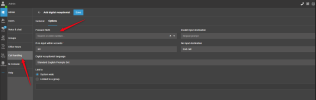
Now, any DID that is enabled for SMS in Flowroute will message the assigned user in inbound rules. For multiple SMS users, I had to create a new Digital Receptionist and set the timeout to 1 second then connect to whatever the normal route is. Then you have to log into the system using Webclient (Admin Section) click on options then selcect the forward SMS option to the queue. Make sure to route the DID to the new Digital receptions. When a user is sending an SMS and they are associated with multiple number, they now get an options to choose what number they are texting from before sending. I hope this helps and I hope there is an easier way than this:)
 

Attachments

  • ivr_sms_route.png
    ivr_sms_route.png
    177.3 KB · Views: 31
Status
Not open for further replies.

Forum statistics

Threads
112,067
Messages
590,597
Members
165,021
Latest member
haytham