SMS/MMS for AI and Welcome Message behavior

Ryan_Fisher_Techmode

Titanium Partner
Advanced Certified
Joined
Feb 6, 2020
Messages
16
Reaction score
24
Have been doing some extensive testing with the new AI agents and found a couple odd issues that I am wondering if anybody else has experienced.

1. If you send SMS/MMS to a DID associated with a Personal Assistant AI, the messages are not delievered to the person assigned. (Assistant For)
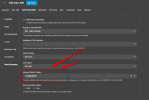
2. In the Agent Type section under Welcome Message nothing changes when you post a custom welcome Message. All you ever get is the default.

Hello! This is {{agent_name}}, Personal Assistant to {{boss_name}}. How may I assist you today?


I apologize if either of these messages were posted before. Thanks!
 
1. If you send SMS/MMS to a DID associated with a Personal Assistant AI, the messages are not delievered to the person assigned. (Assistant For)

Our testing shows the Personal Assistant answers the SMS and screens it, just like a phone call. If you get past the PA the SMS is forwarded to the assigned person, with the chat screening thread. Seems to work well, but I don't know yet what happens if we don't pass screening.
 
  • Like
Reactions: Evolute IT
Our issue is that we don't have the option to bypass the AI for SMS/MMS. Every text gets answered by AI and you don't have an option to bypass it.
 
Dear @Ryan_Fisher_Techmode and @accentlogic
Thank you guys for your feedback

For point 1: I've got some good news for you. Update 9 will contain some cool stuff for your case. You will be able to control this.
Essentially just like a BOSS instructs his/her PA how the calls should be handled, in the same way, update 9 will allow you to provide instructions to the PA to understand how the AI should handle calls.

For point 2: It should work. We depend on this feature a lot and I know for sure it works.

The Personal Assistant AI currently treats SMS/MMS exactly like voice calls and it is correct like this. The PA shields the Boss and assumes that the boss is Always busy.

Now, if the boss gets a call or SMS that needs to go to the boss directly (skipping the pa) then you need to put the Caller ID in the "Allowed Direct Callers".

But we skip the pa based on the "Caller ID" NOT based on the nature of the communication (Whether it is an SMS or not). The SMS can be a spam or a time waster.

Wait for update 9 (coming soon), go to the PA section and tell me how you find the new additions ;)

Speak later

1769948904667.png
 
Have been doing some extensive testing with the new AI agents and found a couple odd issues that I am wondering if anybody else has experienced.

1. If you send SMS/MMS to a DID associated with a Personal Assistant AI, the messages are not delievered to the person assigned. (Assistant For)
2. In the Agent Type section under Welcome Message nothing changes when you post a custom welcome Message. All you ever get is the default.

Hello! This is {{agent_name}}, Personal Assistant to {{boss_name}}. How may I assist you today?


I apologize if either of these messages were posted before. Thanks!
I wanted to add that "What counts as SPAM" doesn't seem to get written to the Agent Instructions either. I have specific definitions in that section and if I look in the agent instructions, this is what I see:

{{#spam_protection}}
## Spam Protection
- **Signals:**
- Any call that matches the configured spam conditions:
***
{{ spam_instructions }}
***
 
@Ryan_Fisher_Techmode Hi Ryan
You do not need to check if the spamprotection part is updated.
It doesnt update in the Agent instructions.
(Otherwise it would make your agent Custom)

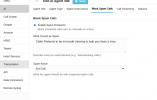
Spam prompt is separate, and you need to configure what is spam in the spam tab.
Do all your keywords there and save.

Just put everything in here
1771059739699.png
 

Forum statistics

Threads
112,025
Messages
590,367
Members
164,978
Latest member
FringeIT-Eric