- Joined
- Apr 12, 2010
- Messages
- 72
- Reaction score
- 0
I recently updated one of my Snom 320 phones to the 8.4.31 FW.
I also updated the 3CX provisioning template for Snom and created a new extension for the upgraded phone.
When I access the web config for the phone, many of the options are missing now.
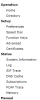
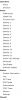
Attached are a few screen shots. The old.png file is of a phone that I have not upgraded yet. The new.png file is the phone with 8.4.31 and the new provisioning template applied to the extension.
Any idea how to get those options back?
I also updated the 3CX provisioning template for Snom and created a new extension for the upgraded phone.
When I access the web config for the phone, many of the options are missing now.
Attached are a few screen shots. The old.png file is of a phone that I have not upgraded yet. The new.png file is the phone with 8.4.31 and the new provisioning template applied to the extension.
Any idea how to get those options back?