


- Joined
- Nov 14, 2019
- Messages
- 9
- Reaction score
- 1
Good afternoon all.
We have 5 SNOM M700 units at our sister office down in London. These are running firmware version IPDECT/04.00/B0002.
We've recently been unable to (re)register new/current DECT. I have stumbled across this today - https://service.snom.com/display/wi...base+to+400B02+my+M65+cannot+register+anymore .
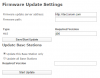
We'd like therefore to upgrade the firmware on the M700 units. However, we'd like to test this first on another M700 unit we have at our head office - this is running IPDECT/03.24/B0012. When I go to the Firmware Update section on the web interface, it looks different to the one of the other M700 units (which look like the screenshot on https://service.snom.com/display/wiki/How+to+update+M300,M700,M900+DECT+Base+Station ). I've attached what the test M700 screen looks like.
Could somebody please advise what I need to enter on this screen to update it to the same version as the other 5 M700 units, so that I can test the next update? Which I assume is going to be version 410, branch 14 as per https://service.snom.com/display/wiki/BSV410B14+(base)+HSV410B11+(handset)+-+Official+Release
Thanks in advance
We have 5 SNOM M700 units at our sister office down in London. These are running firmware version IPDECT/04.00/B0002.
We've recently been unable to (re)register new/current DECT. I have stumbled across this today - https://service.snom.com/display/wi...base+to+400B02+my+M65+cannot+register+anymore .
We'd like therefore to upgrade the firmware on the M700 units. However, we'd like to test this first on another M700 unit we have at our head office - this is running IPDECT/03.24/B0012. When I go to the Firmware Update section on the web interface, it looks different to the one of the other M700 units (which look like the screenshot on https://service.snom.com/display/wiki/How+to+update+M300,M700,M900+DECT+Base+Station ). I've attached what the test M700 screen looks like.
Could somebody please advise what I need to enter on this screen to update it to the same version as the other 5 M700 units, so that I can test the next update? Which I assume is going to be version 410, branch 14 as per https://service.snom.com/display/wiki/BSV410B14+(base)+HSV410B11+(handset)+-+Official+Release
Thanks in advance

 . Seriously though, the M700 is a multi-radio setup so it will update all base stations in the multi-cell setup. This is because for the roaming and all that goodness to work well, all base stations need to be on the same firmware. If you don't have multi-cell setup then it will only update that particular base station.


