- Joined
- Oct 4, 2023
- Messages
- 67
- Reaction score
- 18
Hi, I am new to V20 but a looooooog time 3CX user (Started using V9).
I would appreciate some advise on a particular issue.
Back in the day, 3CX would happily work with a softphone and and IP Phone "co-joined". On the softphone you switched it to CTI mode and if someone picked up a call on the IP Phone, it would trigger the CRM integration as if the call had been answered on the softphone (the functionality is used to pass the telephone number to the the in house developed application to tell it who is calling and bring up their record whilst the operator is still says "Good morning" etc).
I have installed the V20 desktop app and I have configured the IP Phone onto the same extension and in users I have even added an entry for IP Phone on the IP Phone tab..
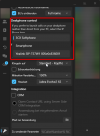
However, on the Windows App whilst I get the little headset symbol on the dial pad, if I click on it, it says 3CX softphone, but will not allow me to change it to "CTI Phone" as the previous Windows app did.
What have I missed?
I would appreciate some advise on a particular issue.
Back in the day, 3CX would happily work with a softphone and and IP Phone "co-joined". On the softphone you switched it to CTI mode and if someone picked up a call on the IP Phone, it would trigger the CRM integration as if the call had been answered on the softphone (the functionality is used to pass the telephone number to the the in house developed application to tell it who is calling and bring up their record whilst the operator is still says "Good morning" etc).
I have installed the V20 desktop app and I have configured the IP Phone onto the same extension and in users I have even added an entry for IP Phone on the IP Phone tab..
However, on the Windows App whilst I get the little headset symbol on the dial pad, if I click on it, it says 3CX softphone, but will not allow me to change it to "CTI Phone" as the previous Windows app did.
What have I missed?