Softphone and IP phone integration

Hayward-i1

SOHO User
Joined
Oct 4, 2023
Messages
67
Reaction score
18
Hi, I am new to V20 but a looooooog time 3CX user (Started using V9).

I would appreciate some advise on a particular issue.

Back in the day, 3CX would happily work with a softphone and and IP Phone "co-joined". On the softphone you switched it to CTI mode and if someone picked up a call on the IP Phone, it would trigger the CRM integration as if the call had been answered on the softphone (the functionality is used to pass the telephone number to the the in house developed application to tell it who is calling and bring up their record whilst the operator is still says "Good morning" etc).

I have installed the V20 desktop app and I have configured the IP Phone onto the same extension and in users I have even added an entry for IP Phone on the IP Phone tab..

However, on the Windows App whilst I get the little headset symbol on the dial pad, if I click on it, it says 3CX softphone, but will not allow me to change it to "CTI Phone" as the previous Windows app did.

What have I missed?
 
Hi, I am new to V20 but a looooooog time 3CX user (Started using V9).

I would appreciate some advise on a particular issue.

Back in the day, 3CX would happily work with a softphone and and IP Phone "co-joined". On the softphone you switched it to CTI mode and if someone picked up a call on the IP Phone, it would trigger the CRM integration as if the call had been answered on the softphone (the functionality is used to pass the telephone number to the the in house developed application to tell it who is calling and bring up their record whilst the operator is still says "Good morning" etc).

I have installed the V20 desktop app and I have configured the IP Phone onto the same extension and in users I have even added an entry for IP Phone on the IP Phone tab..

However, on the Windows App whilst I get the little headset symbol on the dial pad, if I click on it, it says 3CX softphone, but will not allow me to change it to "CTI Phone" as the previous Windows app did.

What have I missed?
Hi Hayward!

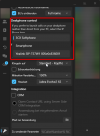
Have you checked your v20 Windows App settings yet? I'm fairly sure this could help you solve your problem ;)

1732789032400.png

The new v20 apps dialer no longer allows you to change your desired end-device or fast-switching between softphone or CTI in that sense, which is ultimately very unfortunate.
Here's to hoping it will make a return sooner or later... Many powerusers seriously appreciated it in v16/v18!
 
  • Like
Reactions: Evolute IT
Thank you, TBH, I didn't see this option so tested it.

Unfortunately this option has two draw backs as far as I can see,

1. Although you can answer the extension on the desk phone, it does not trigger the CRM integration, it just allows you to take the call on the handset, which you can do if you do not set this..

2. Perversely, you also can not pickup the phone on the 3cx Softphone client, although it rings...

The 2nd problem seems ridiculous! But No 1 is the show stopper

Guess little old me falls into the category of a power user.

Fortunately the V16 client works, I am just amazed the V20 client has taken a backwards step, but I was hoping it was just my lack of understanding how the V20 client works.
 
Thank you, TBH, I didn't see this option so tested it.

Unfortunately this option has two draw backs as far as I can see,

1. Although you can answer the extension on the desk phone, it does not trigger the CRM integration, it just allows you to take the call on the handset, which you can do if you do not set this..

2. Perversely, you also can not pickup the phone on the 3cx Softphone client, although it rings...

The 2nd problem seems ridiculous! But No 1 is the show stopper

Guess little old me falls into the category of a power user.

Fortunately the V16 client works, I am just amazed the V20 client has taken a backwards step, but I was hoping it was just my lack of understanding how the V20 client works.
The setting for the CRM is right below (look at the screenshot.) Just enable it.

The v16 softphone clearly doesn't popup your browser or anything as it does not support the server-side integration.
 
  • Like
Reactions: Gasha
The setting for the CRM is right below (look at the screenshot.) Just enable it.

The v16 softphone clearly doesn't popup your browser or anything as it does not support the server-side integration.

Yes, that is the box I use to activate the CRM (and it does exist and work in the V16 client)

However in V20 I am trying to replicate the functionality that exists in V16. Namely that when a user picks up the desk phone it triggers the CRM just like it does when they pick up on the headset.
 

Latest Posts

Forum statistics

Threads
112,283
Messages
591,696
Members
165,406
Latest member
ARKC