Softphone v20 : open contact in custom crm ?

HABELLIS

Premier Customer
Basic Certified
Joined
Aug 25, 2023
Messages
10
Reaction score
6
Hi,

I cannot find that functionality in last public version. Is there a plan where the "local" (in-client) custom CRM integration as present in desktop app and webclient would be restored?

Thanks!
 
Same, following.
 
Hi there.
Are you referring to New 3CX Windows application?
Meantime have you tired use of 3CX PWA?
 
Hi there.
Are you referring to New 3CX Windows application?
Meantime have you tired use of 3CX PWA?
Hi,

Yes I am refering to new 3CX Windows app.

PWA is absolutely unreliable about poping the url window: it works for a couple of hours on day start, then it becomes very unstable. Sometimes the url is called, sometimes not at all, and sometimes several(old) urls are opened at the same time. No problem of this kind in the (now/soon deprecated) windows desktop app.

Besides, depending of browser and push notifications using PWA is sometimes a problem: for example the notification doesn't work well when uBlock Origin is installed on Edge, even if I add exceptions for 3CX url.

Is custom crm url call planned to be integrated in the new Windows App ?

Regards,
 
Hello, currently this feature is not present. Will take note of your feedback.
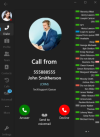
If you have server side CRM integration though, you will get a hyperlink when a call is incoming / connected as per screenshot. Manually clicking on it will open the contact page in your CRM

1718006499079.png
 
Sadly no CRM integration server-side possible for us. The software we use doesn't allow that kind of integration as it doesn't give us any API to connect to. We need a direct url to open directly the customer page from the 3CX app.

Thank you for taking note of our need.
 
Meantime have you tired use of 3CX PWA?
It isn't really successful for us. The V18 Desktop App works really well, i can't see why the "Open Contact URL using Server Side integration" can't be put into the new V20 app so that the matching CRM record can be brought up automatically.

Asking staff to click on more links is just not feasible.
 
Hi @ThomB_3CX,

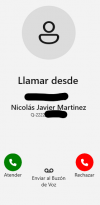
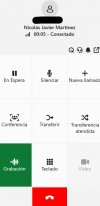
I'm trying the new v20 softphone and the CRM link does not show.

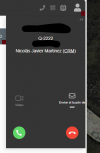
In v18 Desktop App and WebClient does show, i attach some screenshots.

incoming_webclient.png inncoming_v20softphone.png connected_v20softphone.png


It's a new versio n bug?

Regards!
 
@nicojmb2 we are aware of it and is fixed for next release
 
  • Like
Reactions: accentlogic
Hey I have the same issue as @nicojmb2 - There's been a release since then - is this fixed @ThomB_3CX ?
 
We're finalizing a build for the next Beta where this is fixed with some improvements
 
  • Like
Reactions: Evolute IT
We're finalizing a build for the next Beta where this is fixed with some improvements
Hi ThomB,

Is this no longer an option? It is available on the web client but not the Windows App.
 

Latest Posts

Forum statistics

Threads
111,939
Messages
589,843
Members
164,822
Latest member
Lengo