


- Joined
- Sep 19, 2023
- Messages
- 1
- Reaction score
- 0
Upon upgrading to v20, more than a few users from different instances could not longer access the system through their 3CX mobile app. When they would scan the QR code from their user screen or the web client, they would receive an eror message, typically 404, even though the FQDN resovled to the proper address and the system was working fine for other users. Even generating a new QR code (since they are one-time use) didn't work. So, here's what I did and it has worked for every user we've tried it on so far:
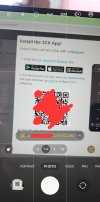
Scanned the QR Code with my phone's camera app and it gives me the option to do other things with it (the yellow text).
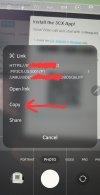
After clicking the yellow text, I'm able to copy the link instead of visit it
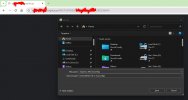
Paste that link into a web broswer and down the xxxx.3cxconfig file, then email that to the user and have them open it on their mobile device.
- Go to the user's settings page
- Generate a new QR code
- Scan the QR code with any phone that is capable of allowing you to copy the URL instead of immediately following the link
- Send the link however you can to yourself or someone else so it can be opened on a desktop computer (email, mobile/dekstop sync, text, etc...)
- Visit the link with a web browser and download the .3cxconfig file
- Email the .3cx config file to whomever is having trouble provisioning their app and have them open the email on their mobile device
- Send or share the attachment with the 3CX app and it should provision like it used to
Scanned the QR Code with my phone's camera app and it gives me the option to do other things with it (the yellow text).
After clicking the yellow text, I'm able to copy the link instead of visit it
Paste that link into a web broswer and down the xxxx.3cxconfig file, then email that to the user and have them open it on their mobile device.


