Some new phones not registering

ash720

Customer
Joined
Jan 2, 2020
Messages
25
Reaction score
0
I have a newly installed on-premise V20 system.

I added an old Yealink T53W for each user as an SBC router phone, to be taken home and used when working from home. I bought new Yealink T85Ws for each user to have as an office phone. One of these registered fine, the others did not. For the phones/users not registering I read a thread on here that suggested that having two different phones per user, provisioning would not work out of the box, so I tried to manually configure. Still no joy.

Firmware updated so the same on the phone that does register and those that don't.

Any other things I should try?
 
Firstly, users can have as many phones as they like - it affects nothing.

You first need to ensure the Yealink phones are at the correct firmware version https://www.3cx.com/docs/phone-firmwares/

The follow the instructions to set up the phone as a router phone. https://www.3cx.com/sip-phones/yealink-t5-series/

check the activity logs on your 3CX.

though, the main cause can simply be the firmware is not at the correct version that enables the SBC function to be able to use it as a router phone.

Check your IP blacklist and that your 3CX passes the firewall test.
 
  • Like
Reactions: KyriacosS_3CX
Hello,

Just to be 100% the two SBC phones registered fine. Then from the T85s, only one did.
Correct?

If you switch the two T85s and add them to the other user, is the same one not registering (full factory reset before the switch)?
Are they getting the RPS info, IP addresses etc normally?
 
Hello ash720,

Are you using the phones on the WIFI, as the model T85W does support WIFI.
If yes, you could (ask) try to use the IP phone on the Ethernet port as a test, this does not have to be permanent but does eliminate the WIFI connection being a problem in this connection.

Paulo
 
Whilst trying to fathom out what the problem was, I attempted to delete all phones for a user and try to install new Yealink T85W as an SBC router phone. This has now worked, as a temporary workaround. However, the user needs the home phone to work as a router phone and only one phone for each user can be an SBC, so I need the office phones to connect locally.
 
Wired and running from POE at the moment (in all cases).

I'll try adding the currently unregistered phone to the user that worked and see what happens.
 
So I attempted to add a second T85W to the user which has successfully got both the T53W and a T85W registered and it is showing as register failed. It has current firmware.

Firewall test passed except we have only opened the first 14 9000+ ports as will only have 4 simultaneous calls.

Nothing in the IP blacklist.

Event log says that provisioning file was generated successfully. Not sure where I might find detail on failed registering.
 
Are you running latest firmware? 96.87.0.22 (53) 185.87.0.37(85)
 
Yes, latest firmware for all phones.
 
Hello ash720,

Just as a general remark, this will not fix your problem with the phones.

An Router Phone will be setup as a SBC, meaning it will use the Tunnel port (default port 5090).
This tunnel port is used on TCP for signalling and on UDP for the data (voice).

So the Router Phone will first setup the Tunnel and on that tunnel it will than send the SIP register for his own account and for other SIP phones using it as an SBC from the local lan.

Whith this information, I do not think you have a SIP registration problem, but it will be a Tunnel port problem.
Meaning it would be good to check the port 5090 on TCP and UDP

Paulo
 
Firewall test passed except we have only opened the first 14 9000+ ports as will only have 4 simultaneous calls.
Anyway, this isnt a good idea. The ports are random and not the first 14.
 
Following on the comment from @bitn2 ...

If you want to limit the range of RTP ports, you will need to work with the custom parameters FIRSTEXTPORT and LASTEXTPORT. You cannot just unilaterally decide which ports you want to use and hope that 3CX can telepathically guess this ;)
 
  • Haha
Reactions: paulodagraca
Hello ash720,

You can check if the Tunnel port is connected on the 3CX.
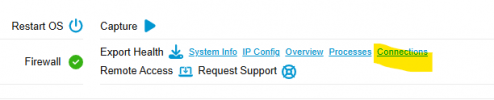
Go to to the 3CX Admin Dashboard and klik the 'Connections'.
1771418574715.png

There try to find the connection on port 5090 (if not changed from default).

1771418609892.png

It should be 'ESTABLISHED'.
(in my example you can see that there can also be multiple Tunnel connections (SBC/Routerphone) from same IP adress.

Paulo
 
FIRSTEXTPORT and LASTEXTPORT updated to reflect the ports opened through our firewall.

Looked at the connections and found the following:
1771421831118.png
IP address in the first column is the 3CX server in both cases. In the second column, one IP address is our firewall, the other is unknown external IP, possibly our SIP trunk provider.
 
Following on the comment from @bitn2 ...

If you want to limit the range of RTP ports, you will need to work with the custom parameters FIRSTEXTPORT and LASTEXTPORT.
Tbf it might be good to add that tidbit to the firewall guide: https://www.3cx.com/docs/manual/fir...xt=data, so the-,number of ports,-you need to. And maybe add it’s not recommended.

@ash720 After you tried to manually configure did you factory reset the phone? Not sure I saw that above.

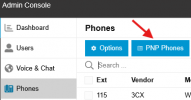
Phones behind an SBC/router phone should automatically show up in 3CX…there is a PnP button to list them (I’m not near a PC at the moment to check current naming).
 
Hello ash720,

Sorry, getting confussed in the configuration.
So basically you have the 2 Router Phones working fine, type T53W.

And the other 2 phones (T85W) are connected in the office, but is the 3CX server local, or in the cloud and the phones are also bound to an SBC in the office?

Or just got it all wrong xD

Paulo
 
3cx server is local.
T53W phones were connected as router phones and work fine for all users.
T85W phones I have attempted to connect locally direct to server in the office, but this only worked successfully for one phone+user combination.

Something I noticed (that may not be relevant). The working phone+user combination has two additional data fields showing when I check details via Users/IP Phone which are firmware and web consule url.
 
@SteveITS Yes, factory reset after each attempt.
 
OK so just to be clear phones on the same network as the 3CX server don't need an SBC or to be a router phone. They (or ones behind an SBC/router) should automatically appear under:
1771427609213.png'
Or can get added as "Local LAN/VPN" which uses RPS.
 
Hello ash720,

So basically it all about getting the Yealink T85W phones working locally on the LAN by means of provisioning.
-= should not be so hard =- :)

As @SteveITS does menition, check the PNP phones.

Paulo
 

Latest Posts

Forum statistics

Threads
112,283
Messages
591,697
Members
165,406
Latest member
ARKC