Some users are missing from the login option

Status
Not open for further replies.

nicojmb2

Silver Partner
Advanced Certified
Joined
Feb 2, 2023
Messages
81
Reaction score
19
Hi,

I've Microsoft 365 users Sign In enable for some users.

Today I was going to add a new one and it does not appear in the search dialog....

How i can force a SYNC or somethig to retrieve all users?
 
Regarding your question, to clarify then, if you press the add users button under the user sync section of the M365 integration option under the management console, you do not see some users. Is this correct?
 
Regarding your question, to clarify then, if you press the add users button under the user sync section of the M365 integration option under the management console, you do not see some users. Is this correct?
Exaclty, i've users in AzureAD that not show in 3cx SignIn serach modal
 
Check the users under the azure portal and ensure that the are set to user-type: Member and not as guest.
 
Check the users under the azure portal and ensure that the are set to user-type: Member and not as guest.
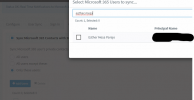
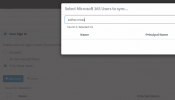
The funny thing is that if I go to the "Contact Sync" tab, the user appears, but not in the "Sign In" tab:

1692734897041.png

1692734950489.png

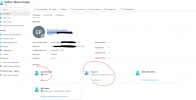
The user is member.

1692735239700.png

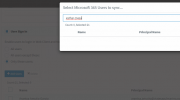
In tabs: "User Sync" and Sign In" the users (are various) not appears

But this users in Tabs "Contact Sync" and "Calendar Sync" yes..


I understand that it has to be some attribute or filter that users don't have, but I don't know which one :(


Please help.
 

Attachments

  • 1692734928799.png
    1692734928799.png
    36.9 KB · Views: 2
Last edited:
Someboy can helpme here, 3cx support tells me they can't help me if I don't upgrade to u8 (i've u7).

In our company it does not let us update to the latest version until a considerable time has passed.

Doesn't seem like an up-to-date requirement to resolve an incident involving a license-paying customer who has a problem..

In addition, it seems easy to solve/investigation, I have asked support to givme the "request" that is executed to the Microsoft API to search for users in SingIn so I would test with POSTMAN and see why not all users are received since in the CalendarSync call if it gets them.

@Nick Galea FYI
 
Kindly note that U7 build 312 is unable to activate and must be updated to the latest version for us to continue troubleshooting. Once on the latest version, reconfigure the 365 integration with the new method available in U8 to rule out any misconfiguration. Once on U8 build 917, kindly reply to the ticket so we may further assist.
 
Hello, comment that it is already solved, the problem is that the user did not have "Name" or "Last Name" filled, only the Display Name was filled in in the AzureAD.

For that reason, 3CX was not getting the users.

Anyway, that's what I asked support, to tell me the requirements for the "request" to the Microsoft API and they haven't passed it to me, I don't think it's necessary to update to give that information.

Thanks to another thread in this forum he told me.

Regards!
 
Last edited:
  • Like
Reactions: Evolute IT
Status
Not open for further replies.

Forum statistics

Threads
111,973
Messages
590,070
Members
164,891
Latest member
esmo