Unsupported spa3000 configuration with 3cx

Status
Not open for further replies.

ltek0

New User
Joined
Jun 15, 2022
Messages
3
Reaction score
0
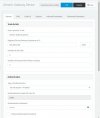
I have been scratching my head for the past few days trying to figure this out, I have read lots of posts but still no luck. I have configured it once before and it worked, however I accidentally poe injected the thing and it died, I don't have the config it had to put on the new one that arrived. And this one no matter how much parameters I change nothing seams to work. The registration state stays either failed or not registered. Someone please help me get out of the hell

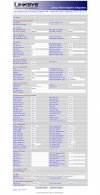
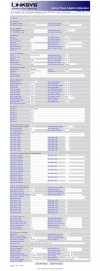
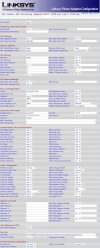
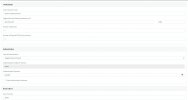
Here are the current status and configs
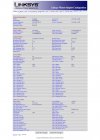
spa3k info.jpeg
spa3k line1.jpegspa3k ptsn.jpeg

Strange things is when I call the PTSN Number it shows this
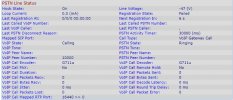
spa3k calling.jpeg

And I have also tried both combination of config in 3cx none of them worked
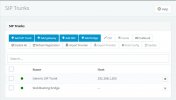

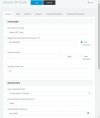
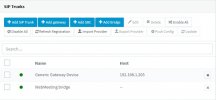
3cx trunks trunk.jpeg3cx trunks trunk0.5.jpeg3cx trunks.jpeg
3cx trunks gateway0.5.jpeg

And the image stayed the same for both
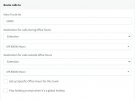
3cx trunks trunk1jpeg.jpeg


Any help is appreciated, it's 6am already I really need to go to bed. please help
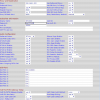
 
You will probably also want PSTN caller ID for VoIP caller ID set to yes. And PSTN answer delay set to 3, if in North America.

What is the 3CX Activity Log showing for a registration attempt?

You won't get 2 simultaneous calls, only one.

Your trunk number is not consistent throughout, I see 10000 and 10001 being used in various places.
 
something like this?pstn.PNG
I also don't know if I should set it up as s sip trunk or gateway in 3cx, what I've seen on forums is a mix of both. outgoing calls are optional or nice to have, I only need to be able to receive calls.

As for the use auth ID, I don't really know what it does, but I remember last time it got registered, but can make or answer any calls are without the use auth ID option enabled

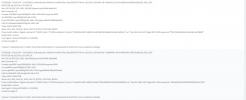
And this nice little message appeared today. and I don't have any logs from yesterday since 3cx purges log every 24 hours.
3cx block.PNG
I have generated some logs and here are they
3cx l9ogs.PNG
doesn't matter what I change still shows the same when it tries to register

Nothing'smaking sense and my brain hurts.
 
Last edited:
It should be setup as a gateway. the password is that provided by 3CX, when you create the trunk. (you can set your own as long as both match) The User ID will be the trunk number in 3CX, if that is 10000.

Have a look at the attachment that I attached in this thread. (it is not the best resolution, but any higher made it too big to attach)

https://www.3cx.com/community/threads/spa3102-setup.73731/

It is the original 3CX web page on provisioning the SPA3102. Most settings on the 3000 will be the same.

If you do a search of the forum, you will find a number of articles on getting a 3000 or 3102 working.

You might want to whitelist the IP for the gateway, or even all IPs on your local LAN.
 
ok I got it working finally, I can't believe how stupidly easy it was, now I feel dumb
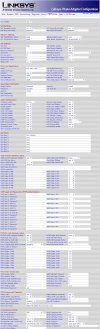
and here is the final config
final config line1.jpegfinal config pstn.jpeg
3cx gateway.jpeg
Thanks a lot.

However, I still can't figure out outbound calling.
It shows this in the log
call logs.PNG
I kind of understand it but I also don't, and now I'm at a loss again.
Probably some stupid thing I missed.

Also can get the caller id to show up on the phone instead of the user id when some dial in from the PSTN line.

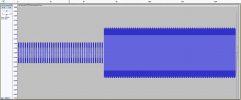
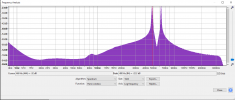
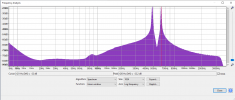
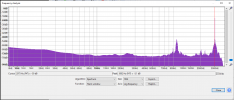
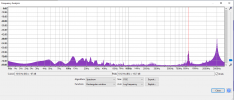
And yes I'm in Hong Kong. The end call tone is weird. Here is what got recorded in audacity. The spectrum looks weird.
The first half "Beep Beep Beep" is a mic of 480 peak and 620 peak.
Here is the full track from the moment the other side ends the call to the ISP cutting the line
tone full.PNG
The first half "Beep Beep Beep", I'm pretty sure is the tone to tell the user the call hand ended, is a mic of 480 peak and 620 peak.
tone first half.PNGtone first half2.PNG
And the second half is this, a very loud 3k mixed with a bit of 1.012k?, is to notify the user to put the phone down.
tone second half.PNG
tone second half2.PNG
I'm pretty sure there are some weird artifacts from all the compression but, it's still weird. I can wait for the forever silent at the end but that would waste a lot of time and during that time someone could call and it would generate a line busy message, which is not good.
I can use the call flow app to look for this tone but, I don't really think it's possible.
I looked around, and it looks like no one is doing something like this in HK since it would make more sense to just get a sip trunk, based on how cheap it is, and probably no one other than businesses are doing something like this. Which by then I wouldn't be asking anything here
 

Attachments

Last edited:
You should not be using the same settings for Line 1. Unless you plan on having an extension also working on the 3102, disable line 1. If you do wish to use it, hen you would take the configuration from an extension you create in 3CX and use those credentials.
The 3102 can be "split" into two devices, a gateway for a PSTN line, and an extension. They can also work in conjunction, but you don't want to do that when using it with 3CX.

However, I still can't figure out outbound calling.
It shows this in the log
call logs.PNG

I kind of understand it but I also don't, and now I'm at a loss again.


This is happening because you have told the 3CX trunk (in the trunk settings you specify the IP and port of the device,) to send outbound calls to port 5060, which is Line 1 on the 3102, You want then to route to port 5061, the gateway (PSTN) part.

Also can get the caller id to show up on the phone instead of the user id when some dial in from the PSTN line.
You will have to find out what type of caller ID is being used (British?), and set the caller Id options accordingly

You will also have to specify the disconnect tome that the 3102 is to listen for. Others probably have this posted if you do a Google search. The 3102 is capable of understanding that the far end had dropped the call, in 3 ways...a tone, silence, and CPC, which is a short current disconnect, if send by your provider. Not all providers do the last option.

See if any of this helps...

https://www.ofca.gov.hk/filemanager/ofca/en/content_404/hkta2201.pdf

This shows the caller Id type is Bellcore

https://en.wikipedia.org/wiki/Caller_ID

So you must change the PSTN Answer Delay to at least 3 seconds, or the caller ID information will arrive after the call has already been sent to 3CX. It comes between the first and second ring. You must also change PSTN CID for VoIP CID to YES.
 
Last edited:
Status
Not open for further replies.