


- Joined
- May 26, 2023
- Messages
- 41
- Reaction score
- 3
Hello everyone,
I want to use Speech to Text in 3CX Call Flow Designer. I'm already using VOSK with a Python script, which works with manual upload through an HTML form with a WAV file. However, unfortunately, the Call Flow Designer is unable to upload the WAV file. The call flow should only continue when certain words like "Hello" are recognized. Google Cloud and Amazon Polly are not options for me; I prefer not to use these services as I want to use my own TTS system with VOSK. Does anyone have an idea of how I can implement this in the Call Flow Designer?
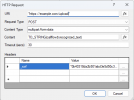
I have already added the HTTP Request component, but I believe the content type in the code line is incorrect. I am also unsure if I need to add anything in the header of the HTTP Request component.
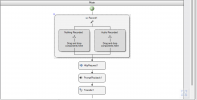
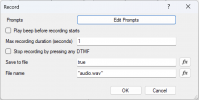
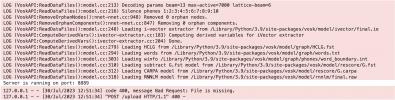
I would be happy to attach some screenshots of the current content of the call flows.
VOSK Script:
import http.server
import socketserver
import os
import vosk
import wave
import json
import cgi
# Load the Vosk model.
model = vosk.Model("/Library/Python/3.9/site-packages/vosk/model")
class CustomRequestHandler(http.server.SimpleHTTPRequestHandler):
def do_GET(self):
# Serve files and folders for GET requests.
super().do_GET()
def do_POST(self):
# Process the POST request and the uploaded file.
if self.path == '/upload':
form = cgi.FieldStorage(fp=self.rfile, headers=self.headers, environ={'REQUEST_METHOD':'POST'})
if 'wav_file' in form:
fileitem = form['wav_file']
if fileitem.filename:
# Get the filename of the uploaded file.
filename = fileitem.filename
# You can either save the uploaded WAV file in the current directory or specify the desired path.
audio_file = "/Applications/TTS/" + filename
with open(audio_file, 'wb') as f:
f.write(fileitem.file.read())
# Load the WAV file.
wf = wave.open(audio_file, "rb")
data = wf.readframes(wf.getnframes())
# Initialize the Vosk decoder.
vosk_recognizer = vosk.KaldiRecognizer(model, wf.getframerate())
# Perform the speech recognition.
vosk_recognizer.AcceptWaveform(data)
result = json.loads(vosk_recognizer.FinalResult())
# Extract the recognized text from the result.
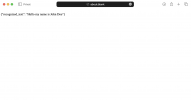
recognized_text = result["text"]
# Return the recognized text.
self.send_response(200)
self.send_header('Content-type', 'text/plain')
self.end_headers()
self.wfile.write(recognized_text.encode())
else:
self.send_error(400, "Bad Request: Upload of the file failed.")
else:
self.send_error(400, "Bad Request: File is missing.")
else:
self.send_error(404, "Not Found: Endpoint not found.")
# Port and server for the HTTP endpoint.
port = 8889
with socketserver.TCPServer(("", port), CustomRequestHandler) as httpd:
print("Server is running on port:", port)
httpd.serve_forever()
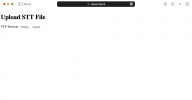
HTML that works:
<!DOCTYPE html>
<html>
<head>
<title>Upload STT File</title>
</head>
<body>
<h1>Upload STT File</h1>
<form action="https://example.com/upload" method="POST" enctype="multipart/form-data">
<!-- CSRF Token goes here -->
<input type="hidden" name="_xsrf" value="0b40318da2b501abd3e5d50c37c8268e0db6d92d0381fc5c872328459dab1fc6">
<label for="wav_file" id="fileLabel">Choose File</label>
<input type="file" name="wav_file" id="wav_file">
<button type="button">Browse</button>
<input type="submit" value="Upload">
</form>
</body>
</html>
I want to use Speech to Text in 3CX Call Flow Designer. I'm already using VOSK with a Python script, which works with manual upload through an HTML form with a WAV file. However, unfortunately, the Call Flow Designer is unable to upload the WAV file. The call flow should only continue when certain words like "Hello" are recognized. Google Cloud and Amazon Polly are not options for me; I prefer not to use these services as I want to use my own TTS system with VOSK. Does anyone have an idea of how I can implement this in the Call Flow Designer?
I have already added the HTTP Request component, but I believe the content type in the code line is incorrect. I am also unsure if I need to add anything in the header of the HTTP Request component.
I would be happy to attach some screenshots of the current content of the call flows.
VOSK Script:
import http.server
import socketserver
import os
import vosk
import wave
import json
import cgi
# Load the Vosk model.
model = vosk.Model("/Library/Python/3.9/site-packages/vosk/model")
class CustomRequestHandler(http.server.SimpleHTTPRequestHandler):
def do_GET(self):
# Serve files and folders for GET requests.
super().do_GET()
def do_POST(self):
# Process the POST request and the uploaded file.
if self.path == '/upload':
form = cgi.FieldStorage(fp=self.rfile, headers=self.headers, environ={'REQUEST_METHOD':'POST'})
if 'wav_file' in form:
fileitem = form['wav_file']
if fileitem.filename:
# Get the filename of the uploaded file.
filename = fileitem.filename
# You can either save the uploaded WAV file in the current directory or specify the desired path.
audio_file = "/Applications/TTS/" + filename
with open(audio_file, 'wb') as f:
f.write(fileitem.file.read())
# Load the WAV file.
wf = wave.open(audio_file, "rb")
data = wf.readframes(wf.getnframes())
# Initialize the Vosk decoder.
vosk_recognizer = vosk.KaldiRecognizer(model, wf.getframerate())
# Perform the speech recognition.
vosk_recognizer.AcceptWaveform(data)
result = json.loads(vosk_recognizer.FinalResult())
# Extract the recognized text from the result.
recognized_text = result["text"]
# Return the recognized text.
self.send_response(200)
self.send_header('Content-type', 'text/plain')
self.end_headers()
self.wfile.write(recognized_text.encode())
else:
self.send_error(400, "Bad Request: Upload of the file failed.")
else:
self.send_error(400, "Bad Request: File is missing.")
else:
self.send_error(404, "Not Found: Endpoint not found.")
# Port and server for the HTTP endpoint.
port = 8889
with socketserver.TCPServer(("", port), CustomRequestHandler) as httpd:
print("Server is running on port:", port)
httpd.serve_forever()
HTML that works:
<!DOCTYPE html>
<html>
<head>
<title>Upload STT File</title>
</head>
<body>
<h1>Upload STT File</h1>
<form action="https://example.com/upload" method="POST" enctype="multipart/form-data">
<!-- CSRF Token goes here -->
<input type="hidden" name="_xsrf" value="0b40318da2b501abd3e5d50c37c8268e0db6d92d0381fc5c872328459dab1fc6">
<label for="wav_file" id="fileLabel">Choose File</label>
<input type="file" name="wav_file" id="wav_file">
<button type="button">Browse</button>
<input type="submit" value="Upload">
</form>
</body>
</html>
Attachments
Last edited:


