SSO Only with M365 on v20

gravasio

Premier Customer
Joined
Apr 29, 2020
Messages
20
Reaction score
7
Hello everyone,
As of now, we are operating on version 18 and have activated Microsoft 365 (M365) synchronization solely for the purpose of enabling Single Sign-On (SSO).

Recently, we attempted to upgrade to version 20. However, we encountered an issue where the ability to log in with Microsoft disappeared. It appears that in order to reactivate this feature, it’s necessary to also enable user synchronization and automatic extension creation; this erroneously created hundreds of inactive extensions and forced us to rollback to v18.

Can anyone confirm if this is correct? Has simple SSO support been discontinued? Are there any plans to restore this functionality?

Thanks
Giuseppe
 
  • Like
Reactions: EscondidoAdmin
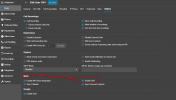
After the upgrade, have you checked if the M365 option for SSO is enabled?
1715578947662.png
 
Yes it was enabled.
The problem seems to be in the page Users->M365 (I cannot provide a screenshot because i needed to rollback) which doesn't allow anymore to enable SSO without enabling user sync.
 
Yes the user has to be synced for the MS365 SSO
 
  • Like
Reactions: GregG_3CX
That was true even before, but it seems that in v20 one cannot disable 3cx extension autocreation on M365 sync.
This is the change that's bothering us.
There is a way to disable user autocreation?
 
@TheodorosG_3CX, can you confirm that there is no way to maintain the old behavior and that there are no plans to restore this functionality?
 
+1 for allowing 365 syncing without auto extension creation.
 
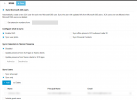
I think we can actually achieve that....
Just select sync users -> Sync only and choose just one user.
I just configured it, we'll see tomorrow if I have thousands of accounts to delete!

3cx_sso.PNG
Just configured
 
I think we can actually achieve that....
Just select sync users -> Sync only and choose just one user.
I just configured it, we'll see tomorrow if I have thousands of accounts to delete!

View attachment 42998
Just configured
hi, we are also having the same issue with the M365 SSO.
Can you confirm this settings was the trick to have the same SSO behavior as in V18?

thank you!
 
  • Like
Reactions: Gasha
hi, we are also having the same issue with the M365 SSO.
Can you confirm this settings was the trick to have the same SSO behavior as in V18?

thank you!
Would like to know this too.

Because importing a billion (exaggerating, but you know how people maintain theri ADs) MS365 users into a fully working system and then sifting through and removing all the rubbish is not optimal.
 
  • Like
Reactions: MayurPatel
+1 for allowing 365 syncing without auto extension creation.
 
+1 for allowing 365 syncing without auto extension creation.

It would also be good to be able to choose what details are synced through. We updated all our mobile numbers in AD to display nicely (+64 21 xxx xxx instead of +6421xxxxxx) for one of our customers templated email signatures which pulled through to 3CX and broke call forwarding to anyone that had their calls forwarded to mobiles because 3CX apparently can't handle stripping out spaces automatically.
 
  • Like
Reactions: telecoms1
Good day 3CX Team,
Could you clarify this questions

First question, in case if I have configured Local users, can I assign them with their MS365 account without deletion or recreate account in 3CX ?
Second Question , can I restrict to use Local credentials to those users after SSO is turned on ?
 
I think we can actually achieve that....
Just select sync users -> Sync only and choose just one user.
I just configured it, we'll see tomorrow if I have thousands of accounts to delete!

View attachment 42998
Just configured
Just curious, did this work? Facing the same issue and I don't want a few thousand new extensions tomorrow!

Many thanks
 
One thing to note is that if you sync the users using the +(Add) button. It will increase the extension numbering incrementally. If some users leave and you remove them it will not utilize the empty extension number. The solution is to disable the M365 sync and reenable it. It will then start from the first extension and fill up any unused extensions before adding new ones.
 
This needs to be changed. The extension has 'Enable SSO' already in the options menu.

There should be 3 options available:

1) 'Sync Microsoft 365 Users' as a standalone check box - when enabled should only look at the email address configured in the extension and sync based on that if the extension also has 'enable SSO' checked. For extensions that share an email address we can then add to the exclude addresses list. This allows us to enable the 'sync all except' option without fear of multiple new extension being created when new users are added to AD\Entra ID. If the user doesn't exist in Entra ID then the green tick does not appear and sync for that extension does not occur. This option should not auto create anything

2) Same as option 1 however there should be the option to auto create an extension to the next available extension number

3) Same as option 2 with the option to set the starting extension sequence.

Administrations need more granular control, not less. We need to have the option to determine what extension a new user is issued without first having to create the user to ensure the correct extension range is used, then add the new user to the list of users to sync. This has added more administration overhead.

We have multiple sites with assigned extension ranges already.
 
+1 for this, we give our extensions names relevant to site and role as opposed to the user and the new sync behaviour is overwriting this to make it confusing for our users.
Please bring back the old SSO functionality
 
Did anyone managed to solve this issue? This BUG is keeping me on v18
 
We are having the same issue. Is this going to be addressed in a future release?
 
This is still a critical issue for us. We use a hybrid Entra / AD config with the local AD being the primary source.

In v18u8, we could enable SSO without having the MS365 sync create users in 3CX. This was perfect since our admins need to decide what number to assign out of a pool of numbers. We use different ranges of numbers for different purposes, there is no single number range that is used only for extensions.

In v20u3, which we upgraded to in late 2024, we find that now in order to be able to use SSO we need to also have the option enabled to have users created in the 3CX if they don't already exist. We have about 1,000 actual 3CX users that have phones and about 500 more employees that don't have and don't need a phone. Plus, this latter group has a high turnover rate so there's constantly new users every day.

Why does this matter?
1) Requiring the option to sync users and automatically create them in 3CX if they don't exist creates a lot of unwanted 3CX users. It's time consuming to try to delete these 3CX users to keep the user list clean. We're often not able to put a user in an OU that can be excluded from the sync.
2) In our organization, different teams create the user's domain account than the team that creates the 3CX users. The domain account is usually created first, which means if the sync runs before the 3CX user is manually created, a user with a phone number in the wrong dialplan range gets created. Before the 3CX user can be created with the correct values, we need to delete the 3CX user that was automatically created when the sync ran.

Please advise on when the option to enable SSO can be enabled independently from requiring the option that automatically creates the 3CX user when the sync runs be enabled.
 
  • Like
Reactions: MayurPatel