Starting with 3CX, could use some tips & tricks

jeroentje

Customer
Joined
Mar 3, 2025
Messages
23
Reaction score
9
Hello all,

Nice to meet you all, I just started with 3CX to see if I can switch from FreePBX to 3CX. It doesn't go very well so far :) but I'm sure that's on me!
First I tried to set up the free SMB but the limitations (I have over 25 phones connected and I use trunks who are not supported in this version) of this free version won't work for me.
Then I tried to set up a hosted version on Google. It worked, I could connect a sip trunk and was able to send en receive calls on the softphones. I didn't try IP phones.

It isn't clear to me what Google is going to charge me for this And besides that, I'm not sure if I want to trust Google with this.
So I did an install on a virtual server. Again, I managed to connect a sip trunk but I'm only able to receive calls, I can't make them. Bigger issue is that I can't connect IP phones. Now, I found some info about the need to use a SBC. Unfortunately my phones don't have that function.
The phones are used in separate locations. Mainly at a community center, a few at home and I gave some elderly people in my street phones so they have a cheap phone connection.

Love to read your thoughts and tips. It is very different from FreePBX but I do like to learn and explore!
 
Again, I managed to connect a sip trunk but I'm only able to receive calls, I can't make them.
Maybe there are just some suitable outbound rules missing. The activity log shows this.

Bigger issue is that I can't connect IP phones. Now, I found some info about the need to use a SBC. Unfortunately my phones don't have that function.
The phones are used in separate locations. Mainly at a community center, a few at home and I gave some elderly people in my street phones so they have a cheap phone connection.

Love to read your thoughts and tips. It is very different from FreePBX but I do like to learn and explore!
Remote IP phones should not be connected to a 3CX via Direct SIP (or STUN) - even if you can deactivate the Block remote non-tunnel connections option per user ;)
Either use router phones or one SBC per remote location.
 
Last edited:
Hello @jeroentje

In addition to what @fxbastler mentioned, you can find the information for dedicated 3CX SBC here.
Make sure to check also the Hardware specifications for the SBC.
You can find all the available supported IP phones and Router phones in our guide Supported IP Phones

As an alternative for remote users is the Web Client / PWA and the 3CX Mobile App. No need for SBC or IP phone devices.
 
Thank you both for your quick response and useful information.
Why does IP phones need a SBC and the mobile app don't? What is the difference between 3CX and FreePBX where you can directly connect IP phones to the PBX?
Don't get me wrong, I'm not saying FreePBX is better (not at all), just try to learn and understand what makes it different.

The mobile app could be a solution for my elderly neighbours. I'm gonna dive in to the world of SBC's ;-)
 
Why does IP phones need a SBC and the mobile app don't?
IP phones communicate via SIP and RTP like RFC 3261, usually unencrypted.
3CX SBC and the mobile apps use different technologies and communicate fully encrypted with the pbx.

What is the difference between 3CX and FreePBX where you can directly connect IP phones to the PBX?
These are functional and security reasons (a long list), hence 3CX SBC or router phones.
 
Small update and a new question:
did a re-install because i prefer 3-digit phone numbers.
Fixed the outbound calling.
Got a Raspberry Pi, going to to make a SBC today
Thinking about getting a 4 or 8 SC Enterprise licence

I talked with one af my elderly neighbours about switching to softphone. He doesn't like that because he don't want to take landline calls when he is not at home. Is there a way to receive only calls when connected to his home wifi?
 
Small update and a new question:
did a re-install because i prefer 3-digit phone numbers.
Fixed the outbound calling.
Got a Raspberry Pi, going to to make a SBC today
Thinking about getting a 4 or 8 SC Enterprise licence

I talked with one af my elderly neighbours about switching to softphone. He doesn't like that because he don't want to take landline calls when he is not at home. Is there a way to receive only calls when connected to his home wifi?
If you need a partner for your license, feel free to DM us! We don't force any other services on you.

As for calls, not exactly but you can show them how to use the DND mode. 3CX works all the time on the mobile app, and unless manually disconnected, it stays logged in and will receive calls.

Could they use simple deskphones instead? Those are physical so if they're not home, the phones will ring and no one will answer.
 
  • Like
Reactions: jeroentje
Just need to DND app or remove push or make silent ring or set working hours related to when is at home only
 
  • Like
Reactions: Evolute IT
If you need a partner for your license, feel free to DM us! We don't force any other services on you.
I can't find the option to DM. Maybe i'm not allowed yet? You can send me a DM if possible...
 
Could they use simple deskphones instead? Those are physical so if they're not home, the phones will ring and no one will answer.
That's the thing, not without SBC phones.
 
Next challenge :cool:
I have a SBC up and running. I still can't connect a IP phone. The phone shows on "Phones --> PNP Phones and it shows its via SBC. But when I add it to a user, nothing happens.
When I log in to the web UI of the phone, there is no data on the accounts tab. Why is it not provided by my 3CX? I must do something wrong I guess.
 
May be firmware on the phone is not the expected by 3CX, are the phones up to date?
Which brand and model do you try to provision?
 
May be firmware on the phone is not the expected by 3CX, are the phones up to date?
Which brand and model do you try to provision?
I have Yealink phones and tried T41P and T46G. I'm trying to update the T46G now. Let's see.
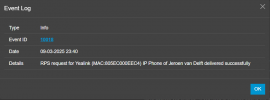
I do have a warning in the event log 30018 RPS request for Yealink (MAC:80**********) IP Phone of Jeroen van Delft NOT delivered. You will need to configure the phone manually by copying and pasting the provisioning link
 
update:
it says RPS request for Yealink (MAC:80**********) IP Phone of Jeroen van Delft delivered successfully

But that's all. Still nothing on the phone

Screenshot_3.png


Screenshot_4.png

Screenshot_5.png
 
Last edited:
I did a lot of rebooting on both phones. No effect. I updated the firmware, that didn't had any effect, to. I'm lost at the moment :)
 
Phones after 3CX firmware update have been factory reset too ?
these phones were they used in STUN somewhere else before you try to use on 3CX ?

in last case if you paste the provisioning link into phone GUI does it connect?
 
I think it's not the phones. Tried on 3 different phones, Tried to manually paste the provisioning link in the GUI, tried to set up the account manually in the GUI, nothing works.
But what then?
Can it have something to do with my setup?
3CX on a VPS, SBC on raspberry. No special settings on my home network. No VLAN's or anything.
btw, did I already tell you all I appreciate the help?
 
  • Like
Reactions: Evolute IT
I think it's not the phones. Tried on 3 different phones, Tried to manually paste the provisioning link in the GUI, tried to set up the account manually in the GUI, nothing works.
But what then?
Can it have something to do with my setup?
3CX on a VPS, SBC on raspberry. No special settings on my home network. No VLAN's or anything.
btw, did I already tell you all I appreciate the help?
Your setup is pretty standard, but by curiosity, what kind of firewall/router are you using?
 

Latest Posts

Forum statistics

Threads
111,964
Messages
590,001
Members
164,869
Latest member
hpgitsupport