Solved Startup Pro Phone Provisioning X4U-V2

Status
Not open for further replies.

Scott EIT

Bronze Partner
Basic Certified
Joined
Jan 29, 2019
Messages
209
Reaction score
18
Hi,

First time setting up a new client using Startup Pro. Followed the guides on adding users and SIP trunks etc which seems to be okay. Problem I'm having is provisioning phones. Trying to add a Fanvil X4U v2 initially before I add the others but phone doesn't appear to be provisioning. Phone showing as offline with the red square beside the user and also showing red in Voice and Chat as the SBC. Followed the guide https://www.3cx.com/sip-phones/fanvil-x3-x5/, updated firmware etc. but not having any success.

Anyone have any ideas where I'm going wrong?
 
Hi @Scott EIT

The only things you need to make sure off is that the phone is upgraded to the correct firmware and that its first configured as a router phone (SBC) before configuring it for a user.
My advice would be to factory reset the phone and try the steps again. Also try to login to the webclient from the same public IP as the phone in case you got blacklisted for some reason.
 
Hi @Scott EIT

The only things you need to make sure off is that the phone is upgraded to the correct firmware and that its first configured as a router phone (SBC) before configuring it for a user.
My advice would be to factory reset the phone and try the steps again. Also try to login to the webclient from the same public IP as the phone in case you got blacklisted for some reason.

Thanks for the reply Yiannis. Phone is certainly on the correct firmware. What do you mean by first configure as a router phone before configuring it for a user? Following the guide the steps are to add the IP phone through a user.
 
  1. Select the “User” for which you want to add a phone and go to the “IP Phone” tab.
  2. Click “Configure a phone”.

At that point I set it up as a router phone yes? Or is there another way to configure as a router phone (SBC)?
 
Hi Scott,


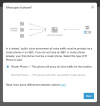
When adding the phone, do you remember reaching this screen and specifically selecting Router Phone?

1681382252416.png


Just to confirm, currently the correct firmware version should be 2.12.15.6
 
  • Like
Reactions: IrinaP_3CX
Thanks for reply John. In short, yes and yes. I remember it well because I've lost count of how many times I've tried it now!

I've had three different results:

1. It appears to be successful but when the phone reboots it's not provisioned
2. Failed to register the phone in RPS serviceDetails: RPS service returned status BadGateway
3. Failed to register the phone in RPS serviceDetails: RPS exception 'The request was canceled due to the configured HttpClient.Timeout of 15 seconds elapsing.'

I've lost count of how many times I've factory reset the phone and tried to run through the process.

I've also tried installing the other "normal" phones, all of which the process appeared to work, but none of the phones are actually provisioned. These are X5U's v1.

The phones are linked to the users but all show as red and none are provisioned.
 
The phones are linked to the users but all show as red and none are provisioned.
Those will rely on an SBC (a standalone one, or a Router Phone which acts as you SBC).

Since the Router Phone did not work, those will also not work as a result.

I will send you a PM shortly so we can check something together.
 
Yes, thought that would be the case. Thanks John.
 
Just a quick update. Managed to get the problem resolved with 3CX support. Something to do with RPS I believe.
 
  • Like
Reactions: YiannisH_3CX
Status
Not open for further replies.

Members Online Now

Forum statistics

Threads
111,834
Messages
589,287
Members
164,663
Latest member
svdDGS