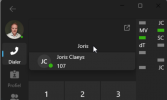
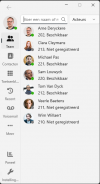
Status circle could using some beefing

ArneDery

Platinum Partner
Advanced Certified
Joined
Jul 28, 2021
Messages
268
Reaction score
404
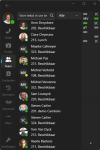
Every time I open up the new softphone client I find it hard to see my own status and those of a teammember.
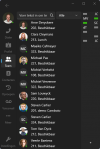
1702564803783.png


When searching for a teammember in the dialer the status is not visible

.1702564893342.png
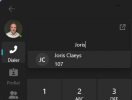
To see the status of a teammember before calling them is one of the big pro's of the current desktopdialer.
No need to here a busy tone if you can see it upfront.

Is something like this possible?
This way it's possible to see the difference between the 2 available statusses as well.
1702565350441.png

1702565456522.png
 
  • Like
Reactions: ArneDery
Just downloaded the new beta 4, transparent avatar image is still being overwritten with initials.

As posted before this not an issue in PWA app or Web, just wanted to let you know.
 
Beta 5 still has this issue:
Just downloaded the new beta 4, transparent avatar image is still being overwritten with initials.

As posted before this not an issue in PWA app or Web, just wanted to let you know.
 
  • Like
Reactions: ArneDery
@illcsales Thanks for your feedback.
Yes Beta 5 does not contain the fix.
It is already fixed for the upcoming build.
 
  • Like
Reactions: illcsales
@illcsales
This has been addressed in the latest RC release of the Windows Softphone
https://www.3cx.com/blog/releases/windows-softphone-rc1/
We've shown the application to serveral customers as a: what's to come.

Two things always popup:
  1. Status circles are not clear. Very hard to see the status in de softphone app.
  2. Can we change our ringtone now, so in a open landscape we know who's phone is ringing.
Will there be made any changes regarding this towards the full release?
 
Any update on the status circles? ;)
 
Hi @ArneDery no updates from my end. But I want to assure you that we have noted down your feedback on the matter.
 
  • Like
Reactions: ArneDery
Same feedback here, status circles to small to see and everyone is confused by the right left right left in the BLF bar asking how to align everything left and why the font of the BLF is so much smaller than the rest of the app.
 
  • Like
Reactions: ArneDery
Glad to see the status circles got beefed. Thanks 3CX :D

1723559040477.png
 
@ArneDery yep tried to find this thread to let you guys know but failed to do so :)
 
  • Like
Reactions: ArneDery

Forum statistics

Threads
111,969
Messages
590,051
Members
164,884
Latest member
it-egt