

N_G
Founder
- Joined
- Jun 6, 2006
- Messages
- 4,870
- Reaction score
- 9,389
We have created this guide to help with troubleshooting battery and background data settings. See our Android Push Troubleshooting guide


Hi Nick, with all due respect - we have invested a plethora of resource in diagnosing issue with Android handsets and Push notifications. The system was put in place assuming there would be no issue with this at all over a year ago. However, we operate in the real world, a 24 hour manufacturing facility with numerous sites across the UK. We've seen the system not working, many many times.We have created this guide to help with troubleshooting battery and background data settings. See our Android Push Troubleshooting guide

Have you tried the "Keep Active/Alive" in the Android app menu? It bypasses Push and stays registered to the PBX.Hi Nick, with all due respect - we have invested a plethora of resource in diagnosing issue with Android handsets and Push notifications. The system was put in place assuming there would be no issue with this at all over a year ago. However, we operate in the real world, a 24 hour manufacturing facility with numerous sites across the UK. We've seen the system not working, many many times.
I count about 5 times we've reached out to 3CX support on diagnosing the issue - hats off to you, you've put the effort in to attempt to assist us in troubleshooting. But the result is always the same, it's hit and miss. A change here, a change there. At one point we were told to create our own Firebase project and route PUSH through that, only to be told to remove it a month later. We were then hit by the 3CX Android app not vibrating on incoming call alerts, and then the app not showing the full screen dialer app (when locked) on incoming call alerts the following month. One thing after the next.
At the end of the day, what you've effectively put in place - is a reliance on too many single points of failure, and ones that cannot be controlled by you or us.
We ripped out our Mitel PBX system, using dedicated Wifi handsets - and have had nothing but issues since. I'm not saying it's totally 3CX's fault. You have no control over the Android ecosystem for both hardware/software. Our handsets in question are latest CAT S42 handsets - ruggedised phones with large batteries running latest Android software. But we've also worked with the latest flagship Samsung models. We've even worked with the manufacturer to see if there's anything that can be done. Even if we got the system working beautifully tomorrow - next week there could be a change/update somewhere along the way and we're back to square one. Confidence is extremely low that the Android Wifi handset solution works flawlessly.
The only solution is to have a register based Wifi endpoint. Non native SIP is fine, as with the 3CX app using port 5090 and it's own protocol - but the handset needs to actively maintain the connection to the PBX for this to be a suitable solution in an environment such as ours (and probably others).

He is using it - but has requested that an option for it to stay enabled post reboot be added to the app.Have you tried the "Keep Active/Alive" in the Android app menu? It bypasses Push and stays registered to the PBX.
Perfect! And that would be a good idea since Android sucks at Push.
Yup - It certainly does. Or at least sucks when it doesn't work.Perfect! And that would be a good idea since Android sucks at Push.
@Nick Galea@timmehb - if you use quality phones and the latest 3CX and android then it works absolutely fine. So Android 11 and up. If the problem persists you need to contact the android phone vendor. We send out PUSH via Google networks and its working just fine with most branded phones.
Have you upgraded to V18? We were in a similar situation to you with Android issues but since switching to V18 these issues have virtually vanished.Hi Nick, with all due respect - we have invested a plethora of resource in diagnosing issue with Android handsets and Push notifications. The system was put in place assuming there would be no issue with this at all over a year ago. However, we operate in the real world, a 24 hour manufacturing facility with numerous sites across the UK. We've seen the system not working, many many times.
I count about 5 times we've reached out to 3CX support on diagnosing the issue - hats off to you, you've put the effort in to attempt to assist us in troubleshooting. But the result is always the same, it's hit and miss. A change here, a change there. At one point we were told to create our own Firebase project and route PUSH through that, only to be told to remove it a month later. We were then hit by the 3CX Android app not vibrating on incoming call alerts, and then the app not showing the full screen dialer app (when locked) on incoming call alerts the following month. One thing after the next.
At the end of the day, what you've effectively put in place - is a reliance on too many single points of failure, and ones that cannot be controlled by you or us.
We ripped out our Mitel PBX system, using dedicated Wifi handsets - and have had nothing but issues since. I'm not saying it's totally 3CX's fault. You have no control over the Android ecosystem for both hardware/software. Our handsets in question are latest CAT S42 handsets - ruggedised phones with large batteries running latest Android software. But we've also worked with the latest flagship Samsung models. We've even worked with the manufacturer to see if there's anything that can be done. Even if we got the system working beautifully tomorrow - next week there could be a change/update somewhere along the way and we're back to square one. Confidence is extremely low that the Android Wifi handset solution works flawlessly.
The only solution is to have a register based Wifi endpoint. Non native SIP is fine, as with the 3CX app using port 5090 and it's own protocol - but the handset needs to actively maintain the connection to the PBX for this to be a suitable solution in an environment such as ours (and probably others).
Hey. yeah were on v18. And things have improved somewhat over v16.Have you upgraded to V18? We were in a similar situation to you with Android issues but since switching to V18 these issues have virtually vanished.
The only issues we see now seem to be linked to our WiFi. Our Blackview phones seem to want to hang on to our Access Points for too long when there is a better Acces Point nearby.
Appreciate it!@timmehb
If anyone has already suggested this or if you have already done this I apologuise, but I want to confirm, in the app when you view the account, do you have an internal and external IP listed, or do you have simply a hostname?
I noticed roaming/connectivity was imrpoved when using hostname instead of IP.
Even when there is such a list with supported phones then there is no control over additional software that is installed on the android phone. We had a customer with the latest android phones and some would ring the 3CX mobile app and on others it didnt. Guess what some users had the hiya.com app installed which somehow blocked the 3CX app from ringing.@Nick Galea
On paper it works great. In real world it doesn't.
For 3CX to make claims like that, there would have to be some sort of approved vendor/model list that you guys maintain. If that was the case, I'd purchase only from that list. You had one at some point.
Keep Active function is the guaranteed solution.
I recommend setting up split dns and having 3CX only use the FQDNAppreciate it!
Local PBX is IP address
External PBX is hostname.
Whats yours?
Cheers for that.I recommend setting up split dns and having 3CX only use the FQDN
https://www.3cx.com/docs/creating-fqdn-split-dns/
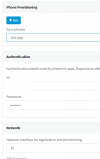
You can edit the extension and change the interface for the phone, then re-provision
View attachment 26923


Founded in 2005, when VoIP was an emerging technology, 3CX has gone on to establish itself as a global leader in business communications.


