Storage module warning won't go away

Techops

Customer
Joined
Feb 5, 2018
Messages
45
Reaction score
0
Ever since upgrading to the newest v20 with the Storage tab, getting the warning that the storage needs to be configured. The storage is actually configured and shows the files listed in the target location, but the warning still persists. Anyone having this same issue?

Warning:
Update Remote Storage Configuration.The remote storage module has been updated and now requires reconfiguration. Please review and update your settings using the options below, then save the changes.
 
Scroll down a bit and look at the Backup location. You need to enter a folder name.
 
  • Like
Reactions: Techops and ivank
Thanks, did enter that folder but still getting the error.
 
Must be a you issue then..

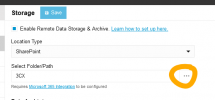
just had it on a new install today and all I had to do was set up the folder/path again.

1730974738210.png
 
I can accept that :)

Ah, you're using Sharepoint, we're using Google. I wonder if that makes difference. Might remove and redo the config completely then, just in case. Thanks for the sanity check.
 
I've got a few on Buckets, let me have a skeg.

yeah.. got no issues. Try downloading your JSON again I guess.
 
Please update I have the same ISSUEs
 
We are experiencing the same issue on one of our installations.

In our case we are using FTP and the back up works, but the warning message is still showing. On all our other installations, the warning message has disappeared once the storage parameters have been completed and saved.

Was a resolution found?
 
COM-TEL
Is Recording section enabled there? If not, enable + save. The warning should go away.
Then, if remote recording is not used, disable + save.
 
COM-TEL
Is Recording section enabled there? If not, enable + save. The warning should go away.
Then, if remote recording is not used, disable + save.
Perfect, thank you.
 
Thanks - the tip of enabling recording and saving (then disabling the recording option afterwards) worked for me too. That's been driving me nuts for days! Thanks for the tip :)
 
We are having the same issue on a particular instance. None of the above suggestions have had an impact.

Can't get rid of the big redder banner that says "Remote storage is partially configured. It is required to keep your system performant and easily updatable."
 
That’s a different issue, it’s required now for 3CX hosting but is a general message.
 
That’s a different issue, it’s required now for 3CX hosting but is a general message.

I don't know what you're talking about, we don't have this on any other instance, and they're all configured the same.
 
You're asking about this banner?
https://www.3cx.com/blog/releases/admin-system-management/

 
Yes, correct, but all our systems are self hosted
 
That's discussed in that thread, and/or later u7 threads. IIRC it remains shown for all, unless I missed a change.
 
Any system where the banner is showing is missing something from the remote storage configs.

While everything works normally while it shows, we do really consider it critical to long term healthy operation that systems be configured with remote storage, so the banner will be everyone's new friend until that's done.

Yes it looks "ugly" and irritating, that's its job.
 
Isnt the point though that remote storage is configured but this banner still persists? Original poster said "The storage is actually configured and shows the files listed in the target location, but the warning still persists"

Noticed same issue myself after upgrading. Remote storage is configured and always has been. Banner doesnt specify exactly what it doesnt like....

(Note just as a I was about to click reply I noticed not all 4 Archive options were ticked. Various tests unticking/ticking some/all appears to show archiving all 4 (Chat File, Faxes, Recordings, Voicemails) is now a requirement as banner disappears when I tick all 4)
 
Indeed, the big change in a way is that now it monitors all those and all need to be set.
 

Forum statistics

Threads
112,285
Messages
591,704
Members
165,406
Latest member
ARKC