





System health monitoring natively within the 3CX platform.
Update 7 Alpha, coming hot off the heels of the successful Update 6 Final release, delivers several major improvements for system administration. Amazon AWS S3 buckets are now included for remote storage. 3CX System Watcher assists Admins in actively monitoring core 3CX services and system metrics. For data offloading, Admins get an even wider range of destinations to choose from. And Backup & Restore V2 brings encrypted backups as well as performance improvements. Read on to learn more about these features and more.
Amazon AWS S3 Buckets for Remote Storage
Remote storage options now include Amazon AWS S3. Expanding upon our existing support for FTP, Google Storage, SMB, SFTP, and SharePoint, AWS S3 can now be configured directly from your Admin Console as a remote storage solution for your backups, voicemails, recordings, and chats. Setup is straightforward and supports multiple AWS regions and buckets to align with your infrastructure needs.
Dashboard Notifications for Non or Partially Configured Remote Storage Setup

Configuring remote storage is now essential and will soon be a requirement for all 3CX hosted systems. If remote storage isn’t fully set up, you’ll see the above banner in your 3CX Admin Console Dashboard.
To ensure compliance, please configure Remote Data Storage & Archive from System > Storage and enable data type options for Backups, Chats, Recordings, and Voicemails.
3CX's Own System Health Monitoring
3CX System Watcher now actively monitors core 3CX services and collects system metrics. In the unlikely event of a service crash, System Watcher will immediately restart the failing service, reducing operation downtime.
System Watcher also keeps you informed by monitoring key metrics like CPU, memory, disk, and network usage. This enables you to take pre-emptive actions and avoid communication downtime or poor audio quality - both of which are critical. When thresholds are exceeded, alerts are triggered, logged to the 3CX Event Log, and email notifications sent to administrators. Find these alerts in your Admin Console under Admin > System > Alerts.
Logging to MySQL and Microsoft SQL Server Databases
We now support an even wider range of destinations, including MySQL and Microsoft SQL Server, alongside existing options like Google BigQuery and PostgreSQL. These integrations give you historical data access beyond system retention limits, enabling powerful third-party tools like Grafana or Power BI.
This feature requires a 16SC and up license.
External Database for System Metrics and Call Recordings
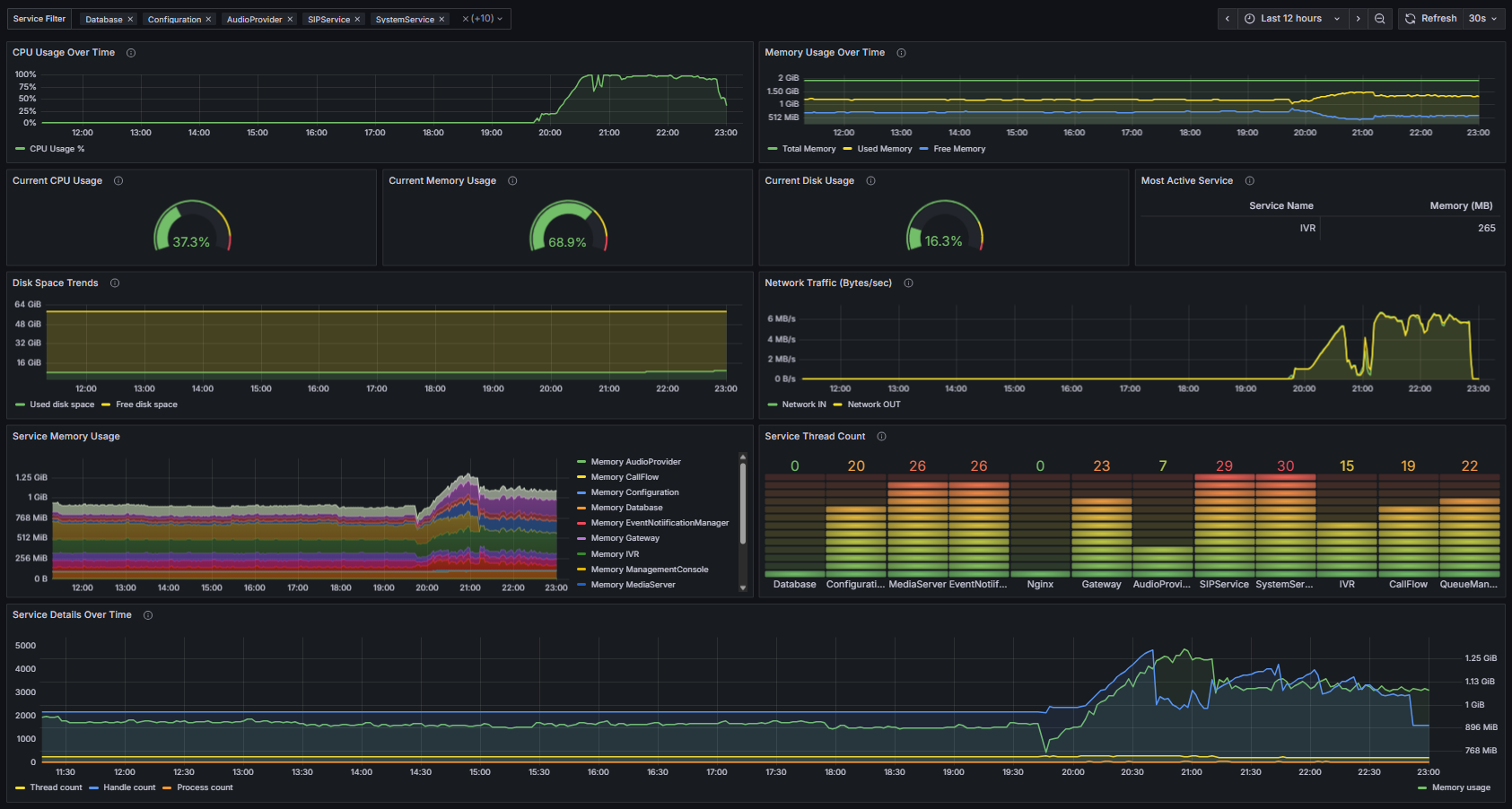
System administrators can now utilize the same remote database setup used for CDR to offload system metric data for long-term analysis and performance tracking. Three types of data connectors have been introduced:
- Recordings: Transfers the data of your call recordings to external databases for scalable archival and intelligent transcript search.
- System Metrics: Export CPU usage, memory load, disk usage, and network throughput, allowing you insights for optimizing audio quality and responsiveness of AI functions
- Audio Quality Metrics: Extract Mean Opinion Score (MOS), jitter, and packet loss values for call quality monitoring.
- CDR: introduced in update 6, now uses a streamlined single-table design optimized for direct observability in BI tools.
Import our 3CX Grafana Dashboards: Google BigQuery, PostgreSQL, or MySQL to load these Dashboards & Reports. This feature requires 16SC and up.
Backup & Restore V2: Faster and More Secure
Our new Backup & Restore V2 system brings significant advancements to safeguard your valuable 3CX data:
- Encrypted Backups: Optional encryption adds a crucial layer of data security during transfer and storage.
- Performance Improvements: Experience notably faster backup (up to 50% faster) and restore operations. For systems with high call volume or large recording archives in particular this is a critical enhancement.
Other Features
Behind the scenes, we’ve also been working on a range of other feature improvements. Watch out for more info on these in future releases. For now, here’s the round-up:
- DATEV Integration: Manage DATEV integration directly from the Admin Console, featuring automatic downloads, multi-edit, and copy extension support (for 8SC+ Enterprise licenses).
- On-Demand Call Transcription: Manually trigger transcriptions for any call recording, perfect for re-processing failed jobs or older calls.
- Advanced OpenAI Integration: Benefit from expanded transcription models (GPT-4 Turbo, GPT-4o, GPT-4o Mini), improved retry mechanisms for timeouts, and improved prompts for summaries and sentiment analysis.
- 3CX Transcription & Sentiment: The core 3CX Engine now supports specifying speech language, and provides detailed call summaries and sentiment analysis in recordings and reports.
- Enhanced Reports: Get better data with enhanced filtering (multi-select), DID search for inbound reports, and new filters for Queue Callbacks, SLA Statistics, Ring Groups, and Queue Agent Chat.
- Secure PostgreSQL Data Connector: Enjoy improved security measures for your PostgreSQL Data Connector, making data offloading even more robust.
- Streamlined Provisioning: Features automatic re-provisioning for BLF updates, Hot Desking Login BLF support, and expanded user import/export options including various custom settings.
- Core System Updates: Under the hood, we've upgraded to PostgreSQL 15.13, updated Bootstrap, marked RTP traffic as high priority (TOS 46), and moved to .NET Core 8.0.17.
- SBC Management Returns: Full, granular management of your SBCs is back, offering detailed control over general info, settings (TLS, RTP ports, failover), and comprehensive logging.
- SMS/MMS E.164 Formatting: A new SmsPrefix parameter ensures proper E.164 number formatting for US/CA providers.
- Spam SMS Blocking: Boost security by blacklisting numbers or blocking messages by country code.
- New Yealink T7 Series Support: Official support is added for the latest Yealink T73U/W, T74U/W, T77U, T85W, and T87W phones.
View the complete changelog here.
Get Started with Update 7 Alpha
To try out these new features, upgrade to V20 Update 7 Alpha.
- Log in to the Admin Console
- Navigate to System > Updates
- Select Update 7 Alpha and click Download
⚠ Important: The Alpha version should be installed for evaluation purposes only. It is not recommended for production systems.
Join the V20 discussion in our dedicated Partner or Customer Forums. Follow us on X and LinkedIn to stay-up-to date on latest news and feature releases.









 Copyright © 2026