Sudden high Memory usage

Status
Not open for further replies.

siscom

Customer
Basic Certified
Joined
Jul 14, 2009
Messages
237
Reaction score
37
Good Morning Colleagues
I hope you are doing good and safe.

One of our customer has 3CX Pro 16 concurrent calls installed on the below machine:
  1. Processor Intel(R) Core(TM) i7-6700 CPU @ 3.40GHz 3.40 GHz
  2. Installed RAM 8.00 GB (7.79 GB usable)
  3. System type 64-bit operating system, x64-based processor
The operating system is windows 10 x64 bit.

Yesterday, We have high memory spike where memory usage reaches more 95% . Problem solved once restart done .

If the issue occur again , Which snapshot required to share here so you can help me diagnosis and solve the issue ?

Thx in advance.

Best Regards
 
Hello siscom,

1. How many total extensions?
2. All windows patches updated?
3. Call Recording enabled for all extensions? In the daily scheduled backup, call recording enabled?
4. Server hardware is old?
5. Any other applications installed on the 3Cx server?
 
Hello Naveen
Kindly find my replay:
1) 6 extensions where only maximum of 3 extensions used simultaneously.
2) It should be but i need to be 100% sure.
3) Call recording is enabled for all extensions , weekly backup enable weekly outside working hours.
4) Workstation is : HP Z240 Tower
5) Only 3CX running on workstation

Best Regards
 
This is pretty weird as, based on our hardware requirements, the host machine you are using should be more than enough for your current 3CX configuration. You already mentioned that 3CX is the only software running on the machine, did you also take into consideration any security software such as antivirus/antimalware software or any remote IT management/monitoring software?

You might want to consider actually checking which processes are using up most of the RAM when the issue occurs.

Also, which exact version of 3CX are you running?
 
Also can you check the windows event viewer to see whether and windows updates kicked in or completed at that time as well? Also could you see from the task manager which process was consuming the memory?
 
Good Afternoon Colleagues
Thanks for your feedback . Kindly find my below notes:
  • Yes. We have Avira installed.
  • Can your propose IT management/monitoring software ?
  • I opened Event Viewer but may i know from where i can find the time for Windows Updates ?
  • Total memory consumption now is less than 50% with the 2 highest process are google chrome & avira.

Best Regards
 
Yes. We have Avira installed.
Regarding the Antivirus software, I recommend uninstalling it completely(do not just disable) and leave it uninstalled. Monitor the system and check if the issue re-occurs while the antivirus software is not installed.

Can your propose IT management/monitoring software ?
The reason I was asking was not to actually use it to monitor the system, but to ask you to remove it temporarily to eliminate the possibility of it contributing to the issue.

I opened Event Viewer but may i know from where i can find the time for Windows Updates ?
The reason we asked that you check this is so that you could determine if during the times you noticed high RAM usage, the Windows machine was performing Windows updates as well. Just review the events occurring around the time you noticed the issue to see if you can spot any windows updates events.


Let us know what happens.
 
Thx Chris for your recommendations . I will let you know.
 
  • Like
Reactions: ChrisC_3CX
Sure thing! Will be waiting for an update! :)
 
  • Like
Reactions: siscom
Good Morning Colleagues
I hope you are doing good and well . As per Chris recommendations , I have monitored the 3CX workstation for about 4 days and i would like to share with you the below summary:
  • The machine has been restarted by last Monday @ 23:50. Once restarted , The memory usage is 35%.
  • The only running applications are 3CX , Avira Antivirus , Anydesk and google chrome (when it is required to login to 3CX management console).
  • Over the few hours/days , The memory usage start to increase.
  • By today @ 4:00 , The memory usage is around 80%.
  • I have restarted the machine and after restart , The memory usage back to 35%.
.Do you have any explanation for the above behavior and is it logic to do manual restart every 2-3 days ?

Best Regards
 
Did you check which process was consuming most of the memory? Also, do bear in mind that I recommended uninstalling the antivirus software completely and any other 3rd party applications such as Anydesk and only then monitor the system to see if the issue persists.
 
Something is leaking memory. I would do as Chris said. Find out what's eating the RAM.

When it's at 80%, don't just reboot! Open the Task Manager and see what's consuming a lot.
 
  • Like
Reactions: ChrisC_3CX
Just my 2 cents, the Task Manager can be a bit misleading in this case. I have seen cases where AV software that does live scanning of processes causes the actual process to use more RAM. My theory is that this happens because the AV software somehow blocks the Windows Garbage Collector from doing it's thing, resulting in high RAM utilization of the said process, so the process would appear to be the culprit, but in reality it isn't.

So I still think the best and most valid test at this point is: uninstall (not disable) the AV software, at least as a test.
 
Just my 2 cents, the Task Manager can be a bit misleading in this case. I have seen cases where AV software that does live scanning of processes causes the actual process to use more RAM. My theory is that this happens because the AV software somehow blocks the Windows Garbage Collector from doing it's thing, resulting in high RAM utilization of the said process, so the process would appear to be the culprit, but in reality it isn't.

So I still think the best and most valid test at this point is: uninstall (not disable) the AV software, at least as a test.
100% Agreed! Most AV will actually show regular usage during a scan, as it's the background service that does the scanning, and not the main UI. So, yeah, it could be misleading as heck.

As for GC, you guess is probably right from my experience with AVs and programming.
 
Good Morning Colleagues
Thx for your feedback . Let me uninstall my antivirus software and will share with you the process if the RAM usage increased again after uninstalling AV software.

Best Regards
 
@siscom
Let me uninstall my antivirus software and will share with you the process if the RAM usage increased again after uninstalling AV software.
If the issue does persist, also remember to check which process is consuming most of the memory before rebooting. We'll be waiting for an update!
 
Good Morning Colleagues
I hope you are doing good and safe . The memory usage now reach 75% . If i leave it without restart , It will continue to increase till 100% like what happened before.

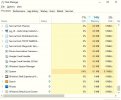
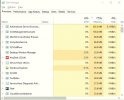
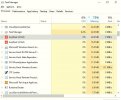
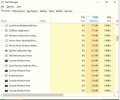
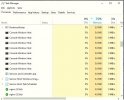
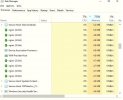
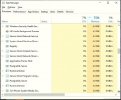
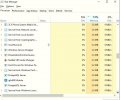
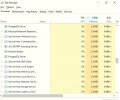
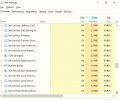
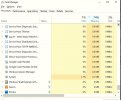
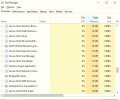
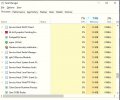
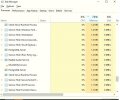
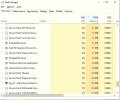
Attached is snapshot for the processes. I will attach the remaining pictures with the next message.

Kindly check and let me know your opinions..

Best Regards
 

Attachments

  • Memory 15.JPG
    Memory 15.JPG
    48.5 KB · Views: 11
  • Memory 1.JPG
    Memory 1.JPG
    49.7 KB · Views: 11
  • Memory 2.JPG
    Memory 2.JPG
    50.8 KB · Views: 11
  • Memory 3.JPG
    Memory 3.JPG
    50.5 KB · Views: 13
  • Memory 4.JPG
    Memory 4.JPG
    49.1 KB · Views: 13
  • Memory 5.JPG
    Memory 5.JPG
    46 KB · Views: 11
  • Memory 6.JPG
    Memory 6.JPG
    54.3 KB · Views: 10
  • Memory 7.JPG
    Memory 7.JPG
    50.8 KB · Views: 11
  • Memory 8.JPG
    Memory 8.JPG
    49.5 KB · Views: 9
  • Memory 9.JPG
    Memory 9.JPG
    51.2 KB · Views: 9
Attached the remaining snapshots from Memory.
 

Attachments

  • Memory 14.JPG
    Memory 14.JPG
    51.3 KB · Views: 10
  • Memory 10.JPG
    Memory 10.JPG
    51.7 KB · Views: 9
  • Memory 11.JPG
    Memory 11.JPG
    52.5 KB · Views: 11
  • Memory 12.JPG
    Memory 12.JPG
    49.9 KB · Views: 10
  • Memory 13.JPG
    Memory 13.JPG
    53.3 KB · Views: 11
I'll be very honest, I don't see anything wrong with the memory consumption of the 3CX Services, they all look to be at very sensible levels....
My gut is still telling me that the Antimalware/Antivirus software may be playing numbers on you here.

One more question, is this a laptop? And if yes, are you using for day to day things as well as running 3CX on it?
 
  • Like
Reactions: ivank
Hi Nick
Thanks for your replay . Kindly find my below notes:

  • No antivirus software installed . Also i disable firewall service of windows defender . The Antimalware related to Antivirus of Windows firewall which cant be disabled for long time as list by windows defender.
  • 3CX installed on dedicated machine for 3CX only which is HP Z240 Tower.

Best Regards
 
Status
Not open for further replies.