- Joined
- Aug 2, 2019
- Messages
- 67
- Reaction score
- 9
Hi guys!
I'm developing a customer satisfaction survey. I already did this before the existence of the Survey component of CallFlow Designer. Now I'm trying with him.
I did all the configuration and recording of the audios, created a MySQL database to store the surveys, etc.
I can compile and upload to 3CX, I can test by listening to the audios and selecting options during the call, however, nothing is recorded in the database.
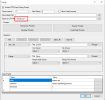
I suspected that the problem could be in the fields highlighted below and when I looked in the logs, I saw that this was it. See:
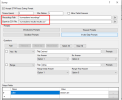
Now look at the log. It is giving error exactly in the directory above:

My question is: Where should this directory be? so I can create and give permissions? What is this CSV file for if I'm recording it in the database?
EDIT:
I discovered that this directory is in /var/lib/3cxpbx/Instance1/Data/Ivr/Prompts/Callflows/surveydemo, it didn't have the "results" directory so I created it and gave write permission, but even so it keeps giving error of permission denied
I'm developing a customer satisfaction survey. I already did this before the existence of the Survey component of CallFlow Designer. Now I'm trying with him.
I did all the configuration and recording of the audios, created a MySQL database to store the surveys, etc.
I can compile and upload to 3CX, I can test by listening to the audios and selecting options during the call, however, nothing is recorded in the database.
I suspected that the problem could be in the fields highlighted below and when I looked in the logs, I saw that this was it. See:
Now look at the log. It is giving error exactly in the directory above:
My question is: Where should this directory be? so I can create and give permissions? What is this CSV file for if I'm recording it in the database?
EDIT:
I discovered that this directory is in /var/lib/3cxpbx/Instance1/Data/Ivr/Prompts/Callflows/surveydemo, it didn't have the "results" directory so I created it and gave write permission, but even so it keeps giving error of permission denied