- Joined
- Jan 30, 2018
- Messages
- 14
- Reaction score
- 0
Hi everyone!
Have you ever had a problem like this??
It's now the second time that an email reaches me in the morning by my 3cx system with the title
"3CX Phone System - Harddisk is at or near capacity!".
The mail goes on with
"3CX installation xxxxxxx.3cx.de is running out of space. (0 bytes Space left out of 500 Mb).
As a result of this, recordings, logging and voicemail services are disabled until this problem is resolved.
Login to the machine, free up some space or add more disk space and reboot the server."
Yesterday it had 94GB of free disk space, this morning it was 8MB only. All processes on the server were freaking out... :-(
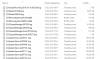
Looking in my folder
C:\ProgramData\3CX\Instance1\Data\Logs\Backup\20180316
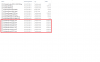
I found - beside some normal looking files - hundreds of files like those in the red box:
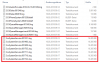
But the list goes endless with this kind of files, each of them having 16.385 KB.
The first of the 16.385-files at 00:13 (001351..log) contains data of the day before the catastrophe (15th):
------------|Inf(00)| Date: 15.03.2018 00:28:06
2018/03/15 00:28:06.043|8780|0025|Erro|Can not delete file C:\ProgramData\3CX\Instance1\Data\Logs\3CXPhoneSystem-20180313-011957.blrec, Exception: System.IO.IOException: Der Prozess kann nicht auf die Datei "3CXPhoneSystem-20180313-011957.blrec" zugreifen, da sie von einem anderen Prozess verwendet wird.
bei System.IO.__Error.WinIOError(Int32 errorCode, String maybeFullPath)
bei System.IO.FileInfo.Delete()
bei _3cxSystemService.OtherTasks.LogBackups.SafeRemoveFile(FileInfo fi)
2018/03/15 00:28:06.057|8780|0025|Erro|Can not delete file C:\ProgramData\3CX\Instance1\Data\Logs\3CXPhoneSystem-20180313-011957.blrec, Exception: System.IO.IOException: Der Prozess kann nicht auf die Datei "3CXPhoneSystem-20180313-011957.blrec" zugreifen, da sie von einem anderen Prozess verwendet wird.
bei System.IO.__Error.WinIOError(Int32 errorCode, String maybeFullPath)
bei System.IO.FileInfo.Delete()
bei _3cxSystemService.OtherTasks.LogBackups.SafeRemoveFile(FileInfo fi)
2018/03/15 00:58:06.068|8780|0033|Erro|Can not delete file C:\ProgramData\3CX\Instance1\Data\Logs\3CXPhoneSystem-20180313-011957.blrec, Exception: System.IO.IOException: Der Prozess kann nicht auf die Datei "3CXPhoneSystem-20180313-011957.blrec" zugreifen, da sie von einem anderen Prozess verwendet wird.
bei System.IO.__Error.WinIOError(Int32 errorCode, String maybeFullPath)
bei System.IO.FileInfo.Delete()
bei _3cxSystemService.OtherTasks.LogBackups.SafeRemoveFile(FileInfo fi)
2018/03/15 00:58:07.074|8780|0033|Erro|Can not delete file C:\ProgramData\3CX\Instance1\Data\Logs\3CXPhoneSystem-20180313-011957.blrec, Exception: System.IO.IOException: Der Prozess kann nicht auf die Datei "3CXPhoneSystem-20180313-011957.blrec" zugreifen, da sie von einem anderen Prozess verwendet wird.
bei System.IO.__Error.WinIOError(Int32 errorCode, String maybeFullPath)
bei System.IO.FileInfo.Delete()
bei _3cxSystemService.OtherTasks.LogBackups.SafeRemoveFile(FileInfo fi)
2018/03/15 09:21:04.966|8780|0003|Erro|CHR: Targeting segment is not found for target 8226f469d56c
2018/03/15 09:31:52.601|8780|0003|Erro|CHR: Targeting segment is not found for target d5353a01473c
2018/03/15 09:35:14.289|8780|0003|Erro|CHR: Targeting segment is not found for target c61bc4591372
2018/03/15 09:43:15.477|8780|0003|Erro|CHR: Targeting segment is not found for target e32858259209
2018/03/15 09:46:28.419|8780|0003|Erro|CHR: Targeting segment is not found for target a3674858d066
2018/03/15 11:10:40.694|8780|0003|Erro|CHR: Targeting segment is not found for target a15b71145b2d
2018/03/15 11:16:58.697|8780|0003|Erro|CHR: Targeting segment is not found for target 2e75c61f571b
2018/03/15 11:50:05.589|8780|0003|Erro|CHR: Targeting segment is not found for target ed5305562902
2018/03/15 11:50:46.632|8780|0003|Erro|CHR: Targeting segment is not found for target 6453b0732316
2018/03/15 14:04:50.535|8780|0003|Erro|CHR: Targeting segment is not found for target d170b060d822
2018/03/15 14:11:35.892|8780|0003|Erro|CHR: Targeting segment is not found for target 4a687c2f6658
2018/03/15 14:14:51.888|8780|0003|Erro|CHR: Targeting segment is not found for target 684df7193851
2018/03/15 14:41:15.886|8780|0003|Erro|CHR: Targeting segment is not found for target 881bef4dde16
Then, day 16 starts:
------------|Inf(00)| Date: 16.03.2018 00:13:39
2018/03/16 00:13:39.238|7312|0001|Inf|Log is created
2018/03/16 00:13:40.553|7312|0004|Info|Log verbosity is set to Low
2018/03/16 00:13:42.819|7312|0003|Erro|CHR: Worker thread caught exception: System.Net.Sockets.SocketException (0x80004005): Der Zugriff auf einen Socket war aufgrund der Zugriffsrechte des Sockets unzulässig
bei System.Net.Sockets.Socket.DoBind(EndPoint endPointSnapshot, SocketAddress socketAddress)
bei System.Net.Sockets.Socket.Bind(EndPoint localEP)
bei CallHistoryReceiver.Listener..ctor(IPEndPoint ip_ep)
bei CallHistoryReceiver.CHReceiver.WorkerMethod()
2018/03/16 00:13:42.819|7312|0003|Erro|CHR: Worker thread caught exception: System.Net.Sockets.SocketException (0x80004005): Der Zugriff auf einen Socket war aufgrund der Zugriffsrechte des Sockets unzulässig
bei System.Net.Sockets.Socket.DoBind(EndPoint endPointSnapshot, SocketAddress socketAddress)
bei System.Net.Sockets.Socket.Bind(EndPoint localEP)
bei CallHistoryReceiver.Listener..ctor(IPEndPoint ip_ep)
bei CallHistoryReceiver.CHReceiver.WorkerMethod()
2018/03/16 00:13:42.820|7312|0003|Erro|CHR: Worker thread caught exception: System.Net.Sockets.SocketException (0x80004005): Der Zugriff auf einen Socket war aufgrund der Zugriffsrechte des Sockets unzulässig
bei System.Net.Sockets.Socket.DoBind(EndPoint endPointSnapshot, SocketAddress socketAddress)
bei System.Net.Sockets.Socket.Bind(EndPoint localEP)
bei CallHistoryReceiver.Listener..ctor(IPEndPoint ip_ep)
bei CallHistoryReceiver.CHReceiver.WorkerMethod()
2018/03/16 00:13:42.820|7312|0003|Erro|CHR: Worker thread caught exception: System.Net.Sockets.SocketException (0x80004005): Der Zugriff auf einen Socket war aufgrund der Zugriffsrechte des Sockets unzulässig
bei System.Net.Sockets.Socket.DoBind(EndPoint endPointSnapshot, SocketAddress socketAddress)
bei System.Net.Sockets.Socket.Bind(EndPoint localEP)
bei CallHistoryReceiver.Listener..ctor(IPEndPoint ip_ep)
bei CallHistoryReceiver.CHReceiver.WorkerMethod()
2018/03/16 00:13:42.821|7312|0003|Erro|CHR: Worker thread caught exception:
and so on... After reaching the end of the file, a new file is created (001400), going on the same way:
2018/03/16 00:13:51.817|7312|0003|Info|Log is continued
2018/03/16 00:13:51.817|7312|0003|Erro|CHR: Worker thread caught exception: System.Net.Sockets.SocketException (0x80004005): Der Zugriff auf einen Socket war aufgrund der Zugriffsrechte des Sockets unzulässig
bei System.Net.Sockets.Socket.DoBind(EndPoint endPointSnapshot, SocketAddress socketAddress)
bei System.Net.Sockets.Socket.Bind(EndPoint localEP)
bei CallHistoryReceiver.Listener..ctor(IPEndPoint ip_ep)
bei CallHistoryReceiver.CHReceiver.WorkerMethod()
2018/03/16 00:13:51.818|7312|0003|Erro|CHR: Worker thread caught exception: System.Net.Sockets.SocketException (0x80004005): Der Zugriff auf einen Socket war aufgrund der Zugriffsrechte des Sockets unzulässig
bei System.Net.Sockets.Socket.DoBind(EndPoint endPointSnapshot, SocketAddress socketAddress)
bei System.Net.Sockets.Socket.Bind(EndPoint localEP)
bei CallHistoryReceiver.Listener..ctor(IPEndPoint ip_ep)
More than 1000 files like this were created...
The system goes well since 3 weeks but this is now the second time that this happens. I solved the problem by deleting all the log files and rebooting the server. It's a 3cx 15.5.0 on a WIN10 Pro build 16299 running with a AMD X4 940 3GHz processor. The message says something about missing rights of a socket...? But why in the middle of that night and the rest of the days working well?
Has anyone a helping idea??
Thank you for your answers!!
Best wishes from the Rhineland Palatinate (Germany)
Fritz
Have you ever had a problem like this??
It's now the second time that an email reaches me in the morning by my 3cx system with the title
"3CX Phone System - Harddisk is at or near capacity!".
The mail goes on with
"3CX installation xxxxxxx.3cx.de is running out of space. (0 bytes Space left out of 500 Mb).
As a result of this, recordings, logging and voicemail services are disabled until this problem is resolved.
Login to the machine, free up some space or add more disk space and reboot the server."
Yesterday it had 94GB of free disk space, this morning it was 8MB only. All processes on the server were freaking out... :-(
Looking in my folder
C:\ProgramData\3CX\Instance1\Data\Logs\Backup\20180316
I found - beside some normal looking files - hundreds of files like those in the red box:
But the list goes endless with this kind of files, each of them having 16.385 KB.
The first of the 16.385-files at 00:13 (001351..log) contains data of the day before the catastrophe (15th):
------------|Inf(00)| Date: 15.03.2018 00:28:06
2018/03/15 00:28:06.043|8780|0025|Erro|Can not delete file C:\ProgramData\3CX\Instance1\Data\Logs\3CXPhoneSystem-20180313-011957.blrec, Exception: System.IO.IOException: Der Prozess kann nicht auf die Datei "3CXPhoneSystem-20180313-011957.blrec" zugreifen, da sie von einem anderen Prozess verwendet wird.
bei System.IO.__Error.WinIOError(Int32 errorCode, String maybeFullPath)
bei System.IO.FileInfo.Delete()
bei _3cxSystemService.OtherTasks.LogBackups.SafeRemoveFile(FileInfo fi)
2018/03/15 00:28:06.057|8780|0025|Erro|Can not delete file C:\ProgramData\3CX\Instance1\Data\Logs\3CXPhoneSystem-20180313-011957.blrec, Exception: System.IO.IOException: Der Prozess kann nicht auf die Datei "3CXPhoneSystem-20180313-011957.blrec" zugreifen, da sie von einem anderen Prozess verwendet wird.
bei System.IO.__Error.WinIOError(Int32 errorCode, String maybeFullPath)
bei System.IO.FileInfo.Delete()
bei _3cxSystemService.OtherTasks.LogBackups.SafeRemoveFile(FileInfo fi)
2018/03/15 00:58:06.068|8780|0033|Erro|Can not delete file C:\ProgramData\3CX\Instance1\Data\Logs\3CXPhoneSystem-20180313-011957.blrec, Exception: System.IO.IOException: Der Prozess kann nicht auf die Datei "3CXPhoneSystem-20180313-011957.blrec" zugreifen, da sie von einem anderen Prozess verwendet wird.
bei System.IO.__Error.WinIOError(Int32 errorCode, String maybeFullPath)
bei System.IO.FileInfo.Delete()
bei _3cxSystemService.OtherTasks.LogBackups.SafeRemoveFile(FileInfo fi)
2018/03/15 00:58:07.074|8780|0033|Erro|Can not delete file C:\ProgramData\3CX\Instance1\Data\Logs\3CXPhoneSystem-20180313-011957.blrec, Exception: System.IO.IOException: Der Prozess kann nicht auf die Datei "3CXPhoneSystem-20180313-011957.blrec" zugreifen, da sie von einem anderen Prozess verwendet wird.
bei System.IO.__Error.WinIOError(Int32 errorCode, String maybeFullPath)
bei System.IO.FileInfo.Delete()
bei _3cxSystemService.OtherTasks.LogBackups.SafeRemoveFile(FileInfo fi)
2018/03/15 09:21:04.966|8780|0003|Erro|CHR: Targeting segment is not found for target 8226f469d56c
2018/03/15 09:31:52.601|8780|0003|Erro|CHR: Targeting segment is not found for target d5353a01473c
2018/03/15 09:35:14.289|8780|0003|Erro|CHR: Targeting segment is not found for target c61bc4591372
2018/03/15 09:43:15.477|8780|0003|Erro|CHR: Targeting segment is not found for target e32858259209
2018/03/15 09:46:28.419|8780|0003|Erro|CHR: Targeting segment is not found for target a3674858d066
2018/03/15 11:10:40.694|8780|0003|Erro|CHR: Targeting segment is not found for target a15b71145b2d
2018/03/15 11:16:58.697|8780|0003|Erro|CHR: Targeting segment is not found for target 2e75c61f571b
2018/03/15 11:50:05.589|8780|0003|Erro|CHR: Targeting segment is not found for target ed5305562902
2018/03/15 11:50:46.632|8780|0003|Erro|CHR: Targeting segment is not found for target 6453b0732316
2018/03/15 14:04:50.535|8780|0003|Erro|CHR: Targeting segment is not found for target d170b060d822
2018/03/15 14:11:35.892|8780|0003|Erro|CHR: Targeting segment is not found for target 4a687c2f6658
2018/03/15 14:14:51.888|8780|0003|Erro|CHR: Targeting segment is not found for target 684df7193851
2018/03/15 14:41:15.886|8780|0003|Erro|CHR: Targeting segment is not found for target 881bef4dde16
Then, day 16 starts:
------------|Inf(00)| Date: 16.03.2018 00:13:39
2018/03/16 00:13:39.238|7312|0001|Inf|Log is created
2018/03/16 00:13:40.553|7312|0004|Info|Log verbosity is set to Low
2018/03/16 00:13:42.819|7312|0003|Erro|CHR: Worker thread caught exception: System.Net.Sockets.SocketException (0x80004005): Der Zugriff auf einen Socket war aufgrund der Zugriffsrechte des Sockets unzulässig
bei System.Net.Sockets.Socket.DoBind(EndPoint endPointSnapshot, SocketAddress socketAddress)
bei System.Net.Sockets.Socket.Bind(EndPoint localEP)
bei CallHistoryReceiver.Listener..ctor(IPEndPoint ip_ep)
bei CallHistoryReceiver.CHReceiver.WorkerMethod()
2018/03/16 00:13:42.819|7312|0003|Erro|CHR: Worker thread caught exception: System.Net.Sockets.SocketException (0x80004005): Der Zugriff auf einen Socket war aufgrund der Zugriffsrechte des Sockets unzulässig
bei System.Net.Sockets.Socket.DoBind(EndPoint endPointSnapshot, SocketAddress socketAddress)
bei System.Net.Sockets.Socket.Bind(EndPoint localEP)
bei CallHistoryReceiver.Listener..ctor(IPEndPoint ip_ep)
bei CallHistoryReceiver.CHReceiver.WorkerMethod()
2018/03/16 00:13:42.820|7312|0003|Erro|CHR: Worker thread caught exception: System.Net.Sockets.SocketException (0x80004005): Der Zugriff auf einen Socket war aufgrund der Zugriffsrechte des Sockets unzulässig
bei System.Net.Sockets.Socket.DoBind(EndPoint endPointSnapshot, SocketAddress socketAddress)
bei System.Net.Sockets.Socket.Bind(EndPoint localEP)
bei CallHistoryReceiver.Listener..ctor(IPEndPoint ip_ep)
bei CallHistoryReceiver.CHReceiver.WorkerMethod()
2018/03/16 00:13:42.820|7312|0003|Erro|CHR: Worker thread caught exception: System.Net.Sockets.SocketException (0x80004005): Der Zugriff auf einen Socket war aufgrund der Zugriffsrechte des Sockets unzulässig
bei System.Net.Sockets.Socket.DoBind(EndPoint endPointSnapshot, SocketAddress socketAddress)
bei System.Net.Sockets.Socket.Bind(EndPoint localEP)
bei CallHistoryReceiver.Listener..ctor(IPEndPoint ip_ep)
bei CallHistoryReceiver.CHReceiver.WorkerMethod()
2018/03/16 00:13:42.821|7312|0003|Erro|CHR: Worker thread caught exception:
and so on... After reaching the end of the file, a new file is created (001400), going on the same way:
2018/03/16 00:13:51.817|7312|0003|Info|Log is continued
2018/03/16 00:13:51.817|7312|0003|Erro|CHR: Worker thread caught exception: System.Net.Sockets.SocketException (0x80004005): Der Zugriff auf einen Socket war aufgrund der Zugriffsrechte des Sockets unzulässig
bei System.Net.Sockets.Socket.DoBind(EndPoint endPointSnapshot, SocketAddress socketAddress)
bei System.Net.Sockets.Socket.Bind(EndPoint localEP)
bei CallHistoryReceiver.Listener..ctor(IPEndPoint ip_ep)
bei CallHistoryReceiver.CHReceiver.WorkerMethod()
2018/03/16 00:13:51.818|7312|0003|Erro|CHR: Worker thread caught exception: System.Net.Sockets.SocketException (0x80004005): Der Zugriff auf einen Socket war aufgrund der Zugriffsrechte des Sockets unzulässig
bei System.Net.Sockets.Socket.DoBind(EndPoint endPointSnapshot, SocketAddress socketAddress)
bei System.Net.Sockets.Socket.Bind(EndPoint localEP)
bei CallHistoryReceiver.Listener..ctor(IPEndPoint ip_ep)
More than 1000 files like this were created...
The system goes well since 3 weeks but this is now the second time that this happens. I solved the problem by deleting all the log files and rebooting the server. It's a 3cx 15.5.0 on a WIN10 Pro build 16299 running with a AMD X4 940 3GHz processor. The message says something about missing rights of a socket...? But why in the middle of that night and the rest of the days working well?
Has anyone a helping idea??
Thank you for your answers!!
Best wishes from the Rhineland Palatinate (Germany)
Fritz